
990FX Motherboard Roundup with Thuban and Bulldozer – A Second Wind for ASUS, Gigabyte, MSI and Biostar
ASUS Crosshair V Formula In The Box
For a top of the range Republic of Gamers’ motherboard, we all want goodies in the box. With the Crosshair V Formula, we get plenty of SATA cables and SLI connectors to fit the bill.
IO Shield
Driver CD
User Guide
Six SATA cables (locking, right angled)
Tri-SLI bridge
SLI bridge
Crossfire Cable
Q-Connectors
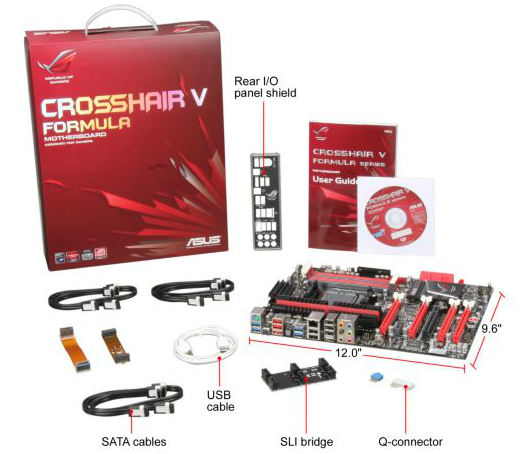
Image courtesy of Newegg
Board Features
| ASUS Crosshair V Formula (990FX) | |
| Price | Link to Newegg |
| Size | ATX |
| CPU Interface | AM3+ |
| CPU Support | AMD FX/Phenom II/Athlon II/Sempron 100 |
| Chipset | AMD 990FX |
| Base Clock Frequency | 200.7 MHz |
| Core Voltage | Auto, 0.675 V to 2.300 V |
| CPU Clock Multiplier | Auto, 4.0x to 39.5x |
| DRAM Voltage | Auto, 1.20 V to 2.90 V |
| DRAM Command Rate | Auto, 1T or 2T |
| Memory Slots |
Four DDR3 DIMM slots supporting up to 32 GB Up to Dual Channel Support for DDR3, 1066-2133 MHz, ECC or Non-ECC |
| Expansion Slots |
3 x PCIe Gen2 x16 (x16/x16 or x16/x8/x8) 1 x PCIe Gen2 x4 1 x PCIe Gen2 x1 1 x PCI |
| Onboard SATA/RAID |
6 x SATA 6 Gbps, Support for RAID 0, 1, 5, 10 1 x SATA 6 Gbps (ASMedia ASM1061) |
| Onboard |
7 x SATA 6 Gbps (6 Chipset, 1 Controller) 8 x Fan Headers 2 x USB 2.0 Headers 1 x USB 3.0 Headers 1 x S/PDIF Output Header 1 x Front Panel Header 8 x Measure Points 1 x Clear CMOS Header 1 x 4-pin Molex Connector Power/Reset Buttons OC / ROG Level Up Button 1 x Go Button |
| Onboard LAN | Intel 82583V |
| Onboard Audio | SupremeFX X-Fi 2 |
| Power Connectors |
1 x 24-pin ATX connector 1 x 8-pin 12V connector 1 x 4-pin 12V connector 1 x 4-pin Molex connector |
| Fan Headers |
2 x CPU Fan Headers (4-pin) 3 x CHA Fan Headers (4-pin) 3 x OPT Fan Headers (4-pin) |
| IO Panel |
1 x Keyboard/Mouse PS2 Port 1 x Clear CMOS Button 1 x Optical SPDIF Output 8 x USB 2.0 4 x USB 3.0 1 x eSATA 3 Gbps 1 x Gigabit Ethernet Audio Outputs |
| BIOS Version | 1003 |
| Warranty Period | 3 Years |
The ROG board is the only 990FX we are testing today to have an Intel network controller, a non-Realtek audio solution, and one of only two to support ECC memory according to the specifications.
Software
The bulk of ASUS’ software is always to be found in AI Suite, and in the land of ROG motherboards, we get a ROG specific skin. Also to hand is a ROG themed CPU-Z, in order to detect accurately the clock speed of the processor.
AI Suite II: As this software is now a few generations into the ASUS blood line, the effort from ASUS to have seamless integration and complete functionality is paramount. Needless to say, on the whole we are not disappointed. We have full control over the fans in the case through the Fan Xpert utility:

Overclocking through this utility is also part of the package. For users wanting a quick, permanent overclock, the Auto Tuning offers two modes labeled Fast and Extreme (see the overclocking section on the previous page to see the results of this on both Thuban and Bulldozer). For in operating system overclocking, users can proceed to the TurboV Evo section to select voltages, CPU ratios and base frequencies on the fly. These unfortunately are not permanent; however they do help overclockers find the limits of the system inside the OS so that when it comes to setting something stable in the BIOS, it is very easy to just plug in the correct values. I would like to see some options in TurboV Evo for ‘automatic’ voltages when applying overclocks (for those not wanting to touch voltage), and this idea has been planted into the ASUS hive mind as an option.
Stalwarts of the AI Suite are still available, such as DIGI+ VRM (primarily to give overclockers more headroom), EPU (energy saving), AI Charger+ (quick charging of Apple devices from specific USB ports), and ASUS update, which should make BIOS updating easier and simpler for a lot of users.


ROG CPU-Z: As mentioned, ASUS has collaborated with the makers of CPU-Z to get a ROG themed version, which allows users to verify their overclocks online, or check that the CPU or the memory is running as stated.
Originally published at https://www.anandtech.com/show/5714/990fx-motherboard-roundup-with-thuban-and-bulldozer-a-second-wind-for-asus-gigabyte-msi-and-biostar (Wayback Machine).