
990FX Motherboard Roundup with Thuban and Bulldozer – A Second Wind for ASUS, Gigabyte, MSI and Biostar
Biostar TA990FXE In The Box
In The Box
For a cheap board, we would expect a bare box with limited additions, reminiscent of what certain other manufactures may put in there. But I was quite surprised:
IO Shield
Driver CD
User Manual
Six SATA cables (locking)
Two Crossfire bridges
The addition of Crossfire bridges is odd, as typically SLI bridges are given in boards (although the initial BIOSes of this board did not support SLI). Also worthy of note is that the CPU back bracket on the board did not function with AMD all-in-one cooler.
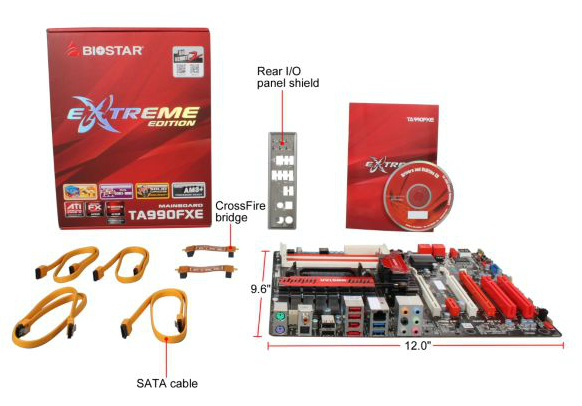
Image courtesy of Newegg
Board Features
| Biostar TA990FXE | |
| Price | Link to Newegg |
| Size | ATX |
| CPU Interface | AM3+ |
| CPU Support | AMD FX/Phenom II/Athlon II/Sempron |
| Chipset | AMD 990FX |
| Base Clock Frequency | Auto, 200 MHz to 600 MHz |
| Core Voltage | Auto, 0.70 V to 1.55 V, Offset +0.50 V to +1.450 V |
| CPU Clock Multiplier | Auto, x8 to x31.5 |
| DRAM Voltage | Auto, -0.25 V to +0.49 V |
| DRAM Command Rate | Auto, 1T or 2T |
| Memory Slots |
Four DDR3 DIMM slots supporting up to 32 GB Up to Dual Channel Support for DDR3, 800-2000 MHz, |
| Expansion Slots |
2 x PCIe Gen2 x16 (x16/x16) 1 x PCIe Gen2 x4 2 x PCI |
| Onboard SATA/RAID | 5 x SATA 6 Gbps, Support for RAID 0, 1, 5, 10 |
| Onboard |
5 x SATA 6 Gbps (SB950) 3 x Fan Headers 1 x Front Panel Header 1 x S/PDIF Output Header 2 x USB 2.0 Headers 1 x USB 3.0 Headers 1 x IEEE1394 Header 1 x Serial Port Header 1 x CIR Header |
| Onboard LAN | Atheros AR8151 |
| Onboard Audio | Realtek ALC892 |
| Power Connectors |
1 x 24-pin ATX connector 1 x 8-pin 12V connector 1 x 4-pin Molex connector |
| Fan Headers |
1 x CPU Fan Header 2 x SYS Fan Headers |
| IO Panel |
2 x Keyboard/Mouse PS2 Port 1 x Optical SPDIF Output 1 x Coaxial SPDIF Output 1 x Gigabit Ethernet 2 x USB 3.0 4 x USB 2.0 1 x eSATA 3 Gbps Port 1 x IEEE1394 Port Audio Outputs |
| BIOS Version | 29/02/2012 |
| Warranty Period | 3 Years from Manufacture date |
As I mentioned in the TA990FXE overview, there are a few oddities. The placement of the PCIe slots is questionable as it doesn't allow a gap between multi-GPU systems, and the inclusion of the Atheros network controller rather than a Realtek (for the combo discount) is odd. The lack of fan headers is a concern.
Software
As we have never covered Biostar software before, it was worth my time to dig deep into what makes Biostar tick in this regard. The myriad of software comes down a few key utilities - eHotLine, BIOS Update, TOverclocker and G.P.U.

eHotLine: This software seems to be part of Biostar's bug reporting. Have an issue with your board, and this software pulls almost all the necessary info for you to send to them to help diagnose it.
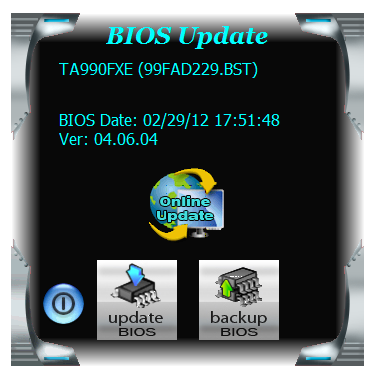
BIOS Update: Does exactly what it says on the tin - even better if you are connected to the internet, as then it will search for the latest BIOS it can find from the Biostar servers, then download it and install.

TOverclocker: The main hub of software action takes place in TOverclocker. On loading, it will apply any overclock previously set (even if it crashes your system), but offers information on the CPU, Motherboard and memory. The OC Tweaker allows the user to change the base frequency and select the overclocking mode - the voltage options did not work on the Bulldozer processor. H/W Monitor shows the voltages and temperatures, and even offers a CPU fan calibration tool.
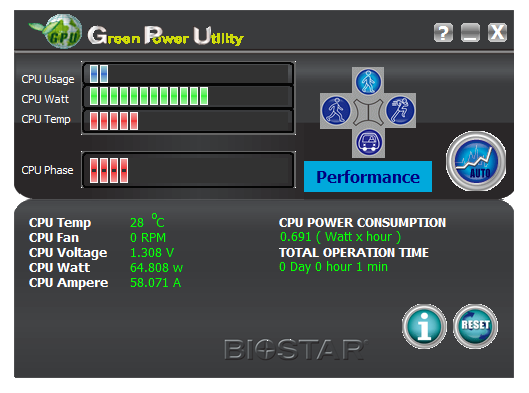
G.P.U: The confusing part of the software is this - the Green Power Utility. Why it was called GPU I have no idea, but this software takes a while to load and attempts to adapt the system to use less voltage.


Originally published at https://www.anandtech.com/show/5714/990fx-motherboard-roundup-with-thuban-and-bulldozer-a-second-wind-for-asus-gigabyte-msi-and-biostar (Wayback Machine).