
990FX Motherboard Roundup with Thuban and Bulldozer – A Second Wind for ASUS, Gigabyte, MSI and Biostar
Gigabyte 990FXA-UD5 In The Box
Gigabyte packages of late have often been criticized for being bleak and uninteresting. This is typically because Gigabyte employ the model of trying to hit the price point for as cheaply as possible – the extra kit in the box costs, and if Gigabyte can hit a channel board in the next price bracket down, they feel it is beneficial to the consumer. With that being said, this bundle has:
Driver CD
User’s Manual
IO Shield
4 x locking SATA cables
3-way fixed SLI bridge
A long non-fixed SLI bridge

Image Courtesy of Newegg
Board Features
| Gigabyte 990FXA-UD5 | |
| Price | Link to Newegg |
| Size | ATX |
| CPU Interface | AM3+ |
| CPU Support | AMD FX/Phenom II/Athlon II |
| Chipset | AMD 990FX |
| Base Clock Frequency | Auto, 200 MHz to 500 Mhz |
| Core Voltage | Normal, -600 mV to +600 mV |
| CPU Clock Multiplier | Auto, x7 to x35 |
| DRAM Voltage | Normal, 1.025 V to 2.135 V |
| DRAM Command Rate | Auto, 1T or 2T |
| Memory Slots |
Four DDR3 DIMM slots supporting up to 32 GB Up to Dual Channel Support for DDR3, 1066-2000 MHz, |
| Expansion Slots |
3 x PCIe Gen2 x16 (x16/x16 or x16/x8/x8) 2 x PCIe Gen2 x4 1 x PCIe Gen2 x1 1 x PCI |
| Onboard SATA/RAID |
6 x SATA 6 Gbps, Support for RAID 0, 1, 5, 10 2 x SATA 6 Gbps, Support for RAID 0, 1 (Marvell 88SE9172) 2 x eSATA 6 Gbps |
| Onboard |
8 x SATA 6 Gbps (6 SB950, 2 Controller) 4 x Fan Headers 1 x Front Panel Header 1 x S/PDIF Output Header 3 x USB 2.0 Headers 1 x USB 3.0 Headers 1 x IEEE1394 Header 1 x Serial Port Header 1 x Clear CMOS Header 1 x TPM Header |
| Onboard LAN | Realtek 8111E |
| Onboard Audio | Realtek ALC889 |
| Power Connectors |
1 x 24-pin ATX connector 1 x 8-pin 12V connector |
| Fan Headers |
1 x CPU Fan Header 2 x SYS Fan Headers 1 x PWR Fan Headers |
| IO Panel |
1 x Keyboard/Mouse PS2 Port 1 x Optical SPDIF Output 2 x eSATA 3 Gbps 1 x Gigabit Ethernet 2 x USB 3.0 8 x USB 2.0 Audio Outputs |
| BIOS Version | F7h |
| Warranty Period | 3 Years |
To keep costs down Gigabyte has gone with a Realtek Audio/NIC combination which is often sold to manufacturers at a discount as a combo. As always, Gigabyte has included a TPM module header on board for those that require that functionality. What Gigabyte tend to skip out on is a pair of power/reset buttons, or onboard Clear CMOS button rather than pins. I would like to see those rolled out over the range if at all possible.
Software
Where certain other manufacturers have increased and improved their software over the years, Gigabyte has essentially kept to the same set of software for a good while with minimal updates. If you discount the 3D BIOS offerings of X79, all we have to play with is, for the most part, EasyTune – Gigabyte’s monitoring and overclocking center.
EasyTune6
EasyTune takes on a slightly different look if you use a Thuban processor or a Bulldozer processor, especially when it comes to overclocking. The Thuban does not get a set of easy overclock buttons:
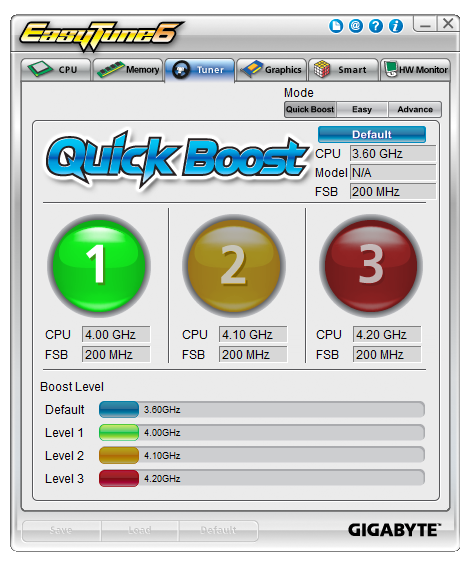
In terms of functionality, there is not much we have not seen before from previous Gigabyte outings. Overclocking is done via the base frequency or the multiplier (and depending on the processor, this may work or not as the case may be), and fan controls are a major issue when it comes to Gigabyte products:
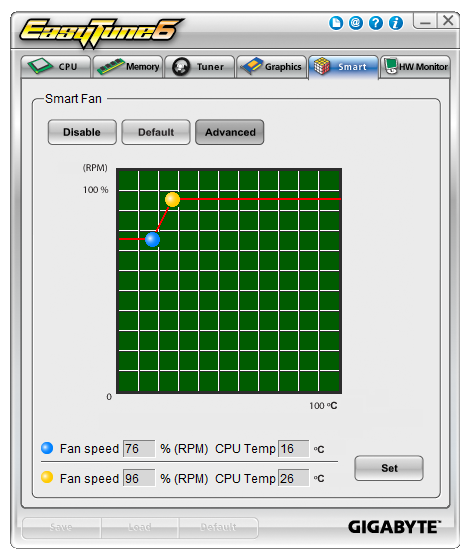
From the operating system, this is all we get for fan control of all the controllable headers on board – one little graph with two points. This is rather disappointing, especially when other manufacturers splash out on some more expensive fan headers to get the control in the hands of the user (and then put in the software to back it up).
As EasyTune also features a hardware monitor which polls the various sensors on board for voltages and temperatures every three seconds, this caused issue with a little of our testing, especially in our DPC test. These sensor readings take CPU priority, and hence the DPC results were often 20x bigger than would be reasonable for performing audio on the board with any degree of accuracy. There is a simple solution though – just close ET6.
@BIOS
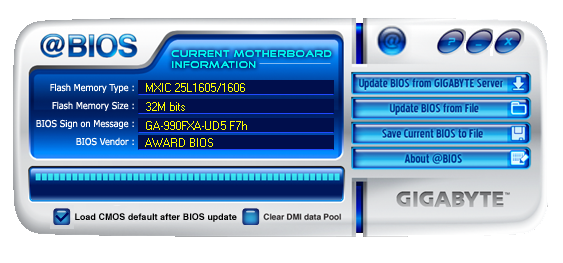
Gigabyte also has a tool for updating the BIOS. It does exactly what it says on the tin, and is needed from time to time if a big enough change is performed from BIOS version to BIOS version.
Easy Energy Saver
In an effort to appear ‘green’, motherboard vendors are now applying software to their products in an effort to reduce the carbon footprint of the motherboard. In the simplest terms, these software packages attempt to reduce the voltage of the processor at all the load states in order to save energy. The more intelligent systems will also look at other components to save energy, either by power gating through software, or adjusting operational voltages. This is all at the limit on the processor you have at hand (as some will work happily at lower voltages), and at the potential expense of stability. For Gigabyte, this comes in the form of Easy Energy Saver:

Using the ‘intelligent’ driver MOSFETs onboard, they can be controlled and the CPU can be throttled to save power. As a person interested in stability and performance, personally I would shun away from these types of software, but for the more energy conscious, they are here to be used.
Originally published at https://www.anandtech.com/show/5714/990fx-motherboard-roundup-with-thuban-and-bulldozer-a-second-wind-for-asus-gigabyte-msi-and-biostar (Wayback Machine).