
Thoughts on the Mac OS X Mountain Lion Developer Preview
- Posted in
- Mountain Lion
- Mac
- macOS
Gatekeeper
Of the Mountain Lion announcements, Gatekeeper has been one of the most discussed. Apple has touted OS X as being a safer, more secure environment than Windows, offering its customers a relatively malware-free experience. In the early days this was often discounted by saying that OS X wasn't a likely target for malware simply because no one used it. Today Apple claims to have a Mac installed base of 63 million users. While there are far more Windows users, that's not an insignificant number. And it's growing.
As the likelihood for significant malware targeting OS X increases, Apple must do whatever it can to maintain its pristine image. In a sense, Apple made its bed by promising a more secure, virus/malware-free experience, and now it has to sleep in it. It's not a bad thing, but it's something that is going to require a lot of work.
The easiest and most obvious solution to the problem is the Mac App Store. Every app distributed through the Mac App Store is certified by Apple and thus no malware/viruses should ever make their way to a customer's Mac if they only run apps from the Store. That's a step in the wrong direction unfortunately. Companies like Adobe and Microsoft don't make their applications available in the Mac App Store (paying Apple 30% for every copy of Photoshop sold seems unlikely to happen), not to mention the tons of useful open source or other programs that aren't distributed through the MAS. While the iPhone can sell just fine as a platform that's more of an appliance, Macs (at least today) cannot.
The alternative is to heavily warn users that what they're running isn't exactly safe but allow applications, regardless of origin, to be run. This is what's done today in Lion. The first time you run an application that you downloaded you'll get a message that looks like this:
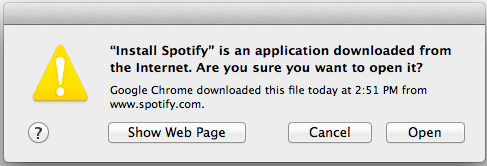
It's the everlasting debate between freedom and security. Give up one to get the other, but what's the right balance?
The compromise in Mountain Lion comes in the form of a tool called Gatekeeper. An innocuous little radio selection in the Security preference pane, Gatekeeper lets you choose what applications can be run on your Mac.
You can choose to only allow applications from the Mac App Store, allow all (the two extremes we discussed above) or pick an in-between option: allow anything downloaded from the MAS or anything by an identified developer.
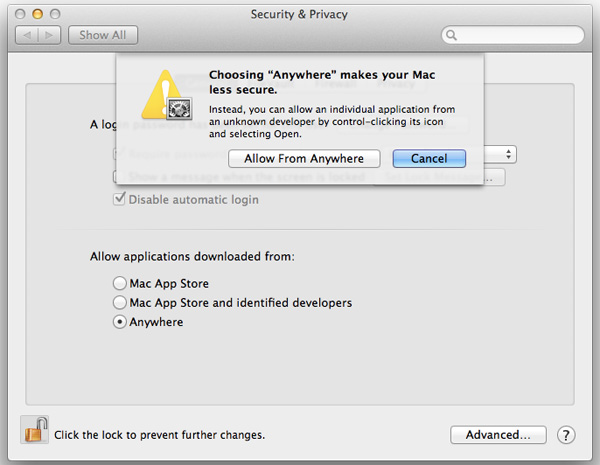
This in-between setting is the compromise.
If a developer joins the Mac developer program ($99/year) it can become an officially identified developer with Apple. The developer can then sign its applications with a unique cryptographic key that Apple recognizes, without requiring that the apps be distributed through the Mac App Store. Unlike the Mac App Store, there's no approval process that the developer's signed apps need to go through. There's only one stipulation that goes along with the identified developer label: the apps distributed with that key cannot be malware.
Apps from identified developers will communicate with Apple's servers to verify the digital signature is intact and correct only upon install or the first run of the application. Subsequent runs do not phone home and there's no remote kill switch for these applications. Should Apple find out that a developer has been distributing malware Apple can revoke the developer's key, but that would only render those apps that have yet to be installed/run from working. Without a certification process for non-MAS apps there's still a degree of risk associated with this compromise. I don't believe the ideal solution is to force everyone to buy through the MAS, but Gatekeeper's compromise isn't an impervious solution.
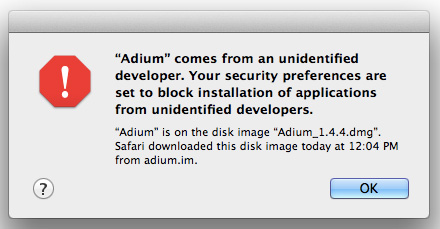
Apple tells us the default Gatekeeper setting in Mountain Lion will be to allow apps from the Mac App Store or from identified developers to run. Hopefully by the time Mountain Lion ships many third party developers will be on-board and identified making the transition mostly seamless. If you don't change the default Gatekeeper setting there's another way around the protection: simply control-click (or right click) on the app you're trying to run and select open. Doing so will override the Gatekeeper setting and let you run an unsigned app.
Originally published at https://www.anandtech.com/show/5545/mac-os-x-mountain-lion-developer-preview (Wayback Machine).