
Thoughts on the Mac OS X Mountain Lion Developer Preview
- Posted in
- Mountain Lion
- Mac
- macOS
General Impressions: The iPad-ification of the Mac
With Mountain Lion Apple officially drops the Mac prefix to the OS, it's now simply OS X 10.8. It's interesting (and perhaps deliberate?) that Apple keeps speaking of the updates in Lion/Mountain Lion as bringing iPad features to the Mac, not just iOS features. Perhaps that speaks to the nature of the convergence we'll see going forward.
There was a time in the microprocessor business where AMD and Intel felt that the ideal architecture for low power was mutually exclusive with the ideal architecture for high performance. Over time it became very evident that what makes you power efficient often gives you great performance as well. What we saw was a unification of mobile and desktop CPU architectures as a result. Although you could argue that the same sort of product bifurcation is happening now with the popularity of smartphone SoCs, I suspect we'll eventually see more convergence there in terms of features over time.
I do wonder whether we'll see a similar transformation in the OS space. Much of the discussion has been focused around bringing iOS user experience and features to OS X, however I'm more curious about whether we'll see a more fundamental merging of the two OSes over time. Today Apple has an i and an X line of operating systems, but what's to say that we won't see an eventual unification there. In many ways this would be a motivation for OS X on ARM, but it's a similar (and possibly a stronger) motivation for iOS on x86.
For this developer preview, the download and installation processes are identical to Lion - you still get the OS from the Mac App Store, it still creates a recovery partition for diagnostic and reinstallation purposes, and it still looks and acts mostly the same. If you made a USB or DVD installer for Lion from the App Store installer, that method continues to work here.
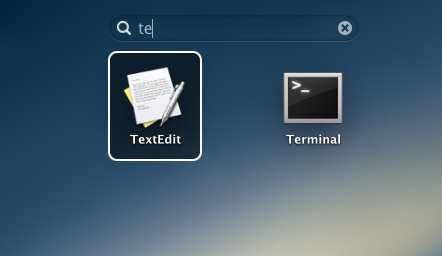
The Mountain Lion Finder, along with Lion additions like Launchpad and Mission Control, are at this point largely identical to their Lion counterparts. There are two obvious new features right now: first, Launchpad now includes a search box at the top of the window that lets you browse your installed apps. Compared to Spotlight, I find it to be of dubious usefulness, but I'm already on the record as finding the whole Launchpad concept to be of dubious usefulness - take my opinion as you will.
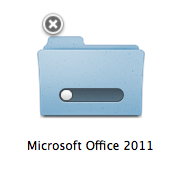
The other addition is also vaguely iOS-ish - you can cancel file copy operations in progress by clicking an X in the icon's upper left-hand corner (see above). Once a copy operation is complete, you delete the files by dragging them to the Trash just as before.
Safari 5.2

Safari 5.2, which is also currently available to developers as a beta for Lion, bumps the browser's WebKit version to 535.18.5, and brings with it some performance improvements and features. Features first: tabs now work as they do on the iPad, with each tab taking up an equal amount of space across the window - in Safari 5.1 and most other desktop browsers, new tabs are a fixed width (in both cases, the tabs begin to contract as you open more of them).

The address bar and search bar in the new Safari are also unified (as in Chrome and IE) - when you begin typing, the browser will search your default search engine, your bookmarks and history, and the content on the current page for matches. The Safari Reader button is now present to the right of the search/address bar at all times.
There's a new passwords manager in Safari that allows you to view and remove any stored user name/password combinations for websites you've visited. In the past this information was only accessible through the OS X Keychain but now it's available in both places.
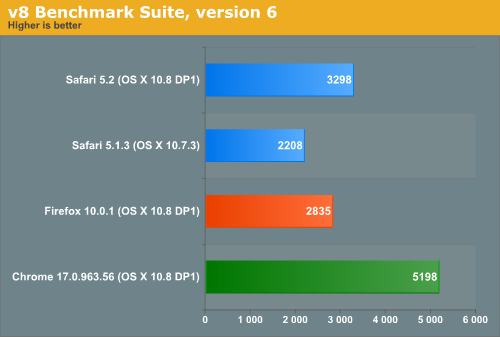
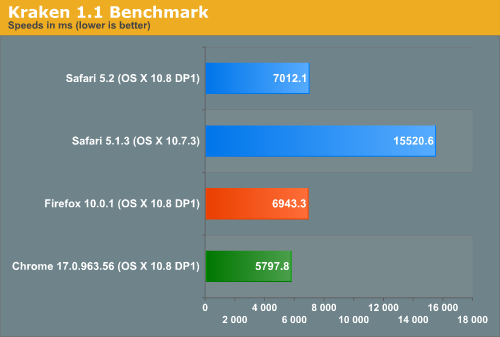
Now, for performance - Safari 5.2 is measurably faster than Safari 5.1.3, and while it doesn't beat the latest stable versions of Firefox or Chrome in the tests below, the upgrade at least keeps Apple's default browser competitive. The problem is that this performance is a moving target - if Safari 5.2 doesn't launch before Mountain Lion's release this summer, both Mozilla and Google will have released several minor upgrades to their browsers that may help them pull even further ahead of Apple's latest. Interestingly enough the new Safari is actually faster than the latest stable build of Chrome in SunSpider but it loses everywhere else. Subjectively Safari feels fast but still not quite as fast as Chrome, although the two are much closer now.
These tests were run on a late 2010 MacBook Air, which runs a 1.6 GHz Core 2 Duo - please try to remember that before you laugh at any of these scores.
Apple Remote Desktop and Screen Sharing
The Apple Remote Desktop client in Mountain Lion has been updated to 3.6, which continues the years-long tradition of bumping the ARD version to support a new OS X release without adding enough fuctionality to justify a major version change. ARD gains IPv6 support and can now report information about batteries, trackpads, and Thunderbolt peripherals, but none of this fundamentally changes how the software works.

On a related note, Screen Sharing is made marginally more functional by the addition of controls at the top of the window - they don't really add anything that wasn't there, but they pull functionality that was previously hidden in menus and expose it to the user. Screen Sharing also supports drag-and-drop file sharing between connected computers, something previously limited to the full Apple Remote Desktop package.
Originally published at https://www.anandtech.com/show/5545/mac-os-x-mountain-lion-developer-preview (Wayback Machine).