
Rosewill Ranger: All About Compromising
- Posted in
- Cases/Cooling/PSUs
- mid-tower
- Rosewill
Assembling the Rosewill Ranger
Rosewill doesn't include motherboard standoffs preinstalled, but once we start hovering around this price point we're willing to sacrifice a few amenities. That said, things don't start off on the best foot with the Ranger. Rosewill includes a generic I/O shield built into the case that has to be punched out, and all that really does is add an extra step to assembly. Getting the I/O shield for our testbed in turned out to be an exercise in frustration, too, as the Ranger made for a particularly tight fit. Wiring things up is a little better, and Rosewill amusingly opted not to include a power LED header at all; given that the front fan glows red, that LED would've been redundant. The cable routing holes made for plugging the eSATA connector into the sideways-mounted SATA ports on the motherboard a bit difficult, though, and the front panel audio header could've used another inch or two of slack.


Mounting a 3.5" drive in the Ranger is incredibly easy; the two drive sleds snap into the sides of the drive and then are held in place when you mount the drive to the cage. The plastic tray included also supports mounting two 2.5" drives, and while it isn't the firmest in the world it definitely gets the job done and is easier than some of the other trays I've used. Finally, the tool-less clips for the 5.25" drive bays are easy enough to use, but they do feel a bit loose: you'll want to screw in the other side of the optical drive for security. You'll have to actually pop the front panel off to remove the drive bay shields as well, which is another in a string of minor nuisances.
Popping in the GeForce GTX 580 from our testbed isn't too tight a fit, but this is really as long a video card as you'll want to go with. Theoretically you could shimmy in something longer like a Radeon HD 6990 or, I don't know, a Voodoo 5 6000, but you'll lose access to at least one external drive bay in the process, depending on where you need to slot it in.
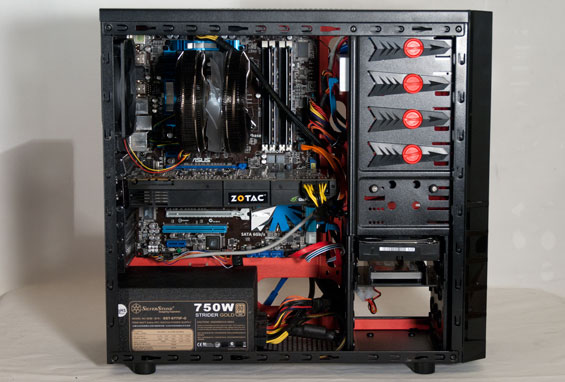
Finally, while getting the power supply in is easy enough, routing cables turns out to be an utter nightmare. The routing holes around the motherboard tray are seeming slightly off center, especially around the side-mounted SATA ports, but your mileage may vary; side-mounted SATA ports on a full-sized ATX board are going to result in serious cable bending. Rosewill at least has all of the cabling for the storage drives routed to behind the motherboard tray. Getting the AUX 12V line in is also very difficult; clearance between the port and the top 140mm fan is borderline nonexistent, and I actually wound up having to use the heatsink to pin the cable down so it wouldn't get caught in the fan.
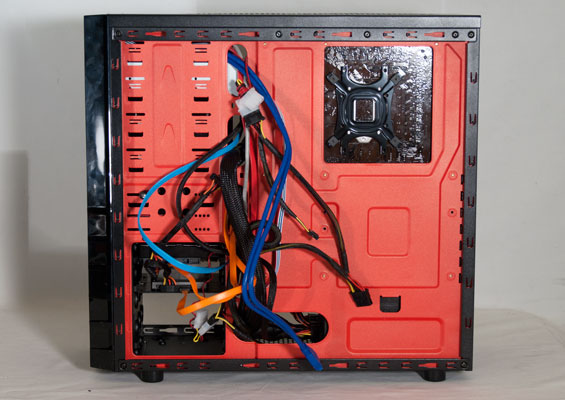
This is also where I realized just how much cable routing space there isn't in the Ranger; I'm used to having to apply a little force to replace the panel behind the motherboard tray, but I had to apply pressure to three of the four sides of the panel at once to eventually squeeze it on. This is really inexcusable; even an extra centimeter or two would've made a world of difference.
Honestly the Ranger is more work to build than it really needs to be. Tweaking the layout of the mounting holes in the motherboard tray and adding 2cm to every axis of the enclosure would've made everything a lot easier without making the case that much bigger. As it stands, this is just too small and difficult to work in. Hopefully it'll at least perform well enough to merit the trouble.
Originally published at https://www.anandtech.com/show/5217/rosewill-ranger-all-about-compromising (Wayback Machine).