
ASUS E35M1-M Pro Review - Anyone For Fusion?
- Posted in
- Asus
- Motherboards
- Fusion
- E-350
Test Setup
| Processor |
AMD Fusion APU E-350 Dual-Core 1.6 GHz Up to 2 "Bobcat" cores, FT1 BGA 80 Stream Processors, 500 MHz |
| Motherboards | ASUS E35M1-M PRO |
| Cooling | Standard Cooling |
| Power Supply | Jeantech 250 W |
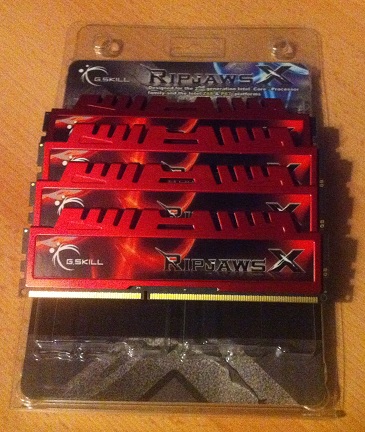
| Memory | G.Skill RipjawsX F3-14900CL9Q-16GBXL |
| Memory Settings | DDR3 1333MHz - 9-9-9-24 1T at 1.5 V |
| Hard Drive | OCZ Vertex 3 240GB |
| Optical Drive | Samsung SH-S223Q |
| Case | Dimastech Bench Table |
| Operating System | Windows 7 64-bit Ultimate |
| SATA Testing | OCZ Vertex 3 240GB |
| USB 2/3 Testing | Patriot 64GB SuperSonic USB 3.0 |
Many thanks to…
Before we go any further, I'd like to take the time to thank G.Skill for providing us with a set of their RipJawsX RAM for my future AMD reviews, in particular, the F3-14900CL9Q-16GBXL kit of which two sticks were used. It is a 16GB (4x4GB) kit which is rated at DDR3-1866MHz with 9-10-9-28 timings on as little as 1.5 volts. It is currently available from Newegg for $149.99.
Power Consumption
Power consumption was tested on the system as a whole with a wall meter connected to the power supply, while in an IGP configuration. This method allows us to compare the power management of the UEFI and the board to supply components with power under load, and includes typical PSU losses due to efficiency. These are the real world values that consumers may expect from a typical system (minus the monitor) using this motherboard. The power supply used for this test was a generic 250W model from JeanTech.
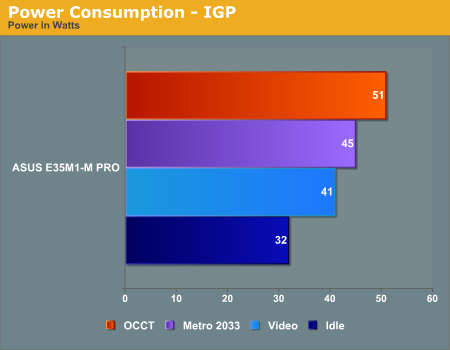
Out of the A50M motherboards which we have had on test, the ASUS E35M1-M PRO has the lowest average power rating across the four tests which we ran.
CPU Temperatures
With most users running boards on purely default BIOS settings, we are running at default settings for the CPU temperature tests. The results of a CPU Temperature test are not easily interpretable – if a motherboard vendor has buffered the amount of copper in the board between the power delivery and the CPU, this lowers the resistance and increases the CPU default voltage causing higher temperatures (but better stability). However, a high temperature could result from using different types of onboard devices, FETs, or the quality of the CPU temperature sensor, so the overall interpretation is purely speculative. The only thing a CPU test can say for sure is how warm the CPU is.
It could be argued that the CPU temperature is an indication of how well (or how adventurous) the vendor has their BIOS configured on automatic settings. A certain number of vendors not making CPU voltage, turbo voltage or LLC options configurable to the end user, which would directly affect power consumption and CPU temperatures at various usage levels.
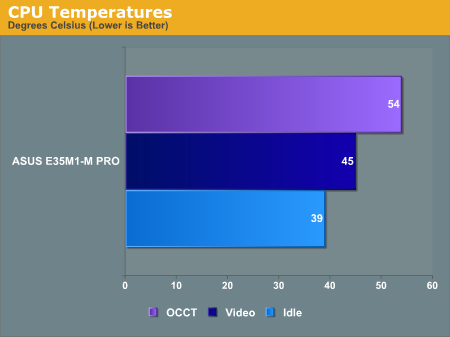
The thermal tests were conducted without the included fan, just like the other Fusion motherboards. As you would expect, the temperatures are significantly lower if you use the fan. For example, if you stress the system with OCCT, the temperatures come down from 54 °C to just 39 °C. The fan is whisper quiet during normal operation and should not be noticed in a HTPC environment - however, when the system is stressed and the fan speeds up to 100%, it does get quite loud.
Originally published at https://www.anandtech.com/show/4996/asus-e35m1m-pro-review-anyone-for-fusion (Wayback Machine).