
BenQ EW2420 Monitor Review
Brightness and Contrast
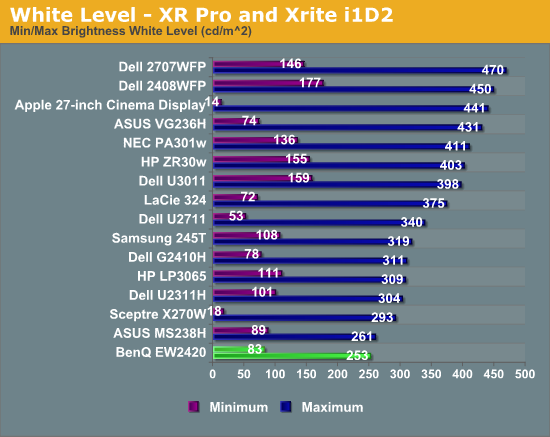
While the move to an LED instead of a CCFL backlight might mean many things, in the case of the EW2420 it does not mean higher maximum light output. With the backlight and contrast controls at maximum it manages 253 nits of light output. Moving the brightness control down to minimum but leaving the contrast control maximized, the light output falls to 83 nits.
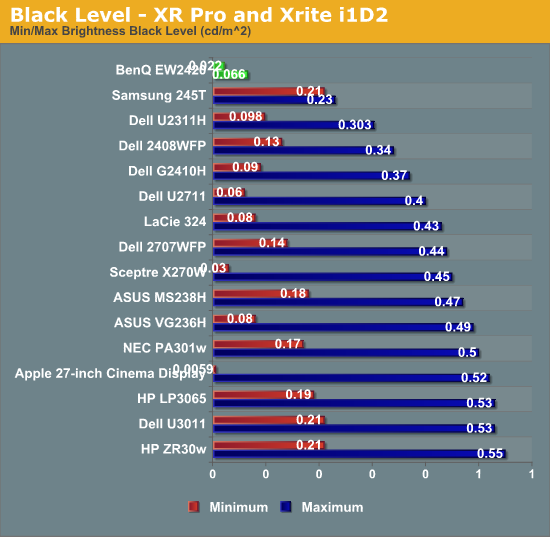
Where the LED backlighting shines is on the light output when displaying a black screen. With the brightness at maximum, the light output with a black screen is only 0.066 nits, and it falls all the way down to 0.022 nits with the brightness at minimum.
What this great black level leads to are superb contrast ratios over 3,800:1 at minimum or maximum brightness, even better than what BenQ specified. This is far more important than the maximum light output since most users will probably use the display somewhere between 100 and 200 nits, and the greater contrast range will be something that you can see. For viewing photos, watching a movie, or playing a game, a higher contrast ratio will make a big difference in the image you can see.
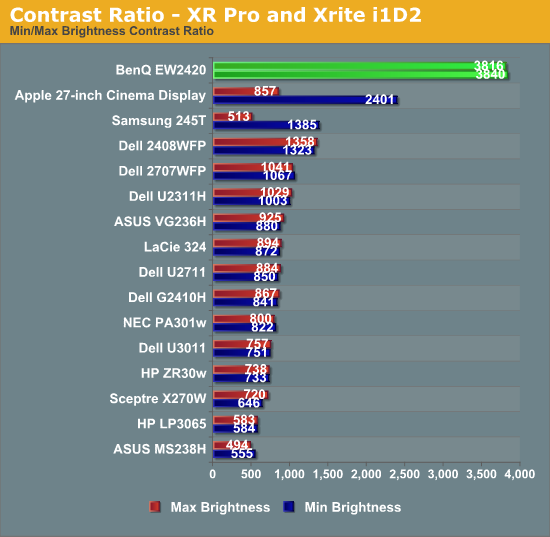
Compared to other displays, the BenQ is far ahead of everyone else. There are other LED lit displays on here, so I’m not sure if it is the combination of the VA panel and the LED lighting, or if they use LED lights with more addressable zones for better light control, or another method. It’s worth nothing that the most advanced LED-backlit televisions can put out a black level below what our test instruments can measure, so monitors still have a little bit further to go with the LED technology, but those sets also are very expensive in comparison.
Brightness Uniformity
With our center measurement at 200 nits, I then measured the light output of a pure white window at nine locations on the screen for the BenQ. While the center and bottom middle locations both are right at that 200 nits level, the light output drops down to the 170-180 nits level at the top of the display.
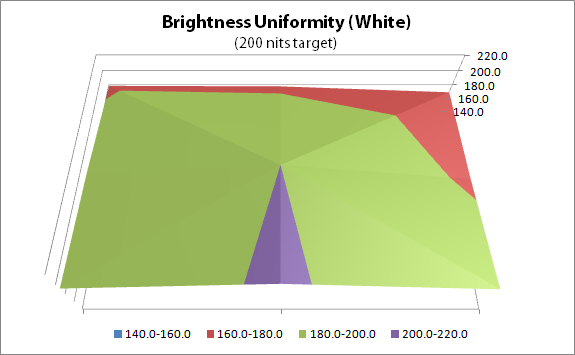
This is better uniformity than the last display I tested, but it still isn’t quite ideal. Since we disable dynamic contrast, the non-uniform lighting is just a case of the LEDs not being positioned/diffused optimally. The best way to address this is to use rear LED lighting instead of edge LED lighting, but that leads to a far more expensive, and thicker, display than an edge-lit one.
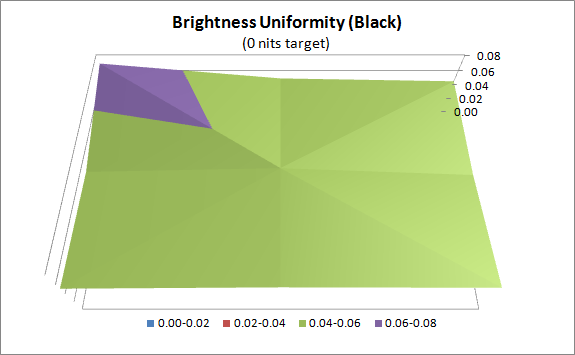
Black uniformity is better than white uniformity. The standard deviation is only 0.007 nits, which is very low. The BenQ is the darkest display I have used on my PC, and it is that way all across the screen.
Originally published at https://www.anandtech.com/show/4960/benq-ew2420-monitor-review (Wayback Machine).