
Apple iOS 5 Review
Multitouch Updates
iOS 5 brings a pretty decent list of user experience changes with it. On the more minor side are things like being able to delete individual calls from the iPhone’s recent calls list instead of clearing the entire list and now being able to make FaceTime calls without a SIM card inserted. A bigger one is being able to use your iDevice while it is plugged in and syncing to the computer - gone are the days of waiting 15 minutes for the backup to complete and the changes to reconcile before you could call or text someone.

The iPad has gotten a few more meaningful UX updates than the smaller devices. The integration of more gesture-based computing models is pretty evident throughout the entire OS, not just the multitouch gestures highlighted in the settings (iPad 2 only, sorry early adopters!) The multitouch ones use four or five fingers - swipe up to see the multitasking bar (read: task manager), swipe down again to get rid of it, swipe right or left to switch between various apps, pinch to return to the home screen. You can find swipe-based gestures in other places too: the mail app, for example. In portrait mode, swipe left to bring up the inbox sidebar. In Calendar, swipe left or right to change months. In the “Now Playing” part of the music app, swipe right or left on the album art to change songs. The gestures are all pretty well integrated and make it such that you can basically avoid touching the home button at all. A big benefit of avoiding the home button is switching between apps is now a much quicker affair, taking another step towards embracing productivity on the iPad.
Keyboard Updates
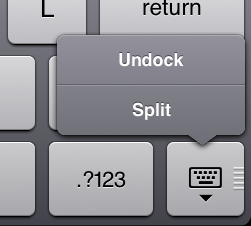

The iPad now has a new split keyboard option - pull the keyboard apart or swipe it upwards, and the entire thing splits in two. It’s meant to be like a QWERTY thumb keyboard split for each hand, like a UMPC (if anyone else remembers those). It’s useful for when you’re standing up and have nothing to support the iPad on when you’re trying to type. In addition, it’s now possible to undock the standard QWERTY keyboard and move it up or down the screen. I’ve personally never been inclined to make use of the undocked keyboard, but I’m sure there is a use case in which it makes sense.
Originally published at https://www.anandtech.com/show/4956/apple-ios-5-review (Wayback Machine).