
ASUS G74SX: Noteworthy Updates to ASUS' G7 Series
Gaming Performance: Good for 1080p Gaming
The GTX 560M is clocked 15% higher on the cores, but memory bandwidth remains the same so we should see a spread of up to ~10%. Driver differences may also play a role, but generally speaking the gaming performance of the GTX 460M was already good for 1080p high quality gaming, and the GTX 560M continues that trend with moderate improvements in performance. Even compared to the older ASUS G73JW, the G74SX isn’t a major step up, so if you’re running the older iteration you can probably hold off upgrading for a couple more cycles.
Medium Quality Gaming
High Quality Gaming
Ultra Quality Gaming
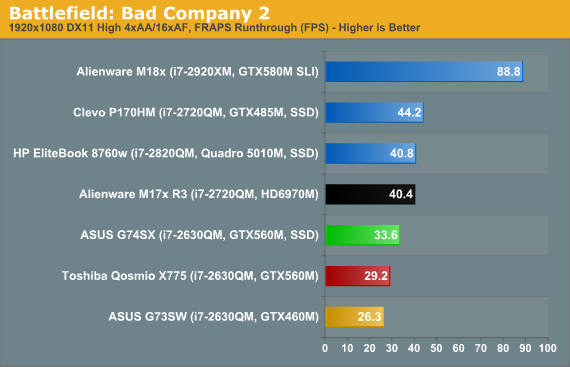
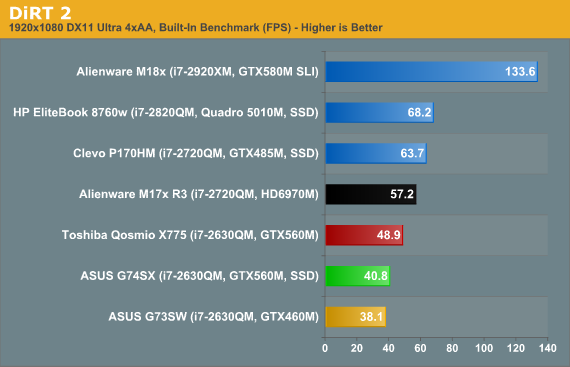
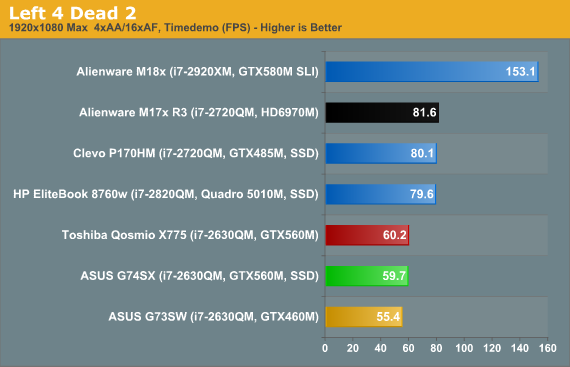
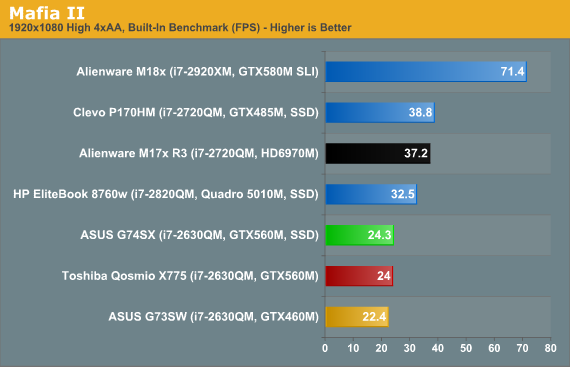
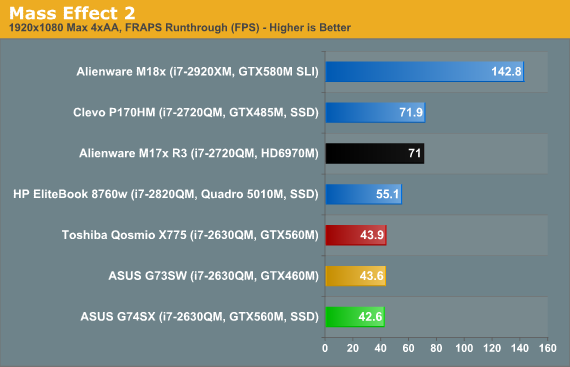
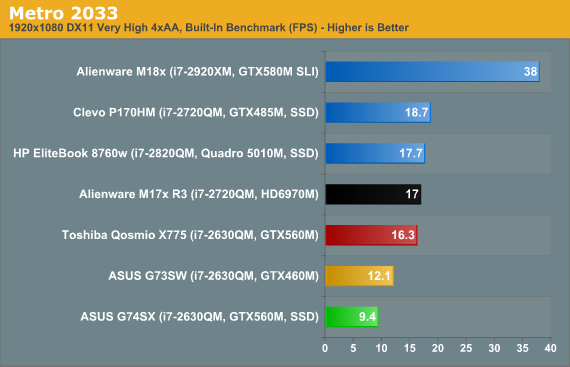
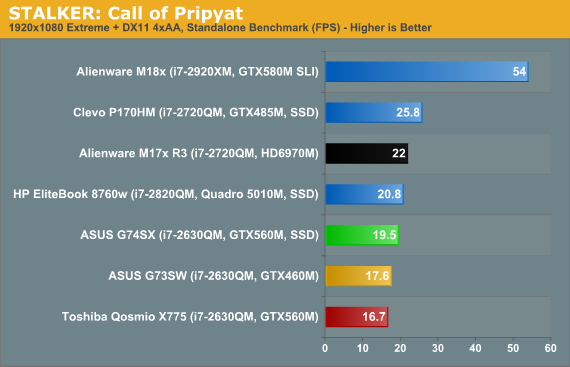
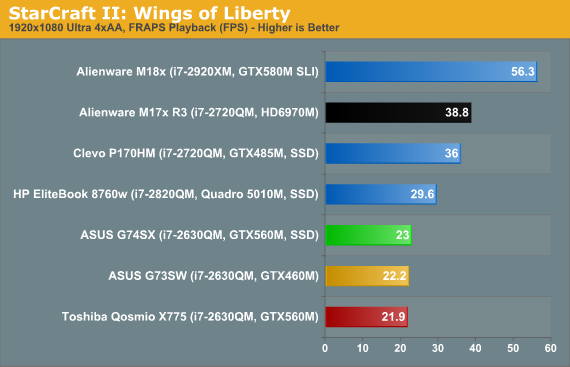
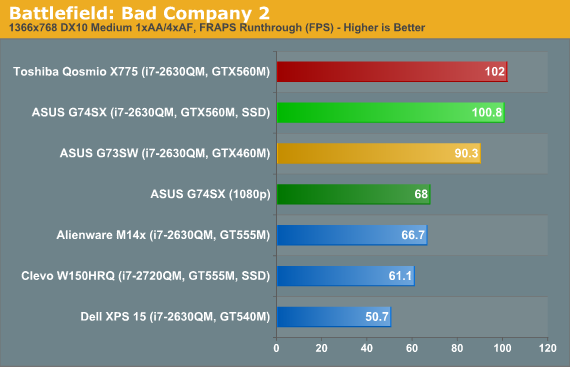
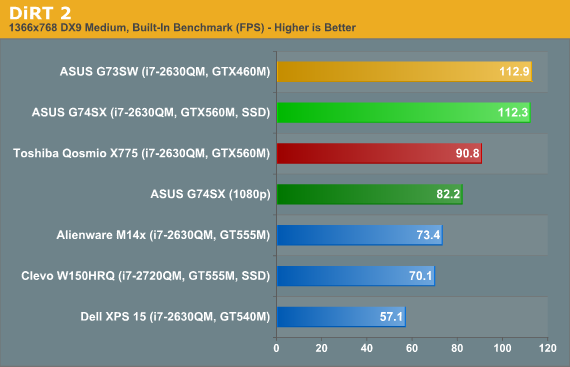
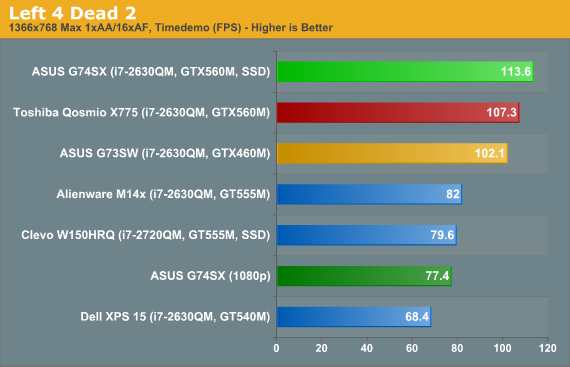
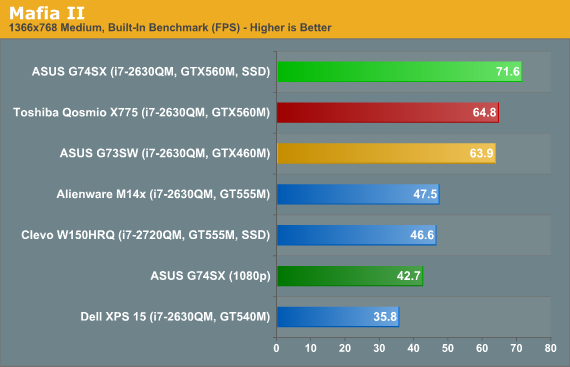
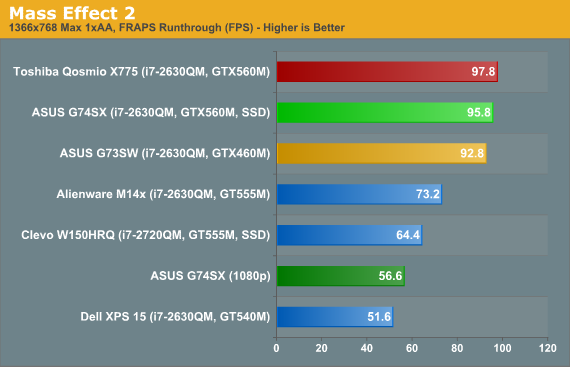
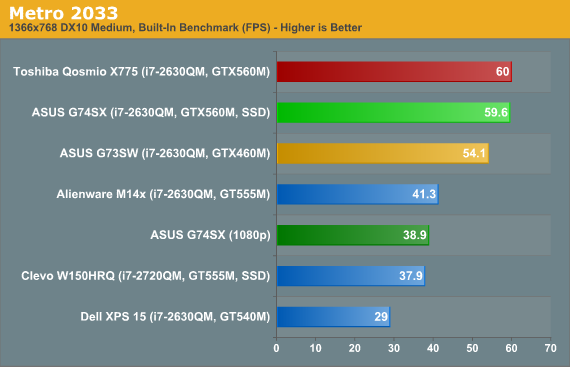
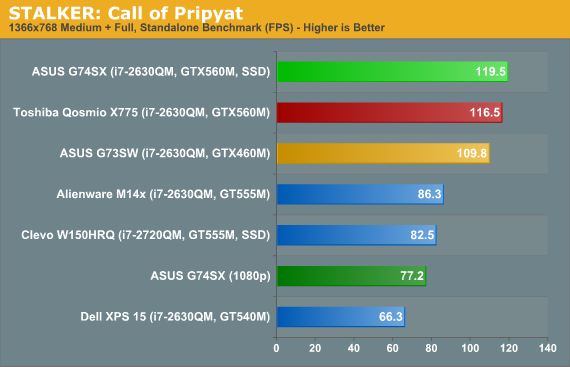
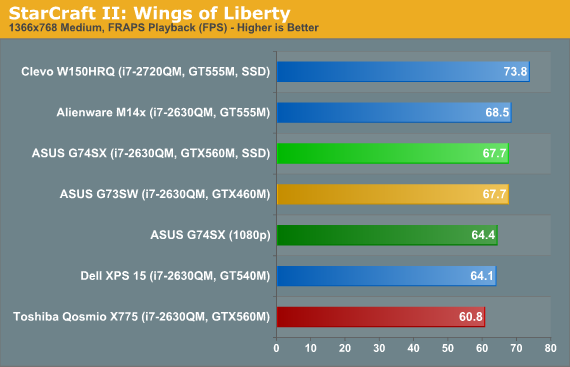
Medium quality gaming obviously doesn’t tax the GTX 560M all that much, and even at 1080p we see that results are generally higher than what the next step down (GT 555M) can manage at 768p. Toss in results from the GT 540M (Dell XPS 15) and we can see just how wide the gulf is between “mainstream” mobile gaming GPUs and “high-end” offerings. Really, if you want to play modern games on a laptop, the GT 540M should be your bare minimum GPU, and it’s only good for 768p and ~medium settings; if you want to play at 1080p, the GTX 560M is what you’ll want.
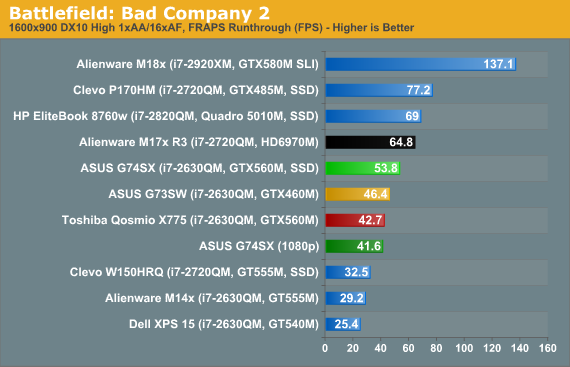
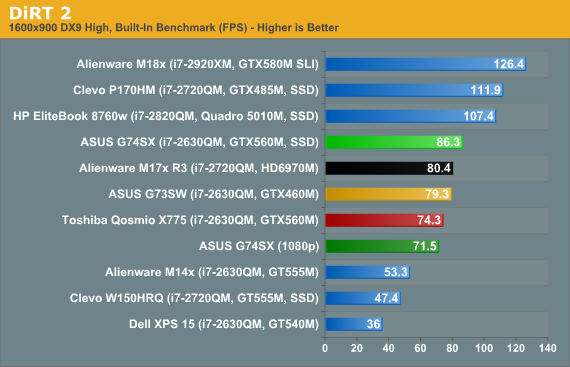
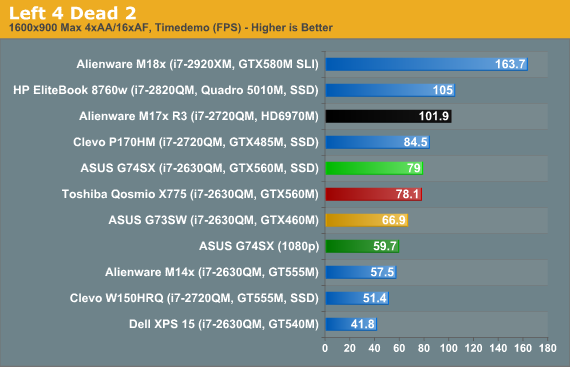
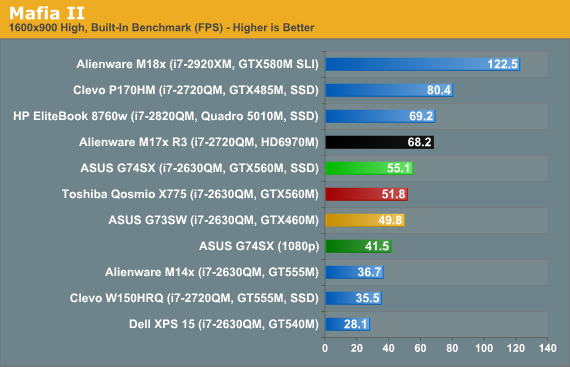
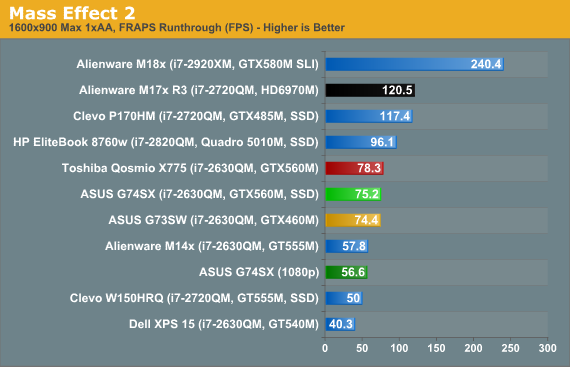
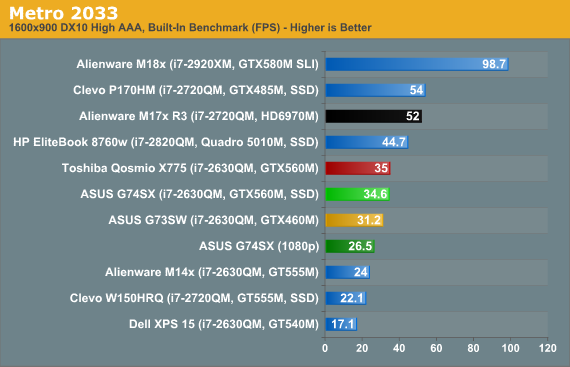
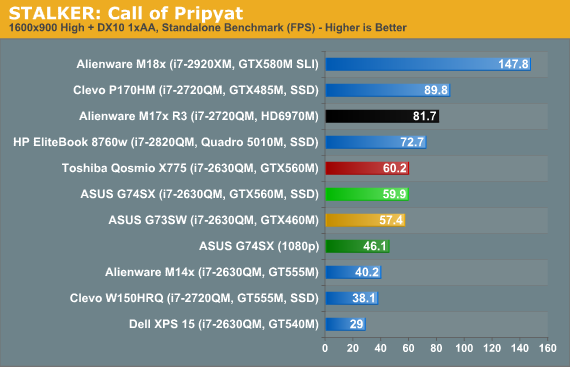
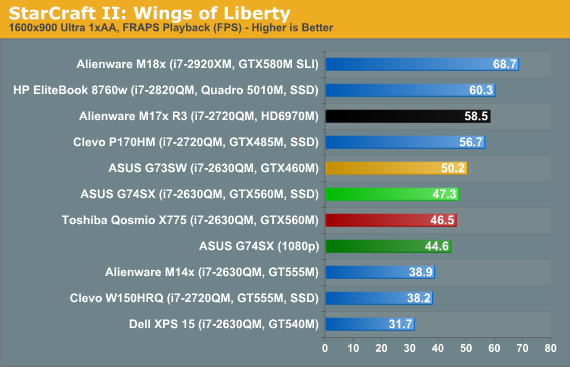
Looking at our eight titles (with a couple more in Mobile Bench), the G74SX can handle 1080p and our Medium settings in every single title while breaking 30FPS, and eight of the ten games break 60FPS. Move to 1080p and our High settings and nearly all of the games still remain above 30FPS, Metro 2033 being the one exception, but only one title (DiRT 2) can actually break 60FPS. When we turn on antialiasing, we clearly hit the limits of what the GTX 560M can handle. In our Ultra charts, half of the games still break 30FPS, but Mafia II, Metro, STALKER, and StarCraft II fall well short of the mark. You’ll want to monitor your use of antialiasing, and personally I find it too much for the G74SX at 1080p in the majority of titles; average frame rates may be reasonable, but 4xAA often introduces periodic stalls where you drop into the teens or even single digit frame rates, and I’d much rather sacrifice visual fidelity than deal with periodic choppiness.
One other interesting item in the above charts is the comparison of the G74SX with the Toshiba Qosmio. Toshiba employs Optimus Technology, but their laptop also felt a bit less optimized for performance, and it was running older NVIDIA drivers. How much each of those elements accounts for the gaming results is difficult to say, but while we see equal performance in some of the results (BFBC2 Medium, L4D2 High/Ultra, Mafia II Ultra, ME2, Metro Med/High, STALKER Med/High, and SC2 High/Ultra), there are also a few areas where the Qosmio is substantially slower. There’s a 20~25% gap in BFBC2 High and D2 Med/Ultra, and a 5~15% gap in BFBC2 Ultra, D2 High, L4D2 Med, Mafia2 Med/High, STALKER Ultra (unplayable though), and SC2 Med. We also see at least one instance (Metro Ultra) where the Qosmio comes in 73% faster (though it’s completely unplayable at <20FPS, regardless). Clearly, there are some differences in how the two notebooks perform, despite having nearly identical hardware (outside of Optimus support).
Originally published at https://www.anandtech.com/show/4911/asus-g74sx-noteworthy-updates-to-asus-g7-series (Wayback Machine).