
Lian Li's PC-V353: Lighter Than Air
In and Around the Lian Li PC-V353
My first impression of the PC-V353 before I even opened the box was amazement: I couldn't believe just how light the case actually was. In fact I still have some trouble with it. Anyone looking for a LAN build may want to consider short-listing the PC-V353 for that reason alone; I can nearly palm the box, and I am a sad, frail, wisp of a man.
Once you get it out of the box, though, confusion is liable to set in. I'm used to cases that take a little more work to figure out, but Lian Li has gone virtually off the grid with this one. The front of the PC-V353 is entirely perforated, with only the power and reset buttons really breaking it up. Our optical drive bay is actually on the right side of the enclosure; you can opt to use the left side instead, but it would be extremely difficult to use both due to how assembly is handled (more on that later.) The ports are also on the right side, below the optical drive, and the port block can actually be removed and swapped over to the left side as well. That's made crystal clear when you look at the left side and see cutouts for the ports (shielded from behind by a plate) along with a bay shield for the 5.25" bay.
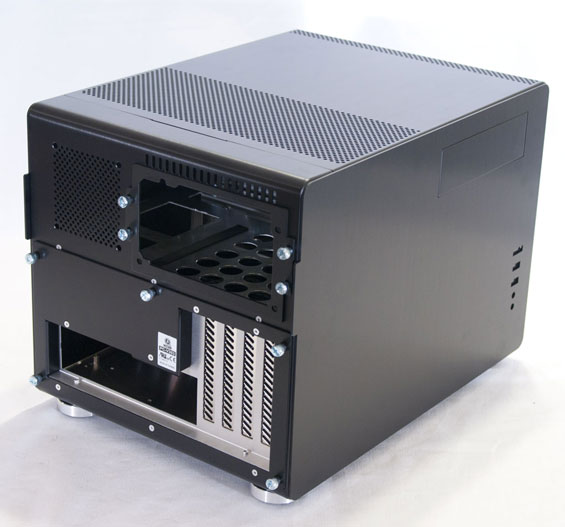
The back of the PC-V353 is home to nine thumbscrews, four of which are used for the power supply mounting bracket while the remaining five hold the removable motherboard tray in place. There are also four vented covers for the expansion slots. At this point I was wondering where the screws were to hold the side panels in place. The answer? There are none!
The side panels actually snap on and off and for what it's worth the mechanism seems pretty sturdy. It would've been easier for Lian Li to simply use screws to hold the panels in place, but I think one too many sacrifices were already made to the fit and finish of the PC-V353 by having the ports swappable between the two sides. Surprisingly, the panels feel like some of the sturdier parts of the case's design; the rest of it is so light, and the motherboard tray can actually bow.
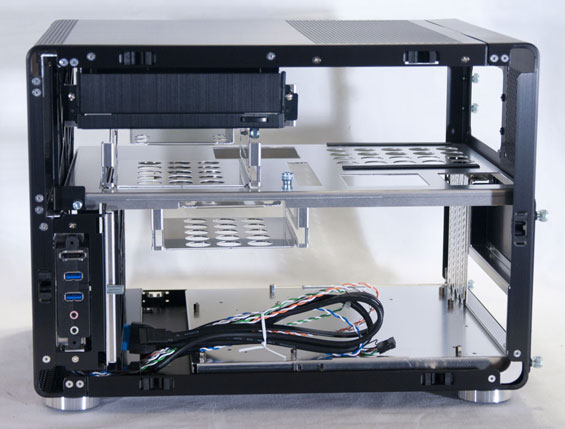
When you do take a look at the interior of the PC-V353, it can actually seem even more puzzling: this is an instance where you're really going to want to go through the instruction manual bit by bit to be sure you know how to assemble a system within the enclosure. There's support for a grand total of five drives: one 5.25", two 3.5", and as a sign of the times, two 2.5". At first glance it also seems like you could fit a fairly long, high end video card in the PC-V353, but when we get to the assembly you'll see it doesn't really work out that way in practice.


I like how the PC-V353 looks for the most part, but I have to be honest and say it feels like they went just a little too far off the beaten path with this one. Assembling it looked frankly daunting, and in my experience smartly arranged ventilation with even a single good, quiet fan has been more effective than just venting everything. I'm also not a fan of being able to swap the optical drive and ports from the right to the left side; the result is that the side you aren't using just looks kind of unattractive and feels like there should really just be a single flat side panel. That's my personal opinion, though; your mileage may vary.
Originally published at https://www.anandtech.com/show/4866/lian-lis-pcv353-lighter-than-air (Wayback Machine).