
StarTech.com Portable SATA Duplicator & USB / eSATA Dock Review
- Posted in
- Gadgets
Dock Mode
In the first dock mode test, we connected the 128 GB Kingston SSD to the 'Destination' port of the SATDUPUE. On the PC, we had the 120 GB OCZ Vertex SSD.
Docked SSD Transfer Rates (MBps)
| eSATA | USB | |
|---|---|---|
| Read from SATDUPUE to PC | 138.27 | 38.57 |
| Write from SATDUPUE to PC | 154.71 | 28.34 |
In the second dock mode test, we connected the Seagate Barracuda LP 2000 GB drive to the SATDUPUE and retained the OCZ SSD in the PC.
Docked HDD Transfer Rates (MBps)
| eSATA | USB | |
|---|---|---|
| Read from SATDUPUE to PC | 110.38 | 37.42 |
| Write from SATDUPUE to PC | 107.02 | 28.12 |
In eSATA mode with the hard disk attached, the unit consumed around 9.6W of power on an average. The power consumption is heavily dependent on the type of disk attached to the unit.
Duplicator Mode
In order to determine the characteristics in the duplicator mode, we tested the cloning of both SSDs and HDDs. The table below summarizes our observations:
SATDUPUE Duplicator Mode Characteristics
| Source | Destination | Time | Xfer Rate(MBps) | Av. Power(W) | Max. Temp. (C) |
|---|---|---|---|---|---|
| 128 GB SSD | 2 TB HDD | 16m 45s | 127.36 | 9.8 | 49 |
| 120 GB SSD | 128 GB SSD | 10m 12s | 196.08 | 8.4 | 47 |
| 2 TB Samsung HDD | 2 TB Seagate HDD | 5h 17m 28s | 104.99 | 15.9 | 65 |
The temperature towards the end of the cloning process with a Ryobi non-contact infrared thermometer on the upper and lower sides of the SATDUPUE. The readings have an accuracy of +-5 C. The power consumption reported is the average power consumed over the course of the cloning, as measured using a Watts Up Pro power analyzer.
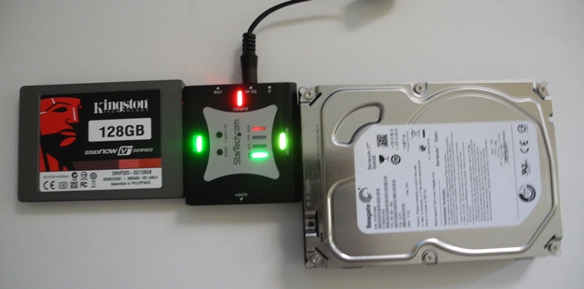
Though StarTech.com claims only 72 MBps transfer rate in clone mode, we found that SSDs could deliver much higher rates. Even hard disks were found to have better performance than claimed. However, waiting for more than 5 hours to get a 2 TB drive cloned does test one's patience. Support for 6 Gbps SATA ports in the JMB352U bridge could have helped here.
All in all, the SATDUPUE works better than it claims. It is available on StarTech.com for less than $80, but can be found for a much lower price point at various resellers like TigerDirect. We conclude the review with a list of the pros and cons of the SATDUPUE:
Pros:
- Cloning rates of more than 190 MBps (when suitable SSDs are used)
- Multipurpose gadget with both eSATA / USB dock as well as clone mode
- JBOD configuration for attached drives over USB 2.0
- Easily portable form factor
Cons:
- Product and power adapter cables appear very fragile. The user needs to be very careful when dealing with multiple 3.5" HDDs and the SATA connectors on the SATDUPUE.
- Product gets quite hot to touch and needs proper heat dissipation when operating
- Comparable product from Bytecc (BT-340) seems to be much cheaper
Originally published at https://www.anandtech.com/show/4737/startechcom-portable-sata-duplicator-usb-esata-dock-review (Wayback Machine).