
Corsair Obsidian 650D: Transmuting Graphite to Obsidian
- Posted in
- Cases/Cooling/PSUs
- Corsair
- mid-tower
In and Around the Corsair Obsidian 650D
Externally the Obsidian 650D is basically the mid-tower version of Corsair's larger 700D and 800D enclosures, and people who aren't fans of the Graphite 600T's curved design are liable to appreciate the monolithic black style. About the only thing that might seem out of place is the window on the left panel; I have a sort of "take it or leave it" feeling about windows on cases and would probably prefer either a solid panel or a 200mm fan intake.


The front of the enclosure is very spare and clean. It's almost entirely black aluminum, with four drive bays. The power button and HDD indicator light are both above the bays along with a door that hides the front I/O. It's a nice stylistic touch but I'll admit I found myself wishing that door was an external 3.5" bay for a card reader; your mileage may vary and I certainly can't ding Corsair for the decision since inside and out, it looks good. Behind that door is also the reset button and frankly that's probably a perfectly fine place for it. Below the bays is a removable fan filter for the front 200mm intake fan.
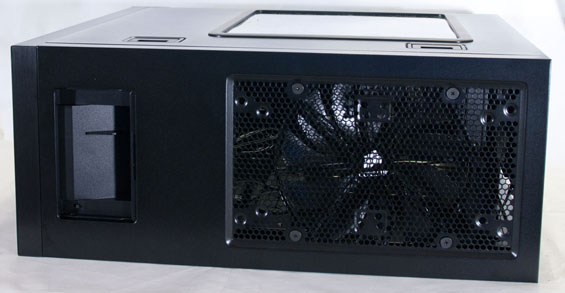
When you get to the top of the 650D, you'll find the SATA hot-swap bay and fan controller hidden by a sliding plastic door. The door on my review unit was a little bit stiff, but it did work fine otherwise. The bay will easily accommodate a 3.5" or 2.5" drive. Behind it is the massive vent for the top-mounted 200mm exhaust fan, and this is a big improvement on the 600T's design. The vent here is perfectly flat and can accommodate a pair of 120mm or 140mm fans instead of the 200mm fan for larger water-cooling radiators. What I really appreciate here, too, is that the removable filter on the top of the 600T is gone and the vent is just built into the case. That filter was a nice enough touch, but over the last few months mine has actually developed a bit of a rattle that requires "concussive maintenance" to silence from time to time. On boutique builds it also had a habit of getting stuck.
Finally, the back and bottom are pretty standard fare. The bottom of the case has a removable filter to go under the power supply's intake fan and is lifted off of the ground to allow you to place the case on carpet, while the back has a small hole for routing the USB 3.0 passthrough cables along with a generous eight expansion slots (one more than the pricier 700D and 800D cases), a 120mm exhaust fan, and two rubber-lined holes for passing water-cooling tubing.
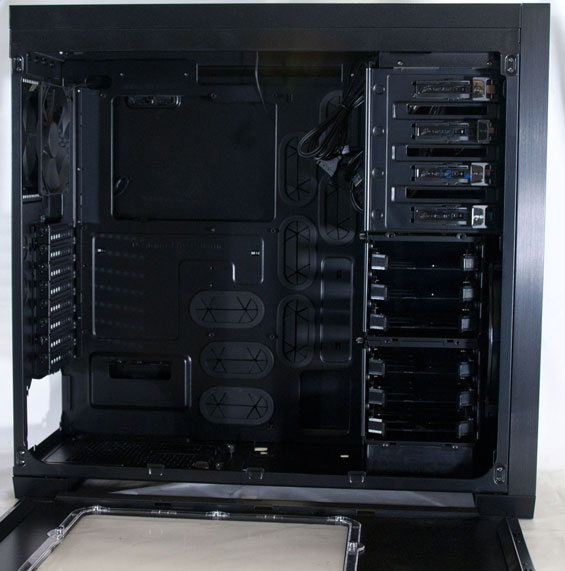
Internally, the 650D is an exercise in deja vu. I have been inside this case before. Corsair retains the latched side panels found on the 600T and these are still one of the best features I've ever seen on any case, period. Getting into and working inside the 650D remains just as easy as the 600T was, so if you're the tinkering type Corsair has your back. Unfortunately, though, the side panels on the 650D don't feel quite as secure and don't go back on quite as easily as the 600T's did, and I could see with the 650D where they might develop a rattle over time.
But the inside design is stellar. The two three-drive cages both feature tool-less drive trays that can support 2.5" or 3.5" drives, once again making a strong argument for using drive trays in modern designs. The top cage can also be removed and placed alongside the bottom one to allow for extremely long video cards, though I doubt that will be necessary: there's already 13.5" of clearance to begin with. Corsair also includes a generous opening in the motherboard tray for mounting heatsinks, and there are an abundance of openings with which to route cables behind the tray.
If I have one complaint to really carry over from the 600T, it's the power supply mounting system. Corsair includes an additional, movable support for the power supply, but it's held in place by two thumbscrews and frankly it's extremely awkward, can be difficult to line up, and is ultimately superfluous. This is an extra piece of complication the case just doesn't need, and hopefully in a future revision they'll just eschew it entirely. It allows for tool-less power supply mounting, but it's just not necessary.
Originally published at https://www.anandtech.com/show/4529/corsair-obsidian-650d-transmuting-graphite-to-obsidian (Wayback Machine).