
Gigabyte Z68X-UD3H-B3 Review
- Posted in
- Gigabyte
- Motherboards
- Sandy Bridge
- Z68
Board Features
| Gigabyte Z68X-UD3H-B3 | |
| Market Segment | Performance |
| CPU Interface | LGA 1155 |
| CPU Support | Sandy Bridge i3/i5/i7 |
| Chipset | Z68 |
| Base Clock Frequency | 38.0 MHz to 400.0 MHz in 0.1 MHz intervals |
| DDR3 Memory Speed | 1333 MHz by default, 800-2133 MHz supported |
| Core Voltage | Auto, offset or fixed modes, 0.800 V to 1.800 V in 0.015 V intervals |
| CPU Clock Multiplier | Dependant on CPU |
| DRAM Voltage | Auto, 1.108 V to 2.464 V in 0.007V intervals |
| DRAM Command Rate | Auto, 1T-3T |
| Memory Slots |
Four 240-pin DDR3 DIMM slots in dual-channel Regular unbuffered DDR3 memory Up to 32GB total supported |
| Onboard Graphics |
1x D-Sub port 1x DVI-D port, supporting a maximum resolution of 1920x1200 *The DVI-D port does not support D-Sub connection by adapter. 1x HDMI port, supporting a maximum resolution of 1920x1200 1x DisplayPort, supporting a maximum resolution of 2560x1600p |
| Expansion Slots |
2 x PCI Express 2.0 x16 slots (x16/x0 or x8/x8) 3 x PCI Express 2.0 x1 slot 2 x PCI slots Supports ATI Crossfire Supports NVIDIA SLI |
| Onboard SATA/RAID |
2 x SATA 6.0 Gb/s ports supporting RAID 0/1/5/10 3 x SATA 3.0 Gb/s ports (blue) supporting RAID 0/1/5/10 2 x SATA 6.0 Gb/s ports (white) from Marvell 88SE9172 supporting RAID 0/1 1 x eSATA 3.0 Gb/s port |
| Onboard |
4 x SATA 3Gb/s connectors 4 x SATA 6Gb/s connectors 4 x Fan Headers (1x4-pin, 3x3-pin) 4 x USB 2.0 headers support additional 8 USB 2.0 Ports 1 x Front panel switch/LED header 1 x TPM module connector 1 x USB3.0/2.0 header 1 x IEEE 1394a header 1x SPDIF Out header 1x Serial port header 1 x Firewire/IEEE 1394 header 1 x Front panel audio header 1x Clearing CMOS jumer |
| Onboard LAN | 1 x Realtek RTL8111E chip (10/100/1000 Mbit) |
| Onboard Audio | Realtek ALC889 Codec, 2/4/5.1/7.1-channel, Dolby Home Theater, S/PDIF Out |
| Power Connectors |
24-pin EATX Power connector 8-pin EATX 12V Power connector |
| Fan Headers |
1 x CPU Fan (4-pin) 3 x SYS Fan (3-pin) |
| IO Panel |
1 x PS/2 keyboard/mouse port 1 x D-Sub port 1 x DVI-D port 1 x optical S/PDIF Out connector 1 x HDMI port 1 x DisplayPort 4 x USB 2.0/1.1 ports 1 x IEEE 1394a port 1 x eSATA 3Gb/s connector 2 x USB 3.0/2.0 ports 1 x RJ-45 port 6 x audio jacks (Center/Subwoofer Speaker Out/Rear Speaker Out/Side Speaker Out/Line In/Line Out/Microphone) |
| BIOS |
2 x 32 Mbit flash Use of licensed AWARD BIOS Support for DualBIOS™ PnP 1.0a, DMI 2.0, SM BIOS 2.4, ACPI 1.0b |
| Warranty Period | 3 Years |
Software
EasyTune6 is Gigabyte's take on the monitoring and overclocking software within Windows. When you open the software, the Tuner tab opens by default. It offers three different “Quick Boost” options which are described in greater detail within the overclocking section of this review.
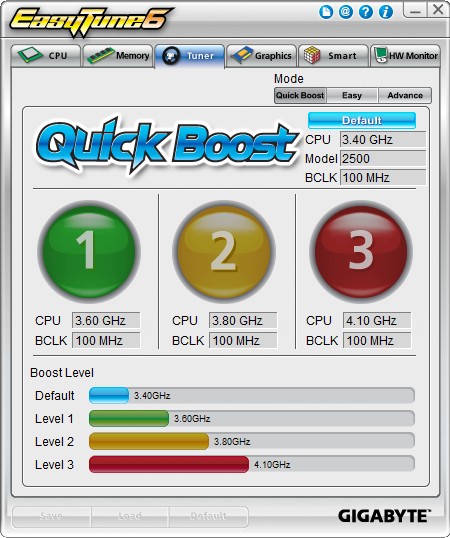
EasyTune6 does pretty much what you’d expect from this kind of software. It tells you everything about your CPU, memory, graphics card(s) as well as providing a hardware monitor and the ability to change your fan profiles.
EasyTune6 allows you to manually set fan profiles within Windows. The default is set at 27% when your CPU is at 20°c and 100% when it reaches 72°c. It increases as the temperature rises in order to try to keep the CPU temperature down. It’s simple really, if the CPU is still getting warmer with increased fan speeds, then the fan isn’t moving enough air so it speeds up more to bring the temperatures down. If all else fails and the CPU reaches 72°c or above, the fan will run at 100%.
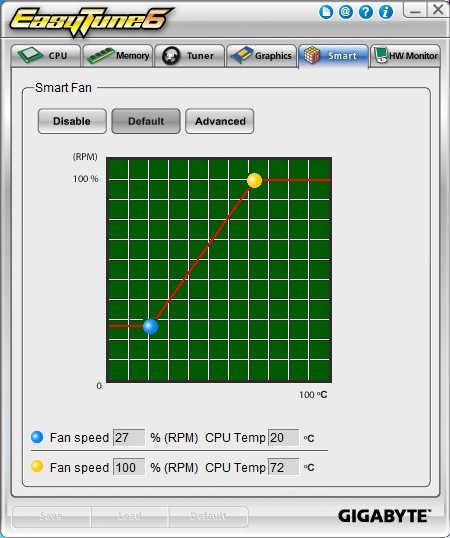
When you select the advanced option, you can manually adjust the settings of the two fans that are controlled by the CPU temperature. Unfortunately, you cannot change the speed of the CPU fan and SYS_FAN2 individually - both are controlled by the CPU temperature. SYS_FAN1 and PWR both run at 100%, no matter what. There is no control over those.
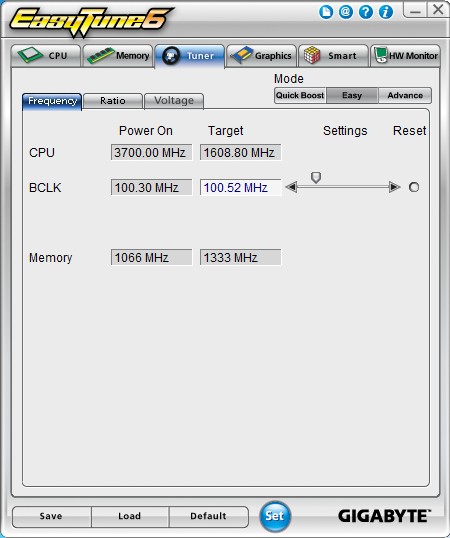
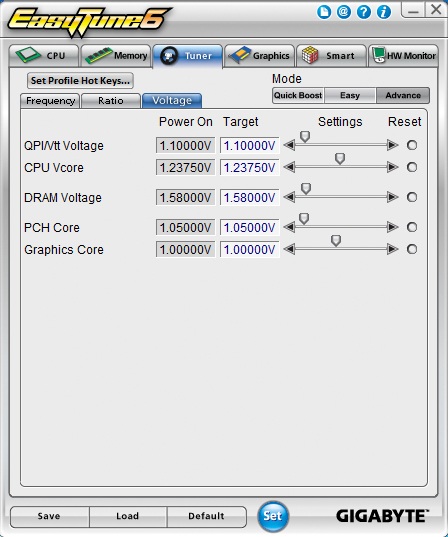
You can overclock your system from within Windows. EasyTune6 allows you to change most of the required settings. You can alter the BCLK, DRAM frequency, multiplier and the system voltages.


Originally published at https://www.anandtech.com/show/4493/gigabyte-z68xud3hb3-review (Wayback Machine).