
Promise Pegasus R6 & Mac Thunderbolt Review
Windows Support
I've got good news and bad news for Windows 7/Boot Camp users. If you're using the Pegasus as a pass through for a 27-inch Cinema Display, your monitor will still work under Windows 7. Unlike what we saw when Apple first introduced the MacBook Pro, there's now a Thunderbolt device listed in Device Manager. As we mentioned in our review of the MacBook Pro, the Thunderbolt device branches off 4 PCIe lanes from the Sandy Bridge CPU itself:
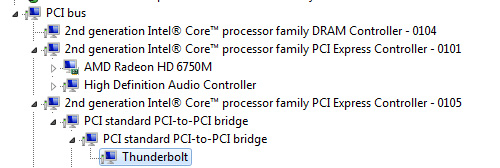
The bad news is that neither Promise nor PMC Sierra have published Windows drivers for the PM8011 SAS/SATA RAID controller - the Pegasus is currently unavailable under Windows.
There's some more bad news. With the Pegasus attached, you lose the ability to put your machine to sleep under Windows. Sleep works totally fine under OS X, just not under Windows with a Thunderbolt device attached. Target display mode isn't supported under Windows either.
There are a couple more quirks that exist under Windows. Apparently you can't use the ExpressCard slot while a Thunderbolt device is connected to your MacBook Pro under Windows. And finally if you have a Thunderbolt device connected and choose to eject it using the taskbar tool, you can't reactivate the device without restarting Windows. This last quirk doesn't really apply yet since there is no Windows driver support for the Pegasus, but these issues do seem a little worrisome for Thunderbolt adoption under Windows. It remains to be seen whether these are Boot Camp issues or broader problems that will impact all Windows implementations of Thunderbolt.
Originally published at https://www.anandtech.com/show/4489/promise-pegasus-r6-mac-thunderbolt-review (Wayback Machine).