
Back to the Mac: OS X 10.7 Lion Review
Like iCal and Mail, Address Book also gains a new, iPad-like look. Like on the iPad, you have a window that looks like a real personal organizer.
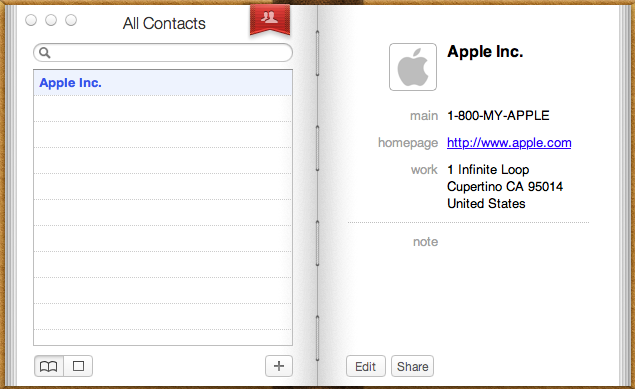
Standard Organizer layout
On the left-hand-side, you have a list of alphabetically sorted contacts. On the right-hand-side, you have the information for the contact you have selected. In the bottom right, there are two buttons: Edit and Share. Edit is fairly obvious and it simply lets you edit the information of the selected contact. Share button prompts you with a new email window with the contact’s .vcf file attached to it, so you can easily share contacts. There is also a plus button on the bottom which generates a new contact.
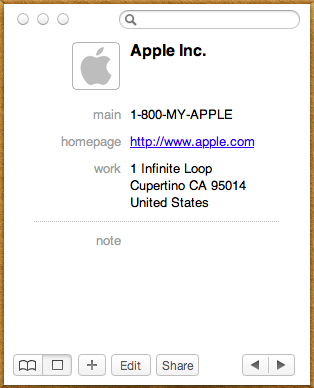
Simplified layout
In the left bottom corner, there is a button to change the layout. There are two options: The first one is the List & Card (organizer) view from iPad but second display mode provides a much more simplified view. You don’t have a list of contacts anymore, only the search bar, contact’s information and left and right arrow buttons. If you already know who you are looking for, this view is enough, you don’t need the list of contacts hogging your precious screen estate, you can just use the search.
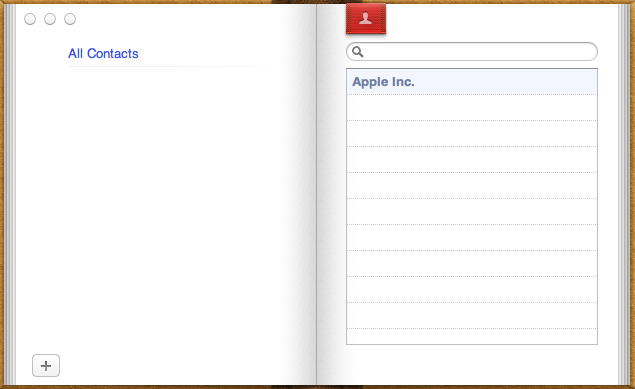
Groups view
In the organizer view, there is a red bookmark and like in iPad’s Address Book, it takes you “one page backwards” to your list of groups. Many of us have different groups for relatives, co-workers and friends, so this can be useful. Groups were present in the old Address Book as well, so this isn’t a new feature, the user interface is just slightly different.
Apart from UI changes, there are a few new features too, which are mainly concentrated on improved social networking and instant messaging support. You should now see instant messaging availability in Address Book. If the contact is available, then there is a green ball next to the picture in Address Book. Red means the contact is away, just like in iChat. Unfortunately the support seems to be limited to iChat as we weren’t able to get any indication of user’s availability with MSN for example when using Adium. In addition to instant messaging support, you can now add social network profiles like Facebook to a contact's information. At least in our tests, adding a Facebook profile didn’t make any difference and you weren’t even able to access the profile though Address Book. FaceTime calls from Address Book are supported as well and can be started by just clicking an email address and choosing FaceTime.
All in all, the new Address Book isn’t that special. The biggest change is the UI and like all UI changes, it will divide people into two groups: Some people like it, others don’t. In my opinion, the new looks of iCal and Address Book don’t really suit with the overall look of OS X. All other windows have grey toolbars and overall designs but the brownish look of iCal and Address book stick out quite a lot. It works in iPad where all apps are full screen but when all of your other windows are greyish, iCal and Address Book windows look like they got lost from the iPad.
Originally published at https://www.anandtech.com/show/4485/back-to-the-mac-os-x-107-lion-review (Wayback Machine).