
Back to the Mac: OS X 10.7 Lion Review
iCal is OS X’s calendar application and it sports a new look in Lion. As you might have guessed, the new look is yet again inspired by iPad’s Calendar app.

Weekly view
The most dramatic change occurs right when you open iCal - the toolbar is now beige leather-ish instead of the old iCal’s regular grey toolbar theme, apparently inspired by the increasingly obsolete personal organizer. Overall the look is simpler and cleaner compared to old iCal but the left-hand-side column is now totally gone which may affect the usability of iCal if you have multiple calendars. The column used to hold your calendars but they are now under a dedicated “Calendars” button. On the right-hand-side you can have a Reminders column which will be useful once iOS 5 becomes available.
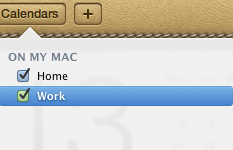
Calendars drop down menu
The redesign isn’t the only new thing, as Lion’s iCal has some new features as well, although they are more or less copied from iPad. The first new feature is Day view, which is exactly the same as on the iPad. On the left-hand side, you have a regular calendar with dates and below it you have a list of your upcoming events. On the right-hand-side, you have all the events for the selected day, which explains the Day view name of the tab. The Day view is actually present in Snow Leopard as well, but Lion takes it one step further by adding a running list of events instead of just a view of your day’s schedule, so this isn’t a totally new feature.
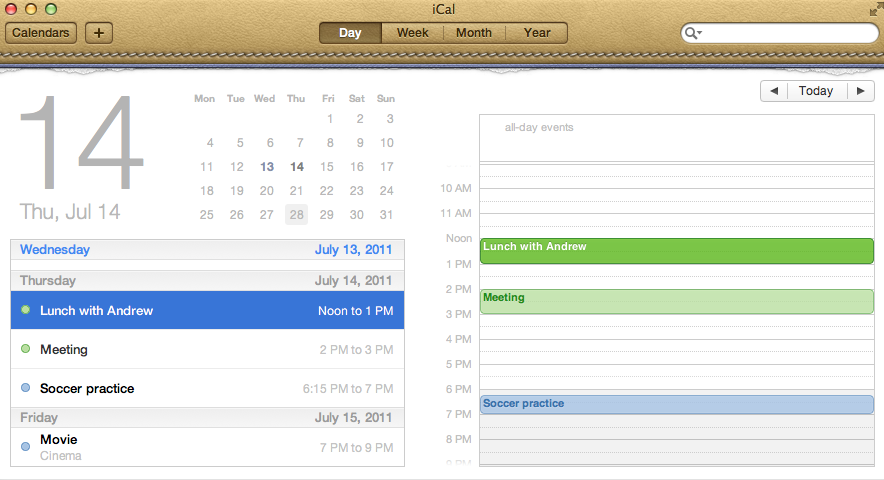
Day view
Probably the most interesting feature of the new iCal is Quick Add: you no longer have to set everything separately, you can just type it. For example, “Lunch with Anand on Friday at 1pm” would create an event on the following Friday at 1pm with the header “Lunch with Anand”. Of course, you can also use regular dates and set the duration. Another example could be “Dinner with Anand on 20th of June 4pm-5pm”. Once you add the event, you will be provided with the regular event editor which lets you set the location, repeat, alert and so on. Quick Add is a similar feature to what things like QuickCal and Google Calendar provide, so some users may already be familiar with the concept.

Quick Add
The biggest shortcoming of Quick Add is that the location must be entered separately, there is no way to “Quick Add” it. For instance, if you typed there “Party at Anand’s Place on Friday at 9pm”, it will create an event for that date but the name of the event will be “Party at Anand’s Place”, not “Party” and “Anand’s Place” as the location. If you were able to include the location in the Quick Add, Quick Add would actually provide a great overall solution for adding new events, but now you need to add the location separately, which kind of defeats the purpose. Of course, if you are fine with locations in the event name or without locations at all, then this isn’t a problem.
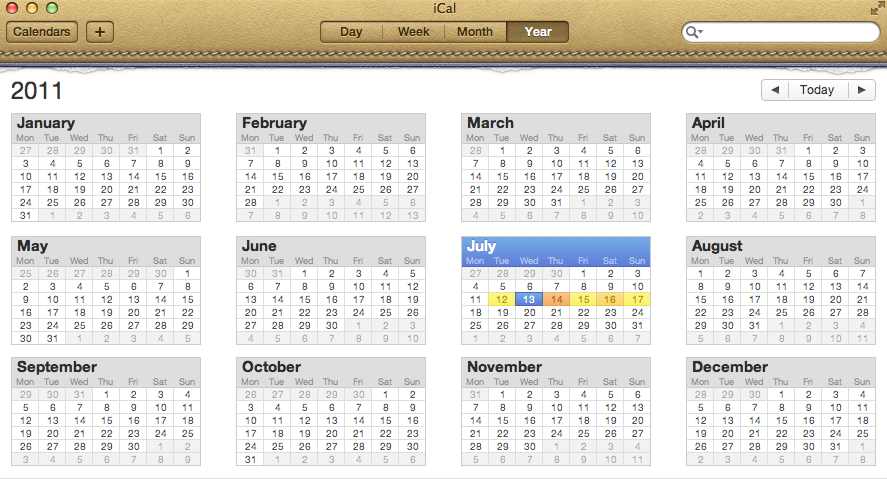
Yearly view
In addition to Quick Add and new look, Lion’s iCal also features a yearly view of your events. This can be useful when planning things weeks or months ahead. The days with activity are marked with colors, something which Apple calls as “Heat map”. Basically, the color shifts between yellow and red depending on how busy that day is. Plain white means there are no events scheduled for that day. Finally something that isn’t copied straight from iOS, although iOS 5 will bring a similar feature.
iCal also supports CalDAV, Exchange, MobileMe, Yahoo and Google calendars, so it’s easy to keep your mobile devices and other computers synced. These features are all present in Snow Leopard, though their continued inclusion in Lion is welcome.
All in all, the new iCal is likely something that will divide people. Anyone who likes the iPad version of Calendar should like and be familiar with Lion’s iCal, as they are very alike. Some users may prefer the old iCal and fortunately, there is already a workaround to get rid of the leather-ish look, you simply have to modify the iCal.app. Quick Add definitely sounds great and handy but essentially it is the only big refinement in addition to the new design.
Originally published at https://www.anandtech.com/show/4485/back-to-the-mac-os-x-107-lion-review (Wayback Machine).