
NZXT H2: Not Quite Quiet
- Posted in
- Cases/Cooling/PSUs
- mid-tower
- NZXT
In and Around the NZXT H2
I have to admit, I was fairly smitten with the NZXT H2 the first time I saw it at CES—though interestingly, NZXT wouldn't even let us take photos at the time. It doesn't seem to be that often that manufacturers try to engineer cases that are, frankly, this quiet. Antec has more or less cornered this market with the P183 and Sonata series, and those aren't cheap cases. With the H2, NZXT has sought to do what we hope every manufacturer would do: take cues from the competition and try to innovate. I'm liable to keep bringing up the P183 during this review, and there's a reason for that: I feel like the H2 is an inexpensive alternative to that case.


The comparison starts with the front door of the case, which has a lot of attractive, sharp angles to it and a single clear triangle at the top that the white indicator LED shines through. As far as lighting goes, that's really it, too. The white LED is bright but not overwhelmingly so; this is a very modest design. When you open the front door, you'll see the inside of it lined with noise-dampening foam. It hides two case fans and three 5.25" bays, and everything is hard plastic. The bay covers are extremely easy to remove by using the small sliders on the right side of each. Likewise, the two 120mm fans in the front can be removed by squeezing the tabs on the side and sliding them out. NZXT uses contacts on the fan housings and the case itself to power the fans, resulting in a clean and cable-less design. Behind the fans are the internal hard drive trays. All in all it's a very elegant solution.
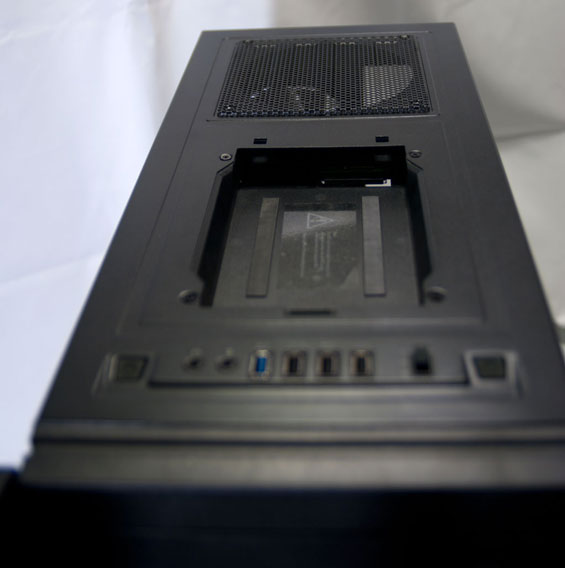
Where the H2 does diverge from the competition is the top control and I/O panel. These are becoming more and more popular lately and I absolutely welcome them; a lot of us keep our cases next to or under the desk, so having the ports and buttons on top just seems more logical. NZXT carefully but smartly packs the top of the case with a lot of useful features: a USB 3.0 port (routed from the back with a cable), three USB 2.0 ports, the usual mic and headphone jacks, a three-stage fan controller, and a hot-swap drive bay. The bay has a removable cover, though I would've been happier if the cover simply opened instead of coming off entirely. Behind it is the 140mm fan grille, which can be covered with a magnetic shield when not in use. Internally, NZXT also provides additional connections for more fans to use the integrated fan controller.
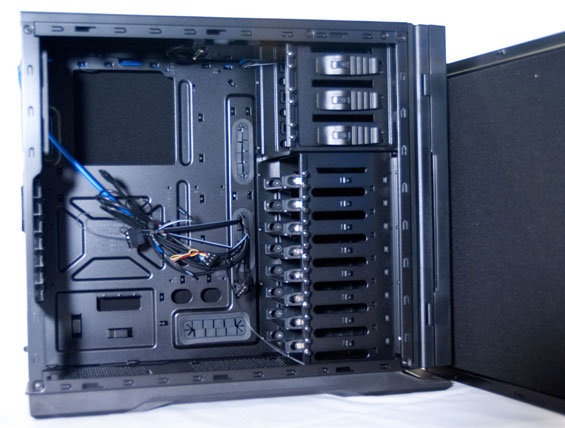
When you open up the H2 you'll find a relatively spacious design that seems geared largely towards ease of use and assembly. While I wound up running into more than a couple of quirks when actually installing the testbed into the case, this is generally a smart design that takes a lot of the better cues from the competition. The drive bays are all tool-less, and there are rows of thumbscrews mounted into the case itself to ensure you never have to go hunting for any new ones. There are really more thumbscrews than you should need, but it's such a welcome change of pace to even have a place for them that I wish more manufacturers followed NZXT's lead. Both side panels are also lined inside with noise dampening foam, and there's 25mm of clearance behind the motherboard tray for cable routing.
Everything else should be pretty familiar: the motherboard cutout for heatsink backplanes is becoming a standard in modern cases (you'd think Intel would take the hint that maybe the pushpins just aren't working out when the entire enclosure and heatsink industries are working around the issue), and the rubber-lined cable access holes are appreciated. Likewise, the expansion slots all have removable covers with grilles for ventilation, which is a welcome find in a case at this price range. All in all, the H2 is promising.
Originally published at https://www.anandtech.com/show/4347/nzxt-h2-not-quite-quiet (Wayback Machine).