
P67 $190 Part 2: MSI P67A-GD65, ASRock P67 Extreme6 and ECS P67H2-A2
ECS P67H2-A2: Overview
I hope my review of the ECS P67H2-A2 doesn’t sound tainted—I had serious issues with a failing power supply while running tests, causing reboots about until I got in a temporary replacement. With this in mind, the P67H2-A2 reminds me a lot of the ECS H67H2-M I reviewed in the H67 roundup back in March—a relatively simple package that does its job. It’s not the fastest board in terms of benchmarks, but it offers a few bells and whistles, such as 8 SATA ports (plus another two eSATA), SATA 6 Gbps RAID, and dual gigabit Ethernet ports which some consumers may require in their product. The BIOS needs a lot of polish (this is one of the understatements of the century) as it is very limited in terms of OC and memory timings, but features such as the fan controls work very well. Is the ECS P67H2-A2 ‘Black Deluxe’ motherboard worth the asking price?
ECS P67H2-A2: Visual Inspection
The ECS Black boards offer a very nice, very special black white and grey livery which looks refined and polished—there’s no denying that. If we start around the CPU socket, the 8+2 phase PWMs are hidden underneath a very thick and somewhat tall (1”-1.25”) heatsink which comes in two parts connected via a heatpipe. This can get fairly hot during an overclock at full-load. The socket area is fairly clean and empty, with only a few capacitors to be seen—these pins stick out the bottom of the board, and are right in the path of my Corsair H50 CPU cooler bracket. If the bracket was more rigid and a lot of force is applied, this could cause some issues with these capacitors from underneath.
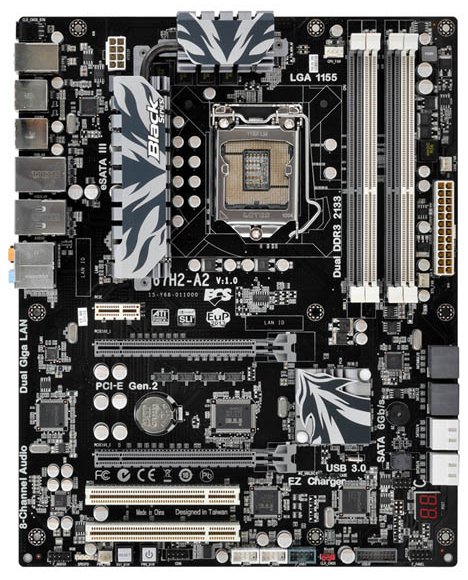
There are four fan headers on the board—one above the CPU socket, two near the 24-pin ATX power connector, and one at the bottom of the board. This would mean some form of fan extension would be needed if I were to use two fans on the H50 CPU cooler (the pump requires one as well). As you’ll see later, two of these are programmable from the OS, but all are programmable from the BIOS.
The SATA ports are colored such that the white ports are SATA 3 Gbps coming from one PCH host controller, two of the grey ports are SATA 6 Gbps coming from another PCH host controller, and the two grey ports at the top of the board are SATA 6 Gbps, supplied by a Marvell 9128 controller. Underneath this is a sideways 2-digit Debug LED, always useful for probing boot errors, followed by an array of headers for extra SATA ports, a USB 3.0 header, and Power/Reset buttons (remember the ASUS and Gigabyte $190 boards did not have Power/Reset buttons on the board).
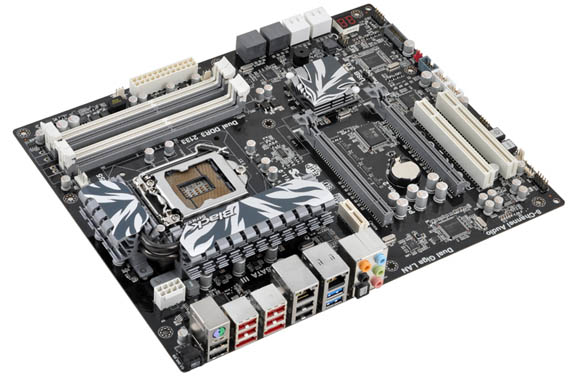
In terms of PCI/PCIe, ECS have decided to split the main full-size PCIe slots and not put a PCIe x1 in the middle—instead, we have the motherboard battery. ECS are taking the view that people running this board will have a discrete dual-slot PCIe graphics card, making any port underneath it unusable. Also, by not going down the full-size PCIe x4 slot at the bottom (instead, we have two legacy PCI slots), all the headers at the bottom are available. This is a very nice configuration, with the PCIe 1x at the top, for any dual-GPU setup.
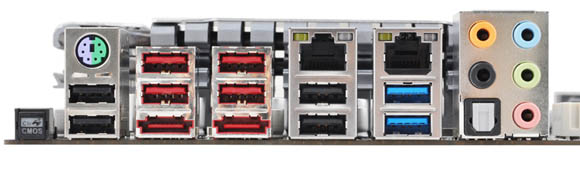
The back I/O panel starts with a Clear CMOS button. I’m always a big fan of these on the back panel if not on the board itself (as a button, rather than a jumper setting), so I’m glad to see it here. The legacy PS2 port also makes an appearance, along with a myriad of 8 USB 2.0 and 2 USB 3.0 ports. Dual eSATA 6 Gbps ports are also present, as well as dual gigabit Ethernet. Noticeably absent is a Firewire port, and a coaxial S/PDIF out connector, but the optical S/PDIF is here, along with standard HD audio inputs/outputs.

Originally published at https://www.anandtech.com/show/4323/p67-190-part-2-msi-asrock-and-ecs (Wayback Machine).