
webOS 2.0 Overview
What 2.0 Brings to the Table
Unlike what the ‘2.0’ suffix may suggest, webOS 2.0 is more of a thorough evolutionary update to the platform than anything else, but this isn’t necessarily a bad thing. As I had mentioned earlier, webOS already had a pretty solid user experience to begin with and with this update, HP is tidying things up and tying loose ends. There still are some issues with the platform in its current iteration (with the mediocre email client being a major one), but considering the fact that it hasn’t been released to the public in its final form, there still may be tweaks and improvements coming. Anyway, we have enough here to get going. If you’re new to webOS or want a primer on what you get to begin with, you can have a look at our Pre review.
Stacks
What can you do when you already have one of the best renditions of multitasking on a mobile platform? Try and make it even better. Using “cards”, webOS made it easy to get in and out of applications in a rather straightforward and seamless manner. If you realized that you had to send your boss an important update while you have a 0.25 second lead over your competitor in Need For Speed, tap the gesture area. The game minimizes, you tap the email app, type and send out the email, tap the game card again, and you’re back to fighting for first place, exactly where you left off.
This made it very easy and quick to switch applications while maintaining their state, but this also encouraged you to have multiple app “cards” running, making it a bit unwieldy and cumbersome to swipe across multiple cards to get to the one you wanted. If only there was a way to somehow stack these cards.... That’s exactly what we get with webOS 2.0: Stacks.
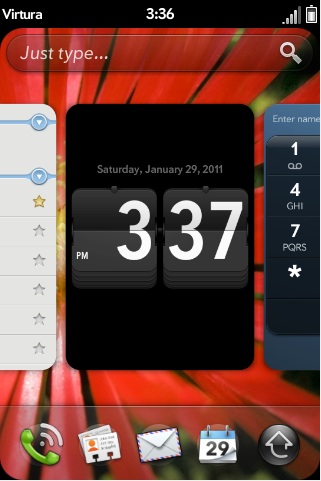
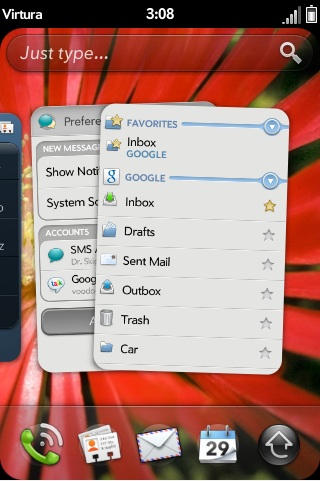
(Left) Multitasking in webOS using cards, (Right) Stacking cards in webOS 2.0
You can now drag cards and drop them over existing cards to create a stack of cards. In addition, any cards resulting from actions in an app will now automatically stack on top of the main app card. And finally, when it makes logical sense, webOS will stack related cards automatically. I found this very useful as now all my calendar events are bunched together with the calendar application, instead of being spread across multiple cards. You can also reorder the cards within a stack, if you choose to do so. While it takes a little practice to get used to dragging and dropping the cards or reordering them, the process in itself is quite logical and easy to grasp.
Originally published at https://www.anandtech.com/show/4145/webos-20-overview (Wayback Machine).