
Welcome to Sandy Bridge, with the ASRock P67 Extreme4
- Posted in
- Motherboards
- ASRock
Board Features
| ASRock P67 Extreme4 | |
| Market Segment | Performance |
| CPU Interface | LGA 1155 |
| CPU Support | i3/i5/i7 Sandy Bridge |
| Chipset | P67 |
| Base Clock Frequency |
100MHz, 85-110MHz in 1MHz intervals 100.39MHz default in OS |
| DDR3 Memory Speed | 1066MHz by default. 1333-2133MHz supported. |
| Core Voltage | Auto, 0.600V to 1.520V in 0.005V intervals |
| CPU Clock Multiplier | Dependant on CPU |
| DRAM Voltage | Auto, 1.200V to 1.800V in 0.015V intervals |
| DRAM Command Rate | Auto, 1N, 2N |
| Memory Slots |
Four 240-pin DDR3 DIMM slots in dual-channel Regular unbuffered DD3 memory Up to 32GB total supported |
| Expansion Slots |
3 x PCI Express 2.0 x16 slots (PCIe 1 and 2 operate at x16 in single mode or x8/x8 in dual; PCIe 3 operates in x4 mode) 2 x PCI Express 2.0 x1 slots 2 x PCI slots Supports AMD Crossfire Supports NVIDIA SLI |
| Onboard SATA/RAID |
4 x SATA 6 Gb/s, all NCQ and AHCI 2 of these support RAID (0, 1, 5, 10, Intel Rapid Storage) 2 from the Marvell SE9120 (no RAID) 4 x SATA 3 Gb/s, all NCQ, AHCI, RAID (0, 1, 5, 10, Intel Rapid Storage) |
| Onboard |
4 x SATA 3 Gb/s w/ RAID 4 x SATA 6 Gb/s (2 w/ RAID) 1 x Floppy 1 x IR Connector 1 x COM port header 1 x HDMI_SPDIF header 1 x Firewire header 1 x Front Panel audio connector 1 x Dr. Debug LED 1 x Power switch 1 x Reset switch |
| Onboard LAN | Gigabit Ethernet via the Realtek RTL8111E |
| Onboard Audio |
7.1 Channel HD Audio via Realtek ALC892 Support for THX TruStudio Pro |
| Power Connectors |
24-pin ATX power 8-pin 12V power 4-pin molex connector for Crossfire/SLI |
| Fan Headers |
1 x CPU fan 1 x CPU auxiliary fan 3 x Chassis fans 1 x Power fan |
| Fan Control |
CPU fans controlled jointly, 10 levels Chassis fans controlled independently, 10 levels |
| I/O Panel |
2 x PS/2 Keyboard/Mouse Connectors 1 x Coaxial, 1 x Optical SPDIF Out 6 x USB 2.0 2 x USB 3.0 via Etron EJ168A 1 x eSATA 6.0Gb/s (Shared with onboard connector) 1 x Gigabit Ethernet 1 x Firewire 1 x Clear CMOS HD Audio Panel |
| UEFI Revision | UEFI 1.20B |
In the box
- Quick Installation Guide, Manual, Driver CD
- 2S SLI Bridge
- I/O Shield
- 4 x HDD Screws
- 6 x Chassis Screws
- Floppy Drive cable
- 4 x SATA cables (2 x 90º cables)
- 2 x Molex to SATA power cable
- Front USB 3.0 Panel
- Rear USB 3.0 Bracket
What I like about the extra hardware in the box is this USB panel. It has a space for an SSD, so it frees up a drive bay while giving you front-port USB 3.0 capabilities. This panel, on its own, would probably sell for $15.

Software
Previous ASRock motherboards have been bundled with a heap of software for all sorts of overclocking or power saving modes. Thankfully, ASRock have been smart this time—they have packaged most of their utilities into one program, making it quicker and easier to install and uninstall. With their CD, apart from the driver updates, ASRock include three programs:
ASRock eXtreme Tuning Utility (AXTU)

The AXTU is not the tool we have come to expect from the socket 1156 and socket 1366 motherboard utilities. It shows the vast array of speeds, temperatures and voltages you would expect, and the tool allows you to control the fan speed on the fly. However, a successful CPU multiplier or voltage change requires a reboot. The main criticism about the overclockability tool is that it lacks the ability to manage the memory timings.

The OC DNA is similar to previous ASRock offerings, allowing users to share UEFI settings with each other. The Intelligent Energy Saver has received a trimmed down version—this one no longer states how much energy you are saving over a period of time, just the current voltage, speed, number of phases being used, and whether it is on or off.
ASRock Instant Boot
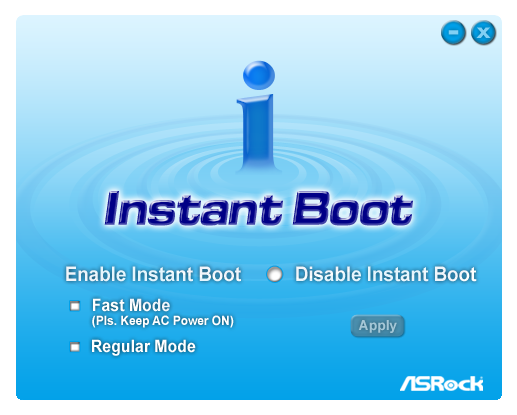
Another stalwart in the ASRock arsenal is its Instant Boot software. The idea behind it is that when you tell the PC to shutdown, the computer will reboot up to the point where the OS is loaded, then enter a low power mode. When the power button is pressed next, the computer will resume normal action, and you are straight into the OS without waiting to boot up. This worked at stock speeds, but failed to enter a low power mode when we applied the overclock.
ASRock XFast USB
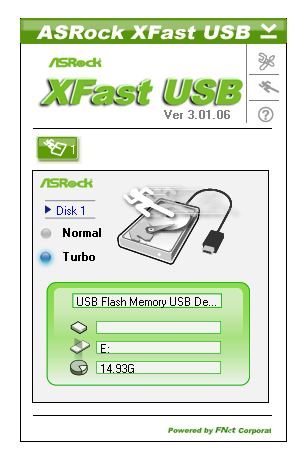
The XFast USB tool is a small application that will attempt to boost USB input/output speed when activated. ASRock claims this little utility will increase USB 3.0 speed by almost double, and USB 2.0 speed by almost quadruple. We will test this with our USB 2.0 and USB 3.0 hardware when we receive it. There's a lack of information online as to exactly how this software works, and the line from ASRock is that the 'XFast USB software modifies part of the USB driver, allowing it to multi-task and enhance the performance - ASRock are continually tuning the performance for better results'. The proof is the pudding, as we'll see.
Originally published at https://www.anandtech.com/show/4080/welcome-to-sandy-bridge-with-the-asrock-p67-extreme4 (Wayback Machine).