
Welcome to Sandy Bridge, with the ASRock P67 Extreme4
- Posted in
- Motherboards
- ASRock
Demand for Sandy Bridge paraphernalia will be high—for almost a year now, the question has always been: Shall I upgrade from X to Y? One of the more popular responses, especially as Sandy Bridge has gotten closer, has been "wait until Sandy Bridge is released; it’s just around the corner." Therefore, each motherboard manufacturer will be trying their hardest to get attention by creating the best product line they can—with as many accessories at the lowest possible price. ASRock are, of course, no exception.
At release, ASRock will have several board on offer, ranging from micro-ATX H67 to top-line P67. The Extreme4 is our candidate today, and represents a standard product that people may actually buy when deciding which Sandy Bridge motherboard to get.
Visual Inspection
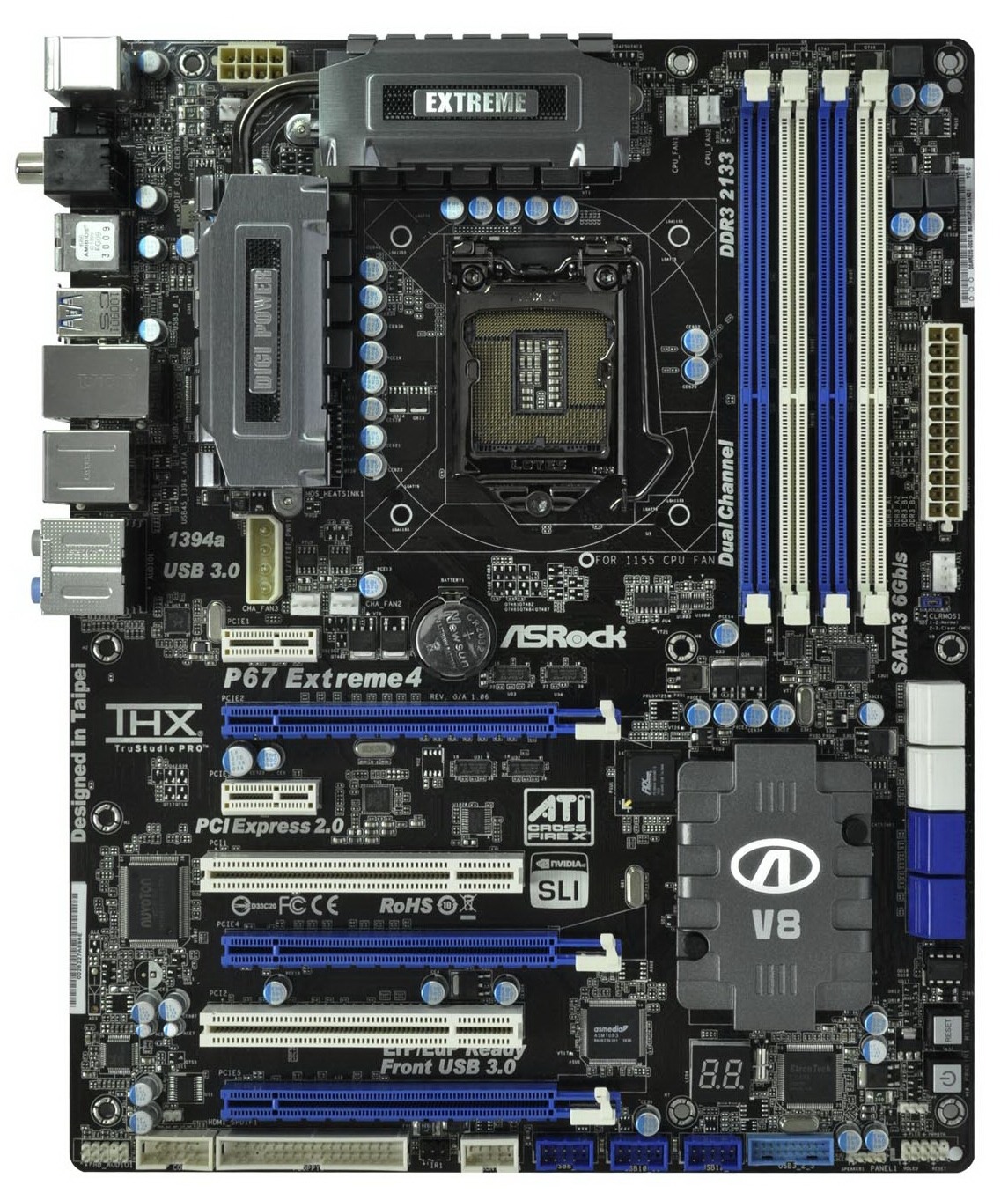
ASRock have produced a board in blue and black livery featuring a black PCB. The 8+2 phase power design sports additional heat sinks connected via a heatpipe. The socket itself is relatively empty, and ASRock have included mounting holes for socket 775 coolers as well as the socket 1155/1156 coolers. A few people will say this is a bad idea, as it weakens the board, it increases the tracing route length from RAM to CPU, or that some manufacturers will try to put traces between in the mounting holes. I have never had an issue with it, personally.

The SATA connectors are blue for SATA 3 Gb/s and white for SATA 6 Gb/s. Only two of these white connectors are applicable to RAID, so double check before setting this up. The power and reset buttons are located just below this, in usually what is the easiest spot for testing on an open bench, but not always the easiest spot when the board is inside a case. These buttons are also an issue when running dual GPUs with long PCB lengths—to the extent that the reset button is not useable.
Some people may wonder why new chipsets still have a floppy drive connector on the motherboard. The simple reason is that a lot of industrial hardware still calls for it, and it is cheaper to replace a PC than a piece of industrial equipment costing five or six digits. We will not be seeing the floppy drive connector go away in the near future. However, there is no IDE connector on this board.

The chipset cooler is quite small, and large GPUs will rest on it. If the GPU gets quite warm, or likewise the chipset, then these two components will transfer heat quite easily between them, possibly limiting overclocks. Power hungry 4870X2, GTX 480 and GTX 580 users take note! The PCIe slots are laid out ideally here, with a x1 slot at the top, and if all x16 slots are filled a PCI slot is still available. Certain manufacturers fail in their layout slot, but ASRock have used their brains, giving a tri-slot gap between the main GPU PCIe slots.
There are five fan headers on this board, two of them are labelled CPU and three are labelled chassis. Two of the chassis headers are located above the first PCIe x1 slot, right next to each other, and the other is between the 24-pin power connector and the SATA ports. I would have liked at least one of them to be on the bottom of the board—for wide cases that require a fan further down, this would be ideal.

The back panel is standard, with PS/2 connectors, SPDIF outputs, USB 2, USB 3, Firewire, gigabit Ethernet, and the audio panel. As I will state in most reviews, I always prefer dual Ethernet ports, however this motherboard only has one without utilizing a PCI card. One of ASRock’s marketing statements is their XFast USB technology, designed to increase throughput of their USB ports; we've seen it on a number of previous ASRock boards also. In pure synthetics, ASRock claims up to a 97% increase in USB 3.0 writing speed and a 360% increase in USB 2.0. We will test these in the benchmark suite.
Originally published at https://www.anandtech.com/show/4080/welcome-to-sandy-bridge-with-the-asrock-p67-extreme4 (Wayback Machine).