
HP Mini 5103: Looking at the Dual-Core Atom N550
HP Mini 5103 Subjective Evaluation
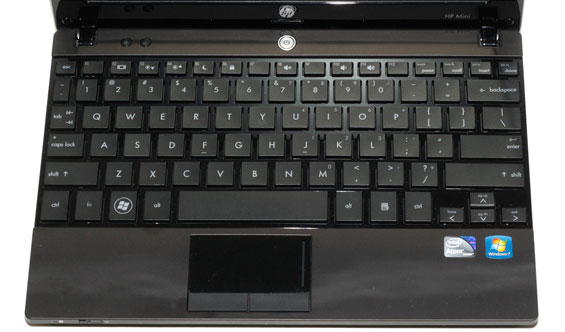
You can read our impressions of the HP Mini 5102 for additional input on the build quality and features of the 5103. Nothing has changed much in those areas: this is a great feeling little netbook, and outside of the change in color from black to “espresso” (brown) it’s the same. You get the best 10” keyboard I’ve ever used and solid build quality. Our test system does come with the smaller 4-cell battery, so expect to see a hit in battery life, but unless you need 8+ hours we’re okay with the decreased weight and having a battery that doesn’t jut out on the bottom. (Or you can simply purchase the larger 6-cell battery, which comes standard on the $400 SmartBuy model.)


A few other areas have “changed”—or rather, we received an upgraded unit that includes features we haven’t previously tested. The biggest upgrade is the display, so let’s focus on that for a minute. If you’ve used a recent smartphone, you have some idea what capacitive multi-touch displays can do for the user interface. In theory, adding such a display to a netbook would be a good thing; in practice, it’s not so clear-cut.
Touchscreen Analysis
There are two major issues I have with the touchscreen interface on the 5103. The first is hardly a surprise: speed. While it can be convenient at times to swipe a single finger down/up/sideways in order to scroll, the action is nowhere near as smooth or fast as on a good smartphone. Everything feels just a little laggy, and a large part of that feeling probably stems from the fact that this is Atom running a full copy of Windows 7. If there’s one thing I’d like to see Google get right with Chrome OS, it’s making Atom netbooks feel at least as responsive as smartphones. More on that in a second. And if you want to do something “crazy” like playing Bejeweled Blitz on Facebook? Forget it! There’s so much lag (mostly from the slow IGP) that your performance will be far lower than normal.
The second issue with the touchscreen interface is precision. Tapping on the screen to “click” often misses your intended target, and the same goes for dragging, selecting text, etc. With a UI build around touch, this could be alleviated, but the standard Windows UI isn’t sufficient. A mouse is a highly precise pointer that targets a single pixel; replacing that with your stubby fingertip that covers perhaps hundreds of pixels and then trying to determine where you clicked is difficult at best, and the result left me wanting.
Chromium OS to the Rescue?
With the above experience, I decided to give the Chromium OS a try on the 5103 (using the latest Flow build by Hexxeh). I actually tried the same build on an Atom Z520 + GMA 500 netbook, and that was a complete bust (likely no good drivers for the GMA 500); the experience with the 5103 was a bit better, but the touchscreen wasn’t recognized so I was left with a standard netbook. Chromium did boot up relatively quickly, but performance and optimizations for something like the 5103 aren’t present so the net result was even worse (in my opinion) than running Win7. Maybe the final shipping version will iron out the wrinkles, but we’ll wait and see.
The final aspect of the touchscreen that I need to comment on is the display quality. Subjectively, the contrast is clearly low, but that’s nothing new. The touch coating on the other hand made things look a lot worse than a standard 10.1” LCD. There’s a ton of “sparkle” across the surface of the display, and colors just look muted in comparison to other laptops. The objective testing results simply don’t tell the whole story here; I like the use of a 768p display on a netbook, because 600 pixels is just too short for typical usage, but with all of the above concerns I’m more than happy to ditch the touch interface for the time being. Perhaps that’s why you can no longer get the 768p + touch from HP, leaving it solely as a 600p option.
Broadcom CrystalHD Redux
The other area I want to discuss before hitting the benchmarks is the CrystalHD card. There was some speculation that my poor experience with Flash 10.1 and the CrystalHD stemmed from some other area. Lack of memory, Win7 Starter, and the single-core N450 CPU were all cited as possibilities. Well, the 5103 covers all of those bases and guess what still doesn’t work properly: that’s right, HD Flash videos. I tried a couple of 720p YouTube videos using both Firefox 3.6 and IE8, and the results were both choppy. It was a bit better than the 5102, so the combination of dual-core Atom and 2GB RAM did have some positive impact, but I still dropped over 400 frames (400 to 800 in multiple tests) in a 2:15 HD video clip. This happened with Flash 10.1.85.3 as well as the newer 10.1.102.64, so nothing has changed in regards to Flash support of the CrystalHD.
It is worth noting that this is purely a Flash issue: using Internet Explorer 8, I was able to grab the MP4 video file out of the cache directory and play that in MPC-HC using the Broadcom video decoder plug-in. CPU usage dropped from an average of nearly 60% to just 12.5%, and there were no issues whatsoever with dropped frames. The Broadcom decoder is capable of doing H.264 decoding at a much faster rate than an Atom CPU; now we just need the driver support/Flash support to make fullscreen YouTube, Hulu, etc. work properly.
Summary
I really don’t have much else to add here that I haven’t said in the 5102 review. This is a nice little netbook, but the price puts it into direct competition with a lot of laptops—including substantially faster CULV, Atom + ION, AMD Nile, and upcoming AMD Brazos offerings. We’ll see in the benchmarks next that performance is still a big issue, and the existence of 12.1” ultraportables like ASUS 1215N makes this a very difficult sell from the performance side of things. You’re basically paying for a “grab and go” netbook with software that will keep it in sync with your desktop, and as a small secondary or tertiary computing device it has something going for it. HP has also added a “DayStarter” feature that shows you a static overlay of your calendar while Windows boots, for those times when you just need a quick look at what’s happening. You can get nearly everything you need with the base $400 model, though, and that’s what we’d recommend as anything over $500 for an Atom-based netbook is simply too much.
Originally published at https://www.anandtech.com/show/4066/hp-mini-5103-looking-at-the-dualcore-atom-n550 (Wayback Machine).