
Sony NSZ-GT1 Blu-Ray Player with Google TV Review
In addition to the usual unboxing pictures, we have an unboxing video too.


With an ultra-glossy black top and white body, the Sony NSZ-GT1 is a handsome Blu-ray player that will stand out in the A/V stack. While I would have preferred an all-black option to better blend in, my only real concern with the player’s design is that its dimensions and shape limits stackablity. This negates any orientation advantage provided by the slot loading optical drive. The front of the player holds a power button, optical drive, a USB port, connect and eject button. After turning the device around, we find the port for the infrared (IR) blasters, an HDMI input (limited to stereo PCM audio), S/PDIF (TOSLINK) and HDMI output, 10/100/1000 Ethernet, a fan, three USB ports and power input.
After removing the cover, we can see that the NSZ-GT1 uses two fans; one in the back and another by the front USB port. The fans are very quiet so they are not a cause for concern, but the large optical drive is quite loud during load and seek operations. Almost half of the size of the player is taken by the optical drive with the other half occupied by the passively cooled CE4100 and motherboard. Given that the device cannot be stored vertically, I would have traded the drive for a sleeker, smaller chassis more like Sony’s other Blu-ray players.


The included remote is actually a small RF keyboard (placed on a CD case below) with a D-pad located on the top left and a touch pad on the top right. For the most part, I found it easy to use with two hands and really enjoyed that line-of-site was not required to drive the player.


The most significant issue I had with the remote was with the touchpad; which is very difficult to use with any accuracy. A trackball would have been a much better choice. Fortunately, outside of web browsing there are not many scenarios where mouse control is critical so the impact of this design decision is limited, but there are some other annoyances also worth noting:
- Key modifiers (Fn/Ctrl/Shift/Alt) are not “sticky” like a mobile phone keyboard, which makes one handed use impossible and inconsistent with existing consumer norms for thumb keyboards
- Disc Player specific buttons (i.e. top menu, audio, eject, etc.) are not dedicated keys and require “Fn” plus the other key to operate
- Mouse control does not work on Blu-ray and some of the other menus creating an inconsistent user experience
- The effectiveness of transport controls is inconsistent: working in some scenarios like disc/video playback but not in others
- No backlight makes it impossible to use in low-light environments
The remote also includes IR capability to control the TV and audio video receiver (AVR) so it can act as a quasi-universal remote, but there are some serious usability limitations to managing the other components in this way. The main problem is that a specific function cannot be assigned to one device (i.e. the AVR controls volume), but also because specific knowledge of the environment and the limitations of the remote are required to make everything work—which seriously limits SAF (Spouse Acceptance Factor). Ideally, an IR receiver and basic navigational functionality should be possible with a true universal remote to at least get the device and necessary components powered on and set to the correct input.
For example, to turn on the GTV and other the devices:
- Turn on TV by pressing “TV I/O”
- Check that “AMP” is not selected
- Turn on NSZ-GT1 by pressing “BD/EXT I/O”
- Press “AMP”
- Turn on AVR by pressing “BD/EXT I/O”
- Use the AVR remote to select the correct input on the AVR
Those fortunate enough to have an HDMI CEC enabled AVR and TV can fix the muddled experience, because the device actually works very well with CEC as long as you assign it to the “Cable TV” input (using another input on the AVR may also work depending on whether the cable/satellite STB is CEC enabled) on the AVR and setup the TV to link volume control with the AVR. In this configuration, turning on the device with “BD/EXT I/O” will also turn on the AVR and TV as well as selecting the correct input automatically; to turn everything off simply press “TV I/O”. This feature was especially convenient when watching a Blu-ray movie, where inserting the disk into the player while “Off” would turn on the device as well as handling everything else required to enjoy the movie without any additional user intervention.


For those who cannot live with the Sony remote, you can swap in a USB wireless keyboard. Obviously the more specific keys may not have a direct map, but I found the similarly sized Lenovo N5901 more than adequate to fill the gap for traditional web browsing. That said, using the “Scroll” left trigger button with the regular remote’s touchpad to move around web pages made the experience tolerable, and I have to wonder if many users will continue to use the browser after the novelty wears off.
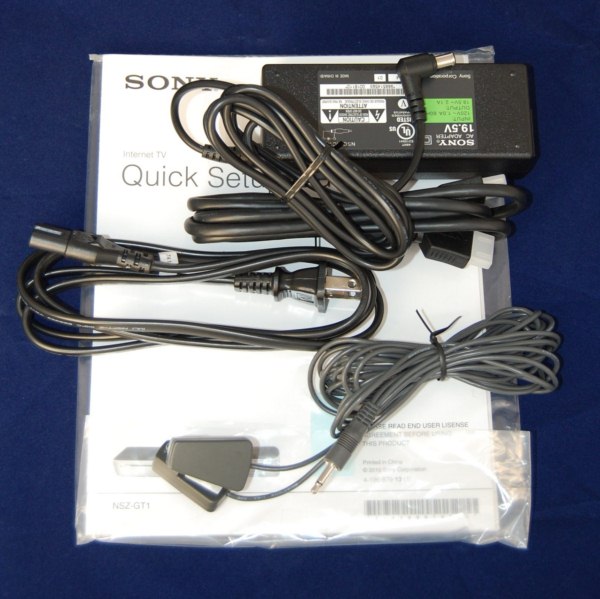
Besides the remote a manual, power adapter, two headed IR blaster and HDMI cable are also included with the player.
Originally published at https://www.anandtech.com/show/4034/sony-nszgt1-bluray-player-with-google-tv-review (Wayback Machine).