Software
While the E5 hardware has a lot going for it, the S60 3rd Edition Feature Pack 2 running on Symbian v9.3 takes it down a few notches. Blackberry users will certainly appreciate the greater flexibility and customization the Symbian platform affords, but if you’re used any modern smartphone OS in the last 3 years or so, prepare to be confused and frustrated.
I must confess that Nokia has done a fair bit to make Symbian more user-friendly and feature-rich since the time I last used a Symbian-based Nokia phone almost 4 years ago. With that being said, the underlying platform IS almost a decade old and there is only so much a company can do before it has to completely revamp the platform.
Starting off with the home screen, there is a fair bit of customization that can be done here. Nokia even offers a bunch of standby screen layout presets such as Active, Basic, Horizontal/Vertical icon etc. that re-arranges what is and is not visible on the home screen. The E5 makes it very easy to switch between the presets (Work/Personal modes). You can display everything from your calendar, inbox(s), notes, clock, shortcuts to frequently used apps, and a couple of more useful features all on one screen.
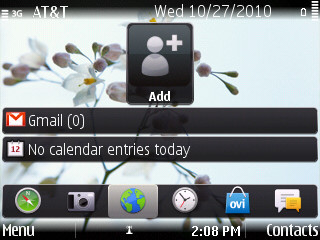


You can choose from a bunch of different home screen ‘styles’ and easily switch between presets
While not at the same level of customizability as Android, I found the flexibility and usefulness of the home screen quite nice. Symbian offers a lot of personalization options and if you are willing to spend the time to try and sift through the dozen or so different menus and options, you may be able to tailor the E5 to your exact requirements. The only issue here is that the interface is not particularly intuitive which, along with the small display, make it a frustrating experience.
While the menu page itself is logically laid out, the options and features they control are not. For example, part of the data connection-related options are under the Settings > Connection section, while there are some options under the Connectivity menu, and you need to look under both to get stuff working.
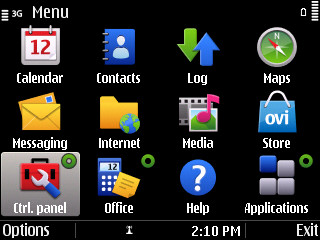
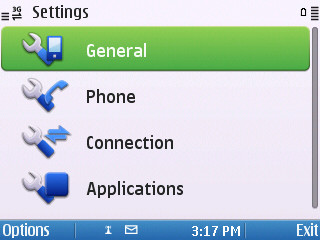
The no-frills menus in Symbian OS
The overall design is clean and simple, without any animated effects or transitions, which is why navigating between menus is snappy and the phone is for the most part pretty responsive. And considering the fact that S60 has a pretty efficient multitasking system, the overall responsiveness of the E5 helps you switch between your mailbox, calendar, contacts and browser very quickly.

Multitasking in Symbian OS is simple and straightforward
You can see a list of apps running in the background by holding down the home key. Another nice touch is that all open apps are identified by a green circle on the top-right corner of the app icon in the menu grid.
Speaking of browsers, the default browser that the E5 comes installed with is one of the outliers to the otherwise snappy response of the phone. Even over WiFi, the browser was quite slow and even no-so-heavy websites caused the browser to hang. This behavior was only exacerbated on 3G, where the browser was slower to load pages. The dull 2.36” screen doesn't do the browsing experience any favors, either. With the phone seriously lacking display real estate and pixel density, websites are completely illegible zoomed out. Even when the website is only moderately zoomed into, you have a scroll a lot both vertically and horizontally. And because you are constrained to the D-pad and soft-keys for browser navigation and actions instead of touch gestures, surfing the net on the phone quickly becomes a chore.

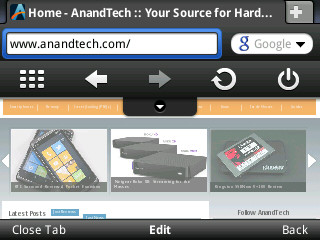

The default browser (left), Opera Mobile 10 (center) and tabbed view of “history” (right)
There was however one feature of the browser that I liked; clicking on the “Back” menu option in the browser shows a “tabbed” view of the previous pages you visited. Initially, I actually thought of them as being real tabs, but soon I realized they were just snapshots of the previous pages I had visited (the default browser doesn't have support for tabs). Nevertheless, it is the one feature that proved useful in a browser that should otherwise be avoided. To imagine the default browser is actually webkit-based! Most of these issues can be readily remedied by downloading an alternate browser such as Opera Mobile 10; a point made blatantly clear by the fact that it is one of the most popular apps in the Ovi App store. But even then, the 600Mhz ARM11 CPU seems to struggle to carry anything more than the weight of Symbian and the E5’s default apps.
