
ASUS U35Jc: Jogging in Place
Battery, Noise, and Heat
ASUS makes one of the most amusingly outlandish claims about battery life we've read in a long time. On their page for the U35Jc, they suggest their "Super Hybrid Engine" combined with NVIDIA's Optimus technology allows the notebook to pull 11.5 hours of running time. It's been a long time since manufacturers have been that brazen, especially when (as you'll see) the product still produces admirable running time on its own.
Update: It appears our battery was functioning at less than ideal levels during our initial testing. We've been rerunning the tests to see if we can improve the scores. Our idle and internet results have already improved by 12% (no change on x264 playback), without using SHE, so we're going to run the whole battery suite with SHE enabled to see what we can get. We'll update the charts and text when we have final results. The current charts contain the original results.
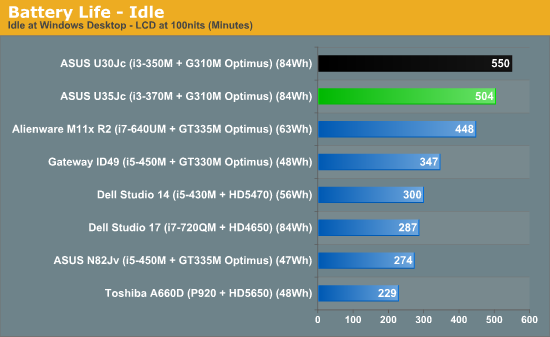
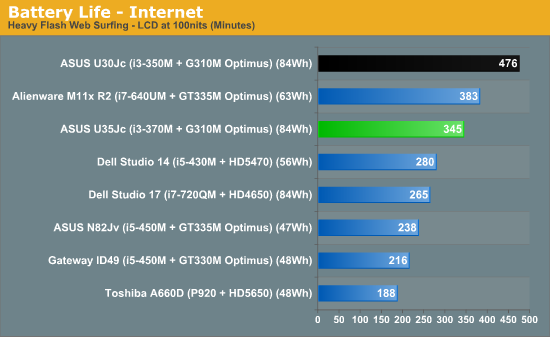
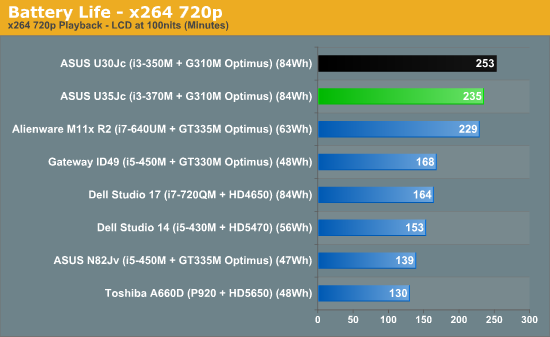
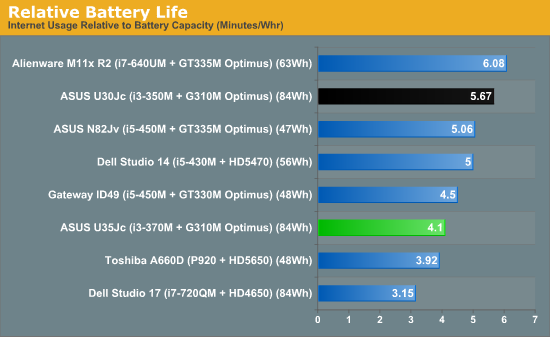
Uh oh. While the battery life of the U35Jc is excellent, it can't keep up with the U30Jc. It's possible that enabling the Asus "Super Hybrid Engine" (left disabled by default) could extend the U35Jc's running time enough for it to catch up to its sibling, but the gulf at idle and especially during internet usage is wide. It's only when a more constant load is applied to the system—during our 720p playback test—that the gap closes. The two major differences between the two notebooks are the slightly faster processor in the U35Jc and the slightly improved screen (more on that on the next page). Maybe there's a difference in heat and, correspondingly, how much the fan has to run.
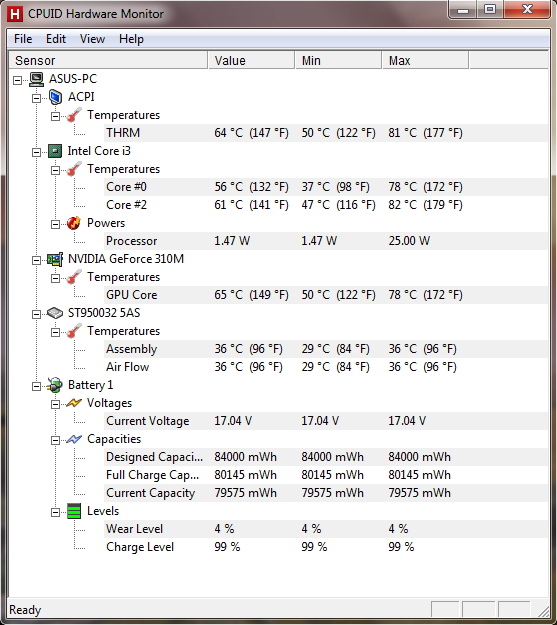
Well, there's at least some explanation. The battery on our review unit is operating at a reduced capacity, substantial enough to account for a small portion of the difference. However, we still need 31% more for the quoted 11.5 hour mark. Even if we enable SHE, run the LCD at 0% brightness, and don't touch the laptop we can't get there. Realistically, we're looking at 9 hours as a more likely result, which is still good. Unless there's some trick to improving battery life further that we've missed--it's still odd that the U30Jc posts substantially better battery life with the same battery--ASUS should curtail their claims. Or maybe they just need to make sure all the batteries and processors they use in the U35Jc are at the same level.
Thermals for the U35Jc after an hour of 3DMark06 were actually pretty good. Processor and GPU temperatures both stayed reasonable given the continued stress on the notebook. The warmest part of the surface was near the exhaust vent on the left side, but it wasn't as scorchingly hot as, say, the same region on the Gateway ID49 we recently reviewed. Complaints about the lack of ventilation around the hard disk also seem fairly ill-founded: the drive peaked at a frosty 36C.
Fan noise wasn't a huge issue either. While the fan did spin up substantially when the system was placed under constant load, it remained a fairly low "whoosh." The difference is noticeable, but not dramatic, and for most users should be fine.
Originally published at https://www.anandtech.com/show/3948/asus-u35jc-jogging-in-place (Wayback Machine).