
A New 30" Contender: HP ZR30w Review
Display Lag and Response Time
For gamers, display lag is a very real concern, and display processing is a nebulously reported (if at all) specification for just about all LCD displays. We’ve been over this before, but ultimately, what matters isn’t GTG, full on, full off pixel response times, or what’s reported on the spec sheet, but the holistic latency of the monitor compared to something we can all agree is lag-free. We previously used a baseline LCD and compared with it as our benchmark of no display lag. Previously we were using a 17” Princeton CRT - some of you were a bit underwhelmed by that monitor.
I spent some time visiting (I kid you not) almost every thrift store in town, and found myself a veritable cornucopia of uh... lovingly cared for CRTs to choose from. I settled on a much more modern looking Sony G520 20” CRT supporting a higher resolution and refresh rate. It’s still not what I’m ultimately looking for, but it’s better. Oh, and it cost a whopping $9. ;)

As I mentioned earlier, the only downside is that this means our old data is no longer a valid reference.
To compute the processing lag, I do two things. First, I watch for differences in the clock between the CRT and LCD, noting these whenever they are visible. I did this for 10 captures of the same sequence. Second, one can compute the processing difference by taking into account the FPS and the frame number difference.

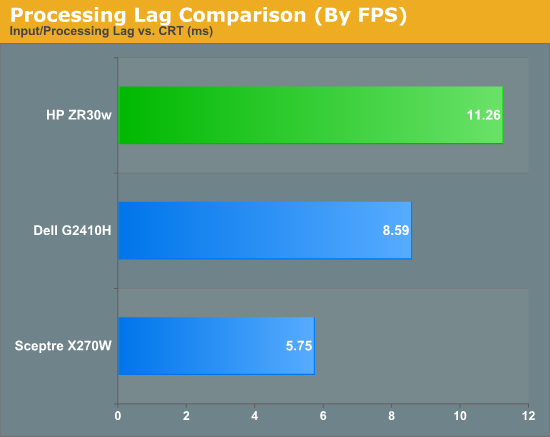
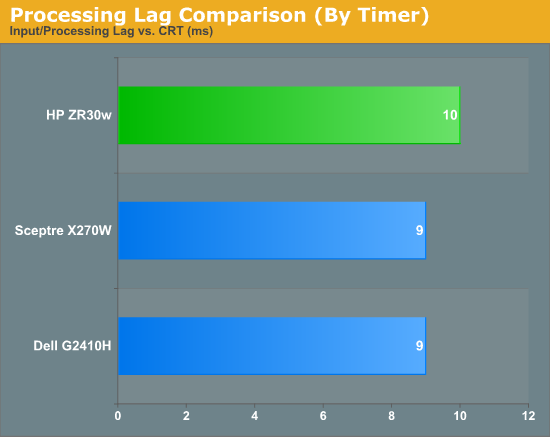
We’re still evolving what we think the best way to measure processing lag is, and even using a CRT isn’t foolproof. In this case, I set the LCD and CRT refresh rates to 60 Hz so both in theory grab the same frame from the GPU’s framebuffer. In practice, it’s likely that they just aren’t, explaining the difference. As we process more LCDs, we’ll be able to tell, but the processing lag we’ve measured from all three monitors this far is totally acceptable.
I played a number of FPS titles and RTS games on the display, and never noticed any display processing lag or ghosting to speak of. If you’re going to use a 30” panel for gaming, the ZR30w seems to be just as good as any.

In the ghosting images I snapped, I usually only saw two frames. The dominant frame, and the preceding frame. This is very surprising, since we’re used to seeing three. But all throughout the images I snapped, only two frames are visible. This is very impressive panel response.
Originally published at https://www.anandtech.com/show/3754/a-new-30-contender-hp-zr30w-review (Wayback Machine).