
ASUS U30Jc Revisited: Adding an SSD
Yawn: CPU and GPU Intensive Tasks Show No Benefit
If you happen to run a test that does very in the way of little hard drive accesses, obviously a faster storage subsystem isn't going to help. Here are results from a few other standard application benchmarks we run, as well as battery life. If you thought a "low powered" SSD would dramatically boost battery life, the results say otherwise. Laptop HDDs just don't use that much power, especially if you're using the Power Saver profile, as we'll see below. (Note that other SSDs may do slightly better in power requirements as well, though we're still talking about a difference of 10% or less at best.)
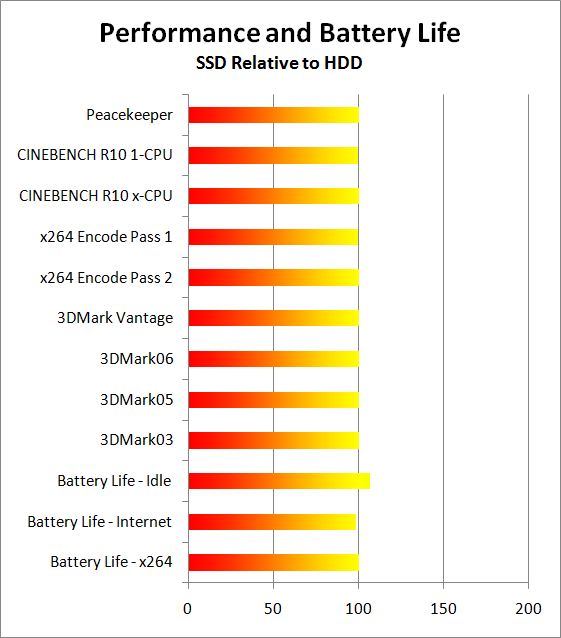
The CPU intensive tasks like 3D rendering and video encoding score essentially the same with or without an SSD. Likewise, 3DMark is unaffected by the faster storage array. If you're looking to spend $300 and you want better CPU performance or faster graphics performance, you'll be better off with a faster CPU or GPU—no surprises here.
Battery life is one area where we expected to see more benefit. Idle battery life went up 7%, which is decent, but Internet battery life actually dropped slightly. The margin of error with battery life testing tends to be around 2%, so in general we don't think an SSD will reduce battery life, but unless you have a very power hungry HDD there's a good chance things won't improve much.
Originally published at https://www.anandtech.com/show/3741/asus-u30jc-ssd (Wayback Machine).