
ASUS U30Jc Revisited: Adding an SSD
The Good News: General OS and Application Performance
We'll start with the areas where SSDs really help. General application performance is better in many cases, and benchmark suites like PCMark reflect this quite well. Booting and shutting down Windows is also noticeably faster. We didn't include boot/shut down times in our initial U30Jc review, but we'll have results with and without the SSD here. If you want to look at performance relative to other laptops, please refer back to our original U30Jc review; our focus here will be on the performance increase (or decrease) caused by adding the SSD.
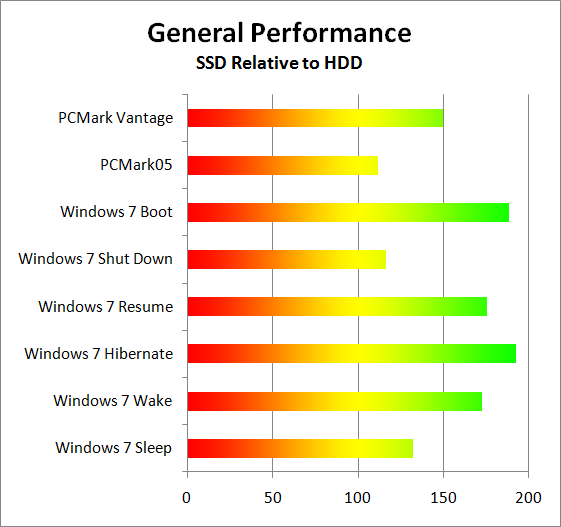
The big win here is PCMark Vantage, which has a lot of hard drive access tests. The overall score increased by 50%, which is certainly worthy of notice. Anyone looking to get to the top of the ORB in PCMark absolutely has to have an SSD, but the increased PCMark Vantage score is also a reflection of the general improvement in application launch times. Windows Start/Shut Down times are also better across the board, particularly the Boot, Resume, and Hibernate tests. On a desktop, I would personally argue that booting/shutting down doesn't happen enough to make these times matter; with a laptop, it's not unusual to hibernate/resume multiple times over the course of a day, and if you want to just make a few quick notes the seconds saved are very noticeable.
Besides the above tests, it's sometimes difficult to quantify what an SSD truly brings to the table. With a good SSD, even a slower laptop like one of the CULV models can feel much faster in general use. It won't be able to do any better at CPU or GPU intensive tasks, but launching office applications and web browsers (especially if you launch multiple applications at once!), surfing the web, installing software and patches… all of these common tasks complete much faster with an SSD. We ran some additional performance tests just to show how much of a difference it can make.
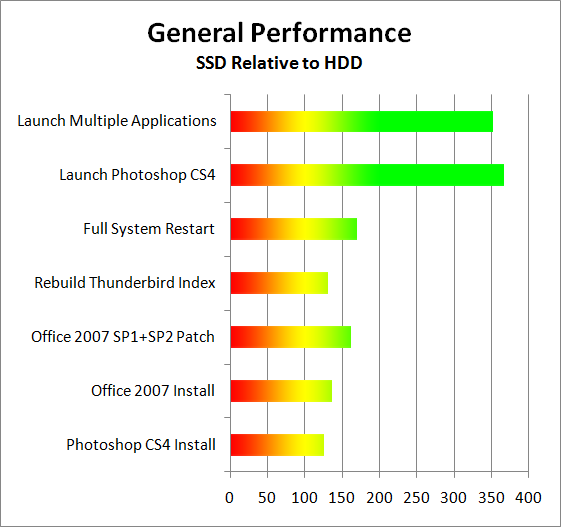
With the above tests, the SSD improves the already good performance of the U30Jc by at least 25% in the simpler tasks like software installation; it's as much as several times faster at launching complex applications/multiple applications (when they're not already cached into system RAM). Launching multiple applications is a great example of what you encounter on a relatively "mature" installation of Windows—after you've installed numerous applications suites, your Internet Security software, printer drivers, etc. We've all experience that two minute (or more) delay on a cluttered installation, and it correlates well with what we're showing in the multiple application launch test.
Other test scenarios we could perform would also show definite benefits. Running applications that do a lot of HDD accesses with real-time virus scanning enabled can be extremely painful on a conventional drive, whereas SSDs plug along with hardly a drop in performance. Even better, try running real-time anti-virus and Internet security (e.g. McAfee, Norton, AVG, etc.), anti-malware (e.g. Ad-Aware, Spybot Search and Destroy, Malwarebytes Anti-Malware), and your favorite BitTorrent client (e.g. Vuze, uTorrent); then go about using your PC. Even fast desktops feel sluggish when you're running such a setup, which is precisely what most home users ought to be doing (minus the BitTorrent client).
Such usage scenarios result in a lot of random storage access, and that's the Achilles' heel of hard drives. If you do them on a regular basis, an SSD is a real boon. There are ways to mitigate the effect somewhat, i.e. if you launch all six of our test applications one at a time rather than concurrently, the HDD "only" takes twice as long as an SSD. With 4GB of RAM, it's also primarily the initial launch that really takes a long time, though depending on the amount of multitasking you do the delays can still be severe. Defrag your hard drive, limit your Windows startup tasks, get a 7200RPM drive instead of a 5400RPM drive… all of these things can make the performance penalty of hard drives slightly less. Even with 15K RPM drives, though, there are access patterns that favor SSDs so heavily that there's no closing the gap.
The results above are the scenarios where an SSD helps substantially. Naturally, there are tests where adding an SSD doesn't help much at all. Let's look at those tests next.
Originally published at https://www.anandtech.com/show/3741/asus-u30jc-ssd (Wayback Machine).