
Dell G2410H Review: A Green 24" LCD
G2410H - Nature’s Best Friend?
Thus far, the G2410H hasn’t really been able to shine - display performance isn’t bad, but it’s just average. Sure, it can hold its own among other more expensive contenders, but what about that green feeling you’re paying a $330 MSRP for? Thankfully, the G2410H really does impress when it comes to power draw.
We measure power consumption using a Kill-A-Watt EZ at the wall while just displaying the Windows desktop using minimum brightness and maximum brightness.
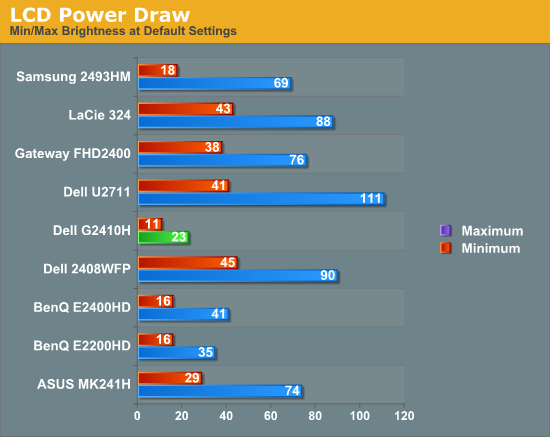
This blows away the other CCFL LCDs we have in our testbench. Clearly, Dell’s design decisions focused around really making this monitor a power sipper, and that it does. Our testing here verifies the power specifications given by Dell back on page one, besting the case with maximum brightness.
Now, what about that ambient light sensor?
Dell provides three different “Energy Modes,” which basically are scale factors the LCD uses to decide on a particular brightness. The LCD ships with the most economical of the three enabled, which is way too dim for my personal taste. There’s also a bar graph marked “Energy Gauge” which does a surprisingly good job of reporting power draw. Glancing back and forth between this and the Kill-A-Watt, it was apparent that there’s some real power monitoring circuitry at play here and not just a dumb brightness setting.


For these numbers, I measured the luminance of the room where I was testing (an average office with a number of full spectrum CFLs). I averaged about 22 nits of brightness using the i1D2.
| Dell G2410H - Power Consumption | |||||
| Energy Mode | Brightness - White (nits) | Brightness - Dark (nits) | Power Draw (watts) | ||
| Energy Smart Plus | 94 | 0.13 | 10 | ||
| Energy Smart | 108 | 0.14 | 12 | ||
| Standard (manual) | 259 | 0.32 | 20 | ||
| Standard (maximum) | 311 | 0.37 | 23 | ||
| Standard (minimum) | 78 | 0.09 | 10 | ||
Even in my relatively well-lit room, letting the ambient light sensor decide on a brightness results in luminance intensities at about our print (100 nits) standard. Quite honestly, this is way too dim for my taste, unless you happen to live in a cave or have hypersensitive eyes. For office work, the “Energy Smart” setting might be acceptable, but being uncomfortable and possibly straining your eyes isn’t worth the 8 watts of difference - just go unplug something else in the house and pay yourself with some well deserved photons. Keep in mind that if you do turn the lights off, the intensity is going to drop even more, and even with the lights off on the most conservative of settings, power use doesn’t drop below 10 watts.
No matter how you stack it, the Energy Smart Plus and Energy Smart settings seem very close to each other for meriting two different settings; a bit more range would be a welcome tweak.
Originally published at https://www.anandtech.com/show/3703/dell-g2410h-review-a-green-24-lcd (Wayback Machine).