
Intel Unveils Moorestown and the Atom Z600, The Fastest Smartphone Platform?
- Posted in
- Smartphones
- Intel
- Atom
- Mobile
- SoCs
Clock Speeds: 1.2GHz - 1.5GHz for Smartphones, 1.9GHz for Tablets
Intel isn't announcing individual Atom Z600 SKUs just yet, but we do know that all versions of the chip will support Hyper Threading (likely due to maintain a performance advantage compared to upcoming dual-core ARM offerings). There will be two versions of the Atom Z600 chips, one for smartphones and one for tablets.
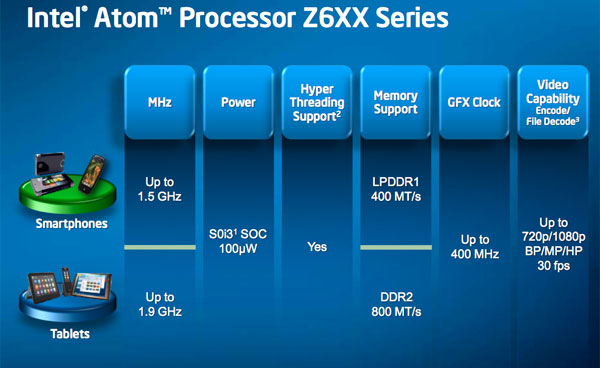
The smartphone SKUs will run between 1.2GHz and 1.5GHz, while the tablet version of the Z600 will run at up to 1.9GHz.
Power Management: Clock Down or Turbo Up
Eleven years ago Intel demoed a technology it called Geyserville for mobile CPUs. The technology simply ran the CPU at a lower frequency when running on battery power and a higher frequency when plugged in. Intel eventually called this SpeedStep.
Four years later we got EIST, Enhanced Intel SpeedStep Technology. This allowed a mobile (and eventually desktop) CPU to run at any frequency depending on the performance demanded by the OS and the running applications.
On today’s Atom processors this usually means the chip will run as low as 600MHz when idle and at 133MHz increments all the way up to 1.66GHz under load. You don’t normally drop below 600MHz because that falls into the inefficient range of CPU performance scaling for a netbook/nettop. In a smartphone though, the majority of time your CPU isn’t being used. The SoC and accessory processors have enough custom logic offload a lot, even when your phone isn’t idle.
Lincroft, or the Atom Z600 series, supports even lower frequency modes. The CPU can clock itself down well below 600MHz.
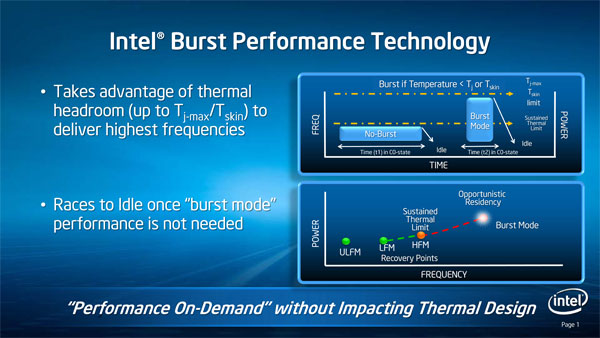
When you need performance however Lincroft has something similar to Turbo Boost on Intel’s desktop CPUs. On the Atom Z600 series it’s called Burst Mode and unlike Turbo, it is more tightly integrated with the OS.
EIST and other dynamic clocking technologies rely on OS P-states to determine what frequency the chip should run at. If an OS requests P0, the CPU simply runs at its highest frequency.
On the Core i5 and i7, if the OS requests the CPU be in P0, then as long as the chip doesn’t violate any current or TDP limitations it will run at a higher turbo frequency instead of the default maximum clock speed the OS is requesting. P0 will always return the highest possible frequency given the thermal conditions of the chip.
The Atom Z600 doesn’t work like this. All potential burst mode frequencies are enumerated as P-states by the BIOS. An OS with proper support for Moorestown will be able to request any specific clock frequency, even burst frequencies. Loading a web page for example might result in the OS asking for the highest possible burst mode frequency, but while you’re reading the page the OS might request a slower P-state. The chip will run at whatever the OS requests, but it will exit burst mode if the chip’s temperature gets too high.
The FSB speed also scales with clock frequency. Once you reach a certain clock speed threshold, the Atom Z600 will automatically double its FSB frequency to help feed the CPU faster. The goal isn’t just to deliver peak performance, but it’s also to complete tasks faster so that the SoC can return to an idle state as soon as possible. The hurry up and go idle approach to mobile CPU performance has been one of Intel’s basic tenants for well over a decade now. And it does work. This is the reason we’ve generally seen an increase in battery life from each subsequent version of the Centrino platform.
The software management of burst mode puts more emphasis on the OS and platform vendors to properly tune their devices for the best balance of performance/power consumption. You can see why Wind River’s Android platform and Moblin are necessary to get the most out of Moorestown.
Originally published at https://www.anandtech.com/show/3696/intel-unveils-moorestown-and-the-atom-z600-series-the-fastest-smartphone-processor (Wayback Machine).