
Windows Phone 7: The AnandTech Guide
- Posted in
- Smartphones
- Windows Phone 7
- Mobile
The State of Cut and Paste
Microsoft stated explicitly and rather abruptly during a Q&A session during day two of MIX10 that there will be no copy and paste support in Windows Phone 7 Series. The annoucement was as simple and unambiguous as that; current plans are that Windows Phone 7 Series hardware shipping holiday 2010 will not have cut and paste support.
This is relatively ironic, considering Windows CE and Windows Mobile have had copy and paste support since day one. Furthermore, Windows Mobile users long cited lack of copy and paste support as a fundamental shortcoming present in other competing OSes. Obviously, having no support for clip-boarding or copy and paste is a step backwards. At this point it's a decision backed up by what Microsoft cites as a number of use studies which show people don't really use copy and paste. Microsoft left the door open slightly, noting that it "isn't sure when it will be added," but then later clarified and noted that it would likely not be included in the current release.
The reasons for this decision are ultimately puzzling. Microsoft cites a number of use studies mentioned earlier where users generally focus on a few predictable forms of information: addresses, phone numbers, or snippets from a web page. Instead of letting users copy and paste this information, it's hoping that users long-press on context-highlighted text and take action from there. "People often want to take an address and view it on a map, highlight a term in the browser, and do a search or copy a phone number to make a call. Instead of the user manually doing a copy and paste in these scenarios, we recognize those situations automatically and make them happen with just one touch," said Casey McGee, a senior marketing manager in Microsoft's Mobile Communications Business group.
The implementation is relatively similar to what we've seen already on iPhone OS. Text the OS recognizes as being a semantic match for either a phone number or address is highlighted. Tapping on those launches either the dialer, or Bing maps, as expected.
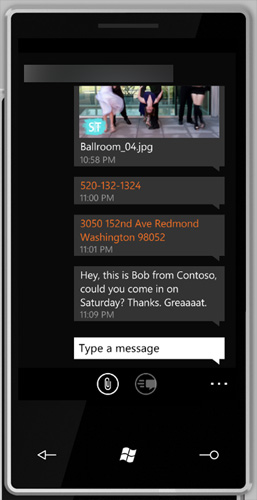
Note the orange text - these are clickable
Longer presses on almost anything result in another dialog appearing. From here, you can forward through SMS or email if the selection is text (or a URL), or save to the photo library or MMS if it is a picture.
Microsoft hopes this intelligent data-recognition process mitigates lack of copy and paste, but in practice there are many more use scenarios where true copy and paste support is advantageous.
Originally published at https://www.anandtech.com/show/2969/windows-phone-7-series-the-anandtech-guide (Wayback Machine).