
Windows Phone 7: The AnandTech Guide
- Posted in
- Smartphones
- Windows Phone 7
- Mobile
Three Kinds of Notifications
Fitting in directly after multitasking are notifications, which Microsoft hopes developers heavily leverage even after multitasking becomes viable. There are three primary methods of notifications baked into WP7S thus far.
The first is a nod to WebOS' less intrusive method of sliding notifications in at the bottom. Instead, notifications slide in from the top ala Android. These are called "toast" notifications, since they're animated like toast popping out of a toaster. Funny, right? The next is notification through tiles. Developers can push new images to the tile, as well as new text atop the tile, letting users know something has changed. A frequent demo was illustrating that the smiley atop the SMS application changes as new messages arrive, in addition to the counter. Lastly, in-application notifications where the dialog slides down revealing new information. We've seen this last kind of notification in virtually every implementation; it isn't so much a true notification as it is a page event.
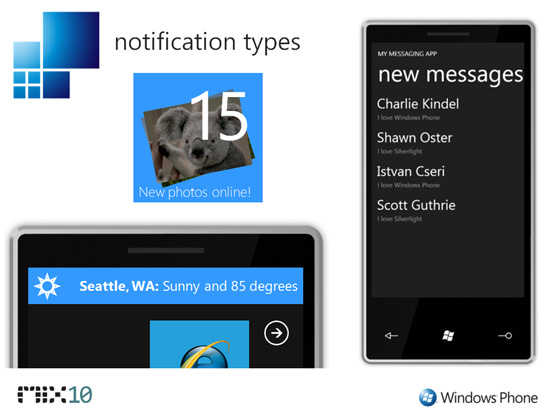
Top left - Tile. Bottom Left - Toast. Right - In-App.
All three of these notification schemes fully leverage a backend push notification service, similar in architecture to iPhone OS' push notifications. This is what Microsoft wants developers to use to mitigate the lack of background processing, very similar to the message Apple has been communicating for some time now. It doesn't cover all the bases or every possible use scenario, but does save battery and allow a way for third party applications to alert users.
Interestingly, the incoming phone call situation is another notification still being finalized. We've seen briefly what the notification looks like, and at present it appears to look like a larger "toast."
Originally published at https://www.anandtech.com/show/2969/windows-phone-7-series-the-anandtech-guide (Wayback Machine).