
Intel DH57JG “Jet Geyser” - Intel's First Mini-ITX H57
- Posted in
- Motherboards
Test setup and power
| Testbed Setup | |
| Processor |
Intel Core i5 661 ES CPU - 3.33GHz - 2 Cores 4 Threads, 4MB L3 Cache
Intel Core i3 540 CPU - 3.06GHz - 2 Cores, 4 Threads, 4MB L3 Cache |
| CPU Voltage |
Various
|
| Cooling |
Intel Air Cooler, Heatkiller 3.0 Waterblock, PA120.2 radiator and DDC ultra pump (with Petra top). 1/2 ID tubing for watercooling
|
| Power Supply |
Corsair HX950
|
| Memory |
Corsair Dominator CMD8GX3M4A1600C8 1600MHz Rev 3.1
|
| Corsair Dominator CMD8GX3M4A1600C8 1600MHz Rev 7.1 | |
| Corsair XMS3 CMX8GX3M4A1333C9 1333MHz Rev 2.3 | |
| G.Skill Perfect Storm 8-8-8-24 2200MHz 4GB kit | |
| Corsair Dominator GT 8-8-8-24 2200MHz 4GB kit Rev 2.1 | |
| Video Cards |
MSI GeForce GTX 275 Lightning (Stock Clocks)
|
| Video Drivers |
NVIDIA 195.62 WHQL
|
| Hard Drive |
Western Digital 7200RPM 1TB SATA 3Gbps 32MB Buffer
OCZ Vertex 120GB SSD |
| Optical Drives |
Pioneer DVR-215DBK
|
| Case |
Open Test Bed - Dimastech Benching Station, Lian-Li V2110
|
| Operating System |
Windows 7 64-bit
|
We utilized memory kits from Corsair and G.Skill to verify memory compatibility on our test boards. Our OS and primary applications are loaded on the OCZ Vertex 120GB SSD drive and our games operate off the WD Caviar Black 1TB drive. We did a clean install of the OS and applications for each motherboard. We used Intel's stock cooler for the stock comparison testing, while water-cooling via the superlative Heat Killer 3.0 water block was utilized for overclocking. For graphics duty, MSI’s GTX 275 Lighting GPU was used to provide performance comparisons between boards during gaming benchmarks.
For our test results we set up each board as closely as possible in regards to memory timings. Otherwise all other settings are left on auto. The P55 utilized 8GB of memory where possible, while the X58 platform contained 6GB. The P55 and X58 DDR3 timings were set to 7-7-7-20 1T at DDR3-1600 for the i7-920 and i7-870 processors at both stock and overclocked CPU settings.
We used DDR3-1333 6-6-6-18 1T timings for the i5-750 stock setup for all system benchmarks (non-gaming tests) as DDR3-1600 is not natively supported at a stock BCLK setting of 133. For our Clarkdale i5 661 and i3 540 CPU’s, we used 7-7-7-20 1N timings at DDR3-1333MHz with 8GB of memory. We would have preferred to use CAS 6 timings to match our Lynnfield setup, but it seems 8GB of memory at CAS 6 on Clarkdale is not possible right now. The 4GHz gaming results used 8GB of memory at DDR3-1280MHz with CAS 6-6-6-18 1N timings to allow a BCLK of 200MHz.
The obvious compare would be to Zotac's H55-ITX, however, we've recently added new members to our reviews team and are still working towards getting everybody working with a common set of components for comparison purposes. Please bear with us while we sort things out.
Power Consumption
Our power consumption testing utilizes the same batch of components under similar circumstances in a bid to monitor variances between idle and CPU load conditions using an AC wall meter for power consumption measurements. We install the vendor supplied power saving utilities on each board and enable power saving modes that don't involve any kind of underclocking or CPU core frequency modulation in order to run an apples to apples comparison. Assuming a maximum 105w load in the worst case scenario, actual motherboard power consumption is around 20% lower than the shown figures if you factor out switching losses at the PSU.
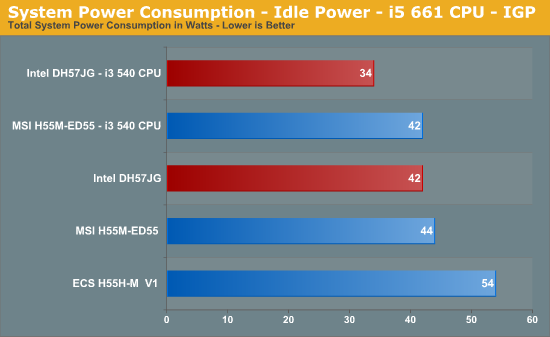
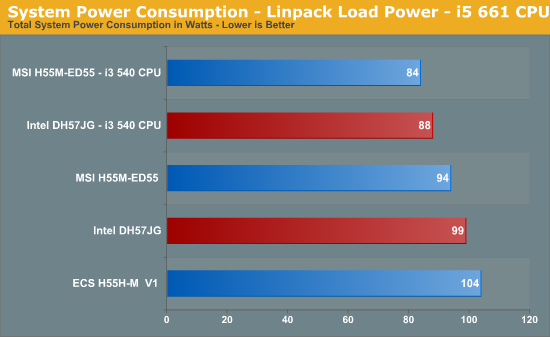
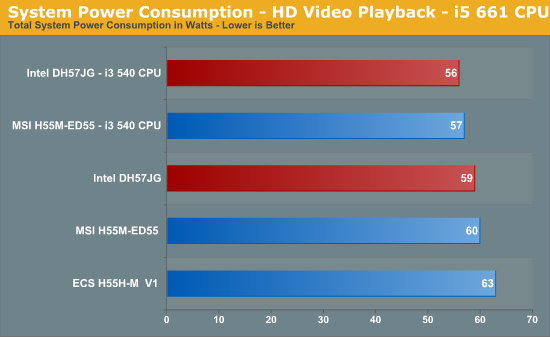
We threw Intel’s DH57JG in against the highly efficient MSI H55M-ED55; the mini-ITX comes out on top during light/medium loads, faltering to MSI only when the CPU is fully loaded. Either way, the DH57JG's power draw figures are highly impressive. Please excuse our use of the Corsair TX950 for these tests; this PSU was used in order to provide a straight compare to other boards in our database.
Originally published at https://www.anandtech.com/show/2949 (Wayback Machine).