
The Highest-End Notebooks, 2009
Mixing Gaming with Batteries
One final area we wanted to investigate before wrapping things up is battery life while gaming. This is something we've hinted that in the past, but we decided it was time to provide real data. There's a mistaken notion that these high-end gaming notebooks can still provide almost an hour of battery life while still delivering a better gaming performance than other laptops. The problem with that assumption is that the notebook manufacturers force the GPUs to run in lower-power modes while using the battery, apparently because the battery can deliver enough power. The GPUs aren't the only part to have lower performance on battery power, as we also noticed CPU performance dropped (regardless of power saving setting). We'll focus primarily on graphics for these tests, turning to 3DMark as a repeatable benchmark.
Let's start with battery life looping 3DMark06 at the native LCD resolution. For reference, we are including the Dell Studio XPS 16. Our version comes with the ATI Radeon HD 3650, which is slower than the latest models that use the HD 4670. We're using the 9-cell battery in this test, which is 85Whr (12% smaller than the D900F battery).
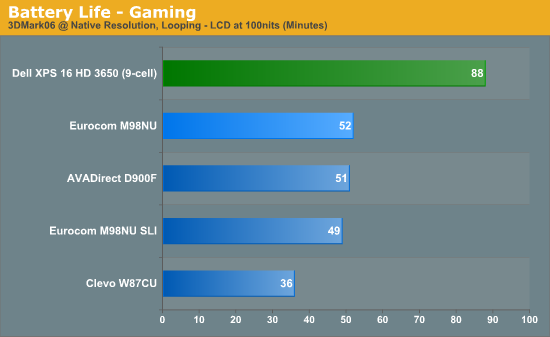
Okay, the Dell Studio XPS comes out on top. We were all expecting that, right? A dual-core CPU with a graphics chip that provides around one fourth the performance of the GTX 280M should last longer. But that's just looking at the duration of battery life. Now let's look at the actual benchmark results for the various 3DMark applications. Note that we had to use an external LCD for the W870CU in 3DMark06 and 3DMark Vantage to run at 1280x1024, which may account for its higher performance relative to the other two desktop replacement systems.
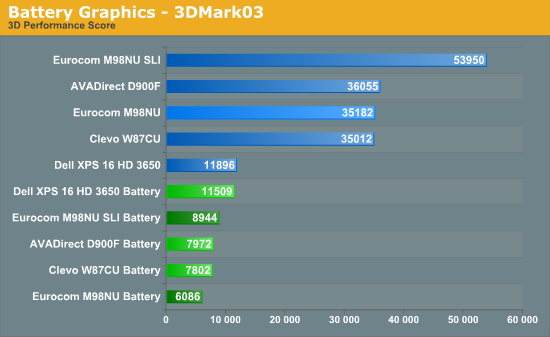
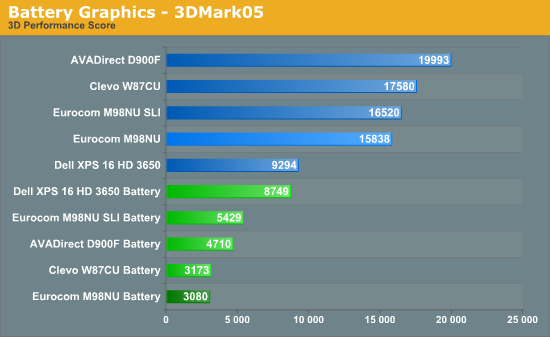
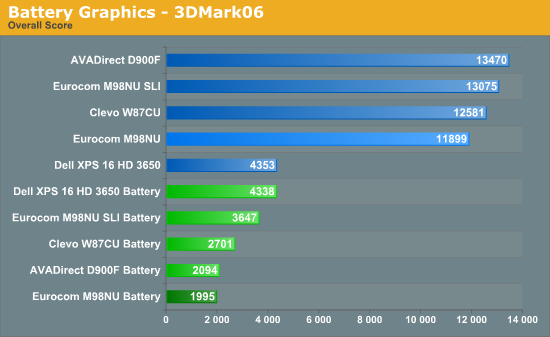
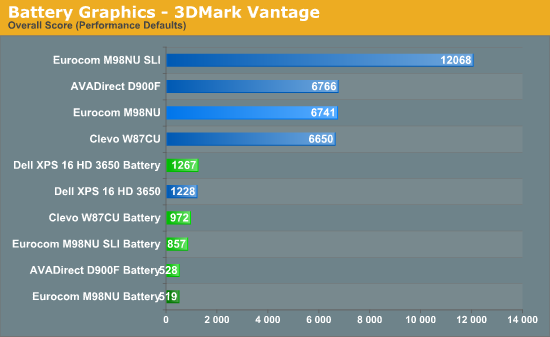
Okay, first things first: we ran each test several times on battery power, taking the highest result. There was more fluctuation than we're used to seeing -- sometimes as much as 30%. Or rather, there was fluctuation on all of the high-end notebooks; the Dell Studio XPS 16 was extremely consistent by comparison. We disabled all power saving features in an attempt to achieve maximum performance on battery life; in reality, there wasn't a major difference between the "Balanced" and "High Performance" profiles (less than 3%).
The big surprise is that the Studio XPS 16 doesn't need to run the graphics in "limp mode", so performance remains essentially unchanged (although you can run the GPU at reduced performance to improve battery life if you so desire). So what do you get with an extremely heavy, powerful desktop replacement notebook when you run on battery power? Oddly enough, you get less performance than a midrange mobile GPU. We haven't performed this test with a lot of other notebooks, but we can say for sure that we were unable to improve graphics performance on battery power for the three tested notebooks. Again, using all the "maximum performance" settings and the "High Performance" power profile, we still couldn't get the GPUs to run at anything other than extremely low clock speeds. Good for battery life, yes, but not for gaming.
Then again, let's not get too concerned about this: if the graphics were running at full power, the D900F and M980NU can consume over 200W, while the W870CU maxes out at around 150W. That means you would get around 15 minutes of battery power if the notebooks didn't limit performance (assuming the battery would even provide enough juice). Long story short, don't plan on intense 3D gaming while on battery power. If that's what you're after, you would be better off settling for a midrange laptop.
Originally published at https://www.anandtech.com/show/2858/the-highest-end-notebooks-2009 (Wayback Machine).