
Memory Scaling on Core i7 - Is DDR3-1066 Really the Best Choice?
- Posted in
- Memory
Heavy Multitasking: The Other Safe Haven for Faster Memory
The vast majority of our benchmarks are single task events that utilize anywhere from 23MB up to 1.4GB of memory space during the course of the benchmark. Obviously, this is not enough to fully stress test our 6GB memory configuration. We devised a benchmark that would simulate a typical home workstation and consume as much of the 6GB as possible without crashing the machine.
We start by opening two instances of Internet Explorer 8.0 each with six tabs opened to flash intensive websites followed by Adobe Reader 9.1 with a rather large PDF document open, and iTunes 8 with The Who blaring loudly. We then open two instances of Lightwave 3D 9.6 with our standard animation, Cinema 4D R11 with the benchmark scene, Microsoft Excel and Word 2007 with large documents, and finally Photoshop CS4 with our test image.
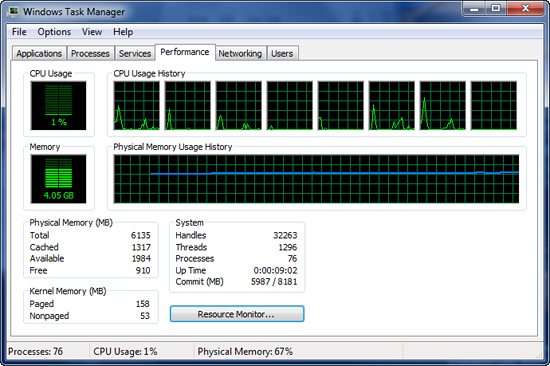
Before we start the benchmark process, our idle state memory usage is 4.05GB. Sa-weet!
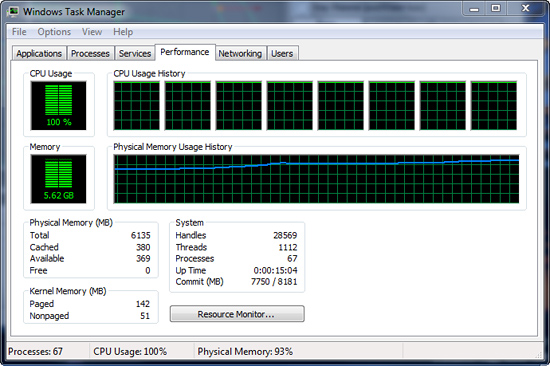
We wait two minutes for disk activity to cease and then start playing Pinball Wizard via iTunes, start the render scene process in Cinema 4D R11, start a resize of our Photoshop image, and finally the render frame benchmark in Lightwave 3D. Our maximum memory usage during the benchmark is 5.62GB with 100% CPU utilization across all eight threads.
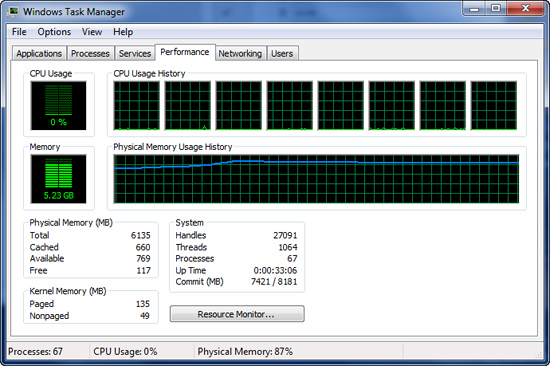
Our idle memory footprint after the benchmark has completed is 5.23GB. Trying to run our normal Photoshop benchmark at this point resulted in an out of memory error and automatic shutdown of Photoshop CS4 x64.
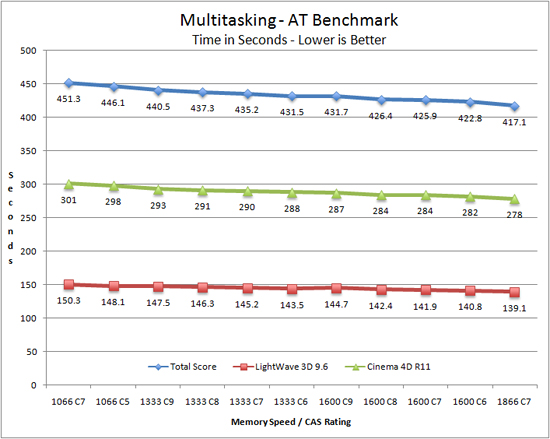
Our results follow an almost linear scale as we increase memory bandwidth in this benchmark. Improved latencies only matter when combined with increased memory bandwidth for the most part except for the DDR3-1333 C6 results just edging past the DDR3-1600 C9 score.
There is an 8% improvement in the total benchmark score when moving from DDR3-1066 C7 to DDR3-1866 C7. If you multitask with several memory intensive applications, at stock CPU speeds, increasing memory bandwidth is a simple way to improve performance.
Overclocked
Based on the above results at stock CPU speeds, we decided it would be interesting to look at what occurs when we overclock the system. We arrived at a 3.8GHz processor clock speed via the 19x200 setting. Essentially this is a free overclock as our CPU only needed an increase in VTT to 1.35V (board/processor dependent) to handle the increased memory loads at DDR3-1600 C6 and DDR3-2000 C8.
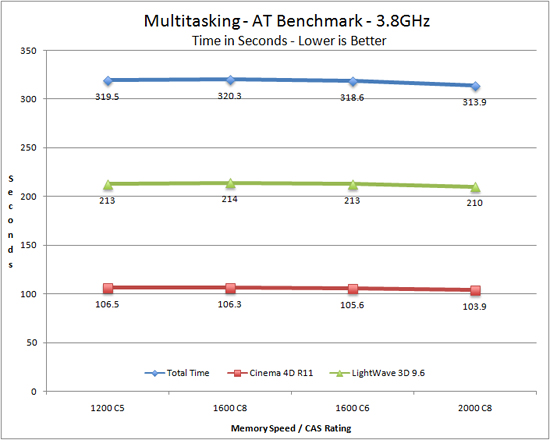
It is not until we hit DDR3-2000 C8 that our system responds favorably to increased memory bandwidth. Even then, the improvement is not as drastic as our stock numbers as going from DDR3-1200 C5 to DDR3-2000 C8 only improves performance by 2%.
Originally published at https://www.anandtech.com/show/2792 (Wayback Machine).