
Overclocking Extravaganza: GTX 275's Complex Characteristics
- Posted in
- GPUs
Pulling it Back Apart: Performance Interactions
Rather than test everything combination of clock speeds and look at scaling as we did in our Radeon HD 4890 overclocking article, we wanted a streamlined way to get a better idea of how combinations clock domain overclocking could help. Our solution was to add only one test configuration and use multiple comparison points to get a better idea of the overall impact of changing multiple clocks at a time.
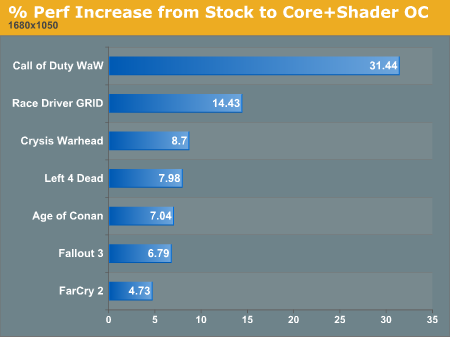
Testing our hardware while overclocking both the core clock and the shader clock gives us four more key comparisons that fill in the gaps between what we've already seen and how the different aspects of the hardware interact with each other. First, and most obviously, we can see how much performance improvement we get beyond stock when overclocking both core and shader clocks.
1680x1050 1920x1200 2560x1600
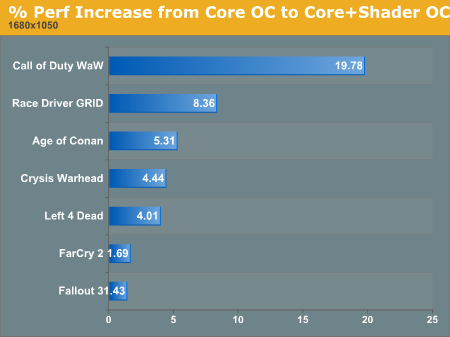
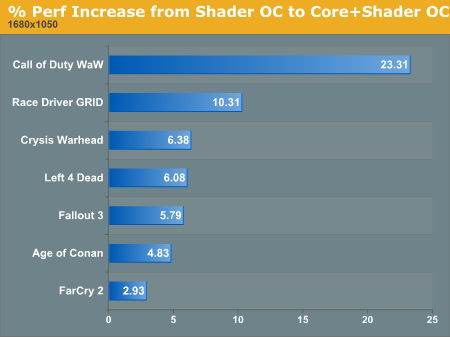
We see higher performance improvement for overclocking both of these at the same time than we do for just overclocking one at a time. And we can break this down into two components in order to answer two different questions: how much faster does overclocking the shaders make the GPU when the core is overclocked, and how much faster does overclocking the core make the GPU when the shaders are already overclocked? These two graphs are very closely related, but they can further help make a decision on how to balance your overclock on NVIDIA hardware.
1680x1050 1920x1200 2560x1600
1680x1050 1920x1200 2560x1600
If we look back and compare our additional performance improvements from increasing either core or shader clock while the other is at maximum, we can get a good idea of how scaling translates in a different landscape. In fact, we see that increasing shader clock speed generally has a larger impact when the core is already overclocked than if the core is set to stock speeds. This could indicate that an increased core clock alleviates some bottleneck on the shader hardware that allows it more breathing room.
We see a similar relationship between core scaling with everything else stock and core scaling with overclocked shaders. This could indicate a reciprocal relationship between the core and shader clocks, meaning that users may typically get a larger benefit from overclocking both at the same time rather than pushing one higher at the expense of the other.
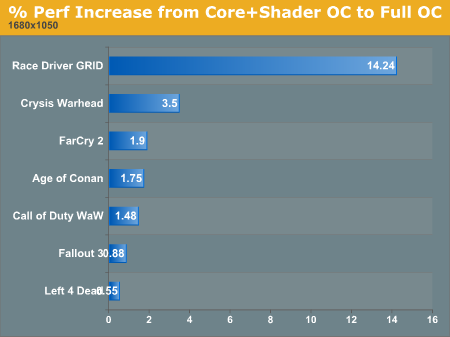
The last question we want to answer with this test is about memory. We saw that overclocking the GTX 275's RAM didn't return much of our investment. But what if both core and memory are overclocked, would memory speed have a larger impact on performance when? If the bottleneck for performance scaling with memory overclocking is in how fast the GPU can consume data, than we might see better performance improvement from memory overclocking when the core and shader are running faster.
1680x1050 1920x1200 2560x1600
These results are certainly interesting, showing, in general, less benefit from moving to 2560x1600 when the GPU is overclocked. We also see less improvement at lower resolution where memory performance isn't as large an issue in the first place (it seems to become even less important). But at 1920x1200, overclocking memory has a higher impact when the GPU is fully overclocked. So at lower resolutions, memory speed isn't as important anyway and the GPU overclock has the prevailing benefit on overall speed. This makes sense. So does the increasing performance at 1920x1200. But the fact that performance improvement we can attribute to faster memory at 2560x1600 is lower with a faster core and shader clocks is a bit of an enigma.
While we can get a better feel for the effects of tweaking different aspects of the chip through these glimpses into scaling, it's still not possible from this data to definitively pin down the interactions between core, shader and memory clock speed. The benefit to different games is dependent on their demand for resources, and there's no real formula for knowing what you will get out.
But the thing to take away is that overclocking the GTX 275 should be done with balance between the three clocks in mind. No single aspect is a magic bullet, and NVIDIA has balanced things pretty well already. Maintaining the balance is the key to extracting good performance improvement when overclocking the GTX 275.
That sums up our analysis of overclocking the GTX 275. The following pages are our raw data for those more interested in direct/absolute comparisons.
Originally published at https://www.anandtech.com/show/2778 (Wayback Machine).