
MSI X58M - Mighty Mouse
- Posted in
- Motherboards
Overclocking
MSI advertises the X58M as an entry level - maybe even mainstream - X58 motherboard and will nudge users towards their enthusiast level Eclipse series for overclocking duties. Well, we disagree with them as this board to date has overclocked just as well as their upper end X58 offerings. There are definitely boards that will hit higher Bclk rates and offer better memory clocking, but we are concentrating on mainstream overclocking abilities in our tests. We focus on the type of overclocks that support 24/7 operation with reasonable cooling and the ability to run a multitude of programs without a problem. We are not optimizing for SuperPI or 3DMark records, though that would provide an interesting twist.
We put an emphasis on stability during our testing sessions so we test with real world applications ranging from a variety of games to digital imaging software to various audio/video creation programs, along with the typical OCCT and PCMark Vantage tests.
i7 920 D0 6GB Results
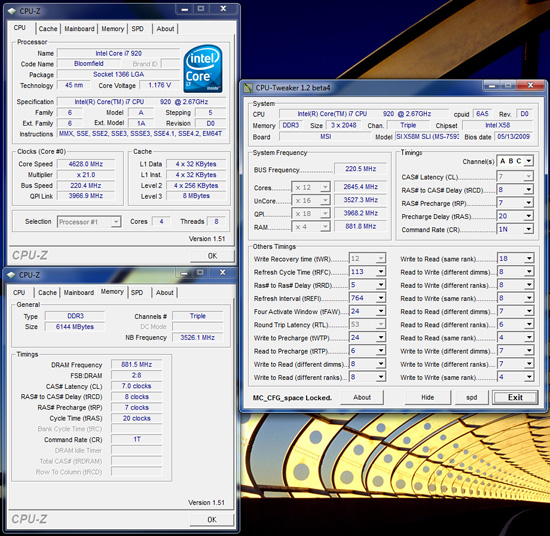
MSI X58M
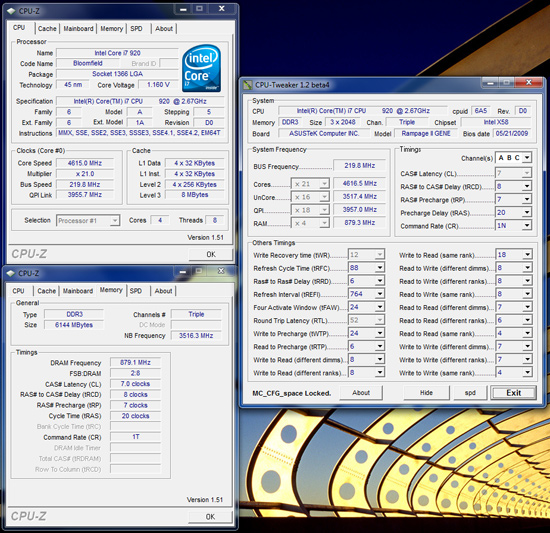
ASUS Rampage II GENE
Our maximum 24/7 overclock on air-cooling with the i7 920 D0 resulted in a 4.62GHz clock speed at a respectable 220 Bclk with our 6GB Patriot memory kit set to DDR3-1760 at 7-8-7-20 1T timings. The primary voltage settings were 1.36V Core VID, 1.38V VTT, 1.85V PLL, 1.65V VDimm, and PCIe at 105MHz. We also enabled MSI’s CPU Phase control and basic power management options so idle Core VID voltages ranged from 1.152V ~ 1.176V. Now, we did find that MSI overvolts VTT so our 1.38V setting would idle around 1.4025V~1.41V but under load would drop to 1.387V on average. Core Vdroop was approximately -.02V with Load Line Calibration (LLC) disabled and is our recommended setting. We do suggest that users provide proper cooling to the PWM area at these overclock rates as the MOSFETs require additional airflow due to the lack of passive cooling via heatsinks.
Our second screenshot is the same component setup with the ASUS Rampage II GENE motherboard sporting the new 0804 BIOS. On the ASUS side, we had to set voltages at 1.36V Core VID, 1.43V VTT, 1.85V PLL, 1.66V VDimm, and PCIe at 107MHz to obtain the same clock rates. The primary difference is the slight increase in VTT required on the ASUS board and increase in PCIe rates for stability. This board has also had problems with the LAN dropping out when increasing PCIe rates above 101 and it continues to be a challenge for us. The good news is that the LAN will not drop with PCIe rates above 110 at stock Bclk rates now, but it still has a tendency to drop when overclocking. ASUS continues to work on it.
Also, each manufacturer takes a different approach to memory sub-timings as ASUS sets tRFC to 88 compared to 113 for MSI, tRRD is 6 for ASUS and 5 for MSI, and RTL is 52 for ASUS and 53 for MSI. Memory performance slightly favors ASUS - though our SuperPI 32M numbers favor MSI at this setting: 08m 02.406s compared to 08m 04.817s for ASUS. These are non-optimized results on Windows7 64-bit with a full software load and all services running.
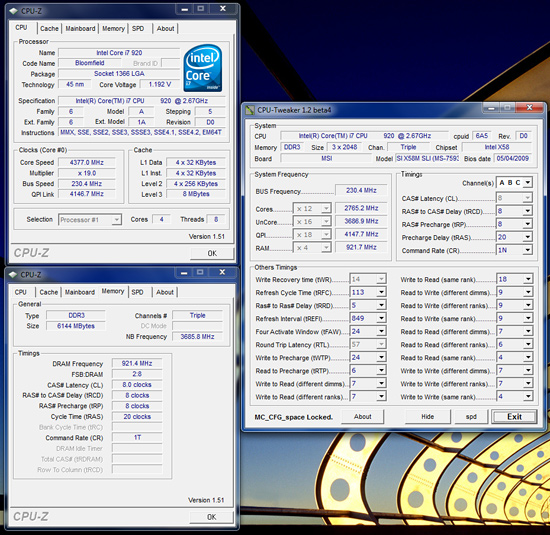
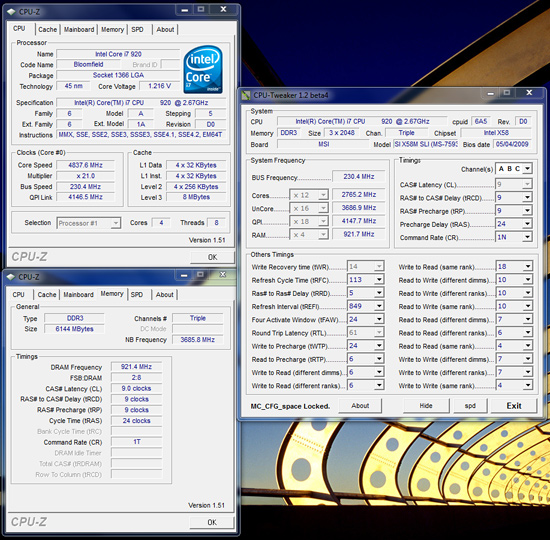
Our maximum stable Bclk speed on the X58M board with air cooling is 230. We could boot from BIOS with either 19x230 or 21x230 configurations. Our 19x230 setup had our voltage settings at 1.30V Core VID, 1.42V VTT, 1.85V PLL, 1.70V VDimm, and PCIe at 110MHz. This resulted in a 4.37GHz core speed and memory speed of DDR3-1842 at 8-8-8-20 1T timings for a 24/7 stable setup, although we see no real reason for running Bclk speeds at this rate except for benchmarking.
We cheated on our 21x230 configuration, as we had to strap a couple of small ice packs (the type used for joint problems) onto the Vigor Monsoon III LT in order to run our benchmarks. In fact, one icepack would only allow us to complete a three-loop run of PCMark Vantage or 3DMark Vantage. However, it just indicates to us that with additional cooling the X58M motherboard provides a very stable platform for aggressive Bclk rates on a uATX form factor board. In case you are wondering, the board just would not POST at anything higher than 235 Bclk even with the CPU ratio set to 12x. In addition, we just could not get our particular Rampage II GENE board stable at a 230 Bclk setting but ended up with an iron clad 19x228 setting at the same voltages dialed into the MSI board.


i7 920 D0 High Clock Low Volt Results
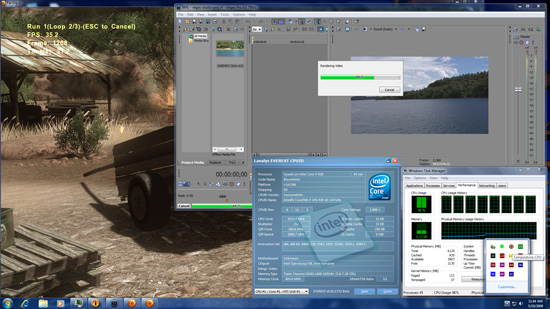
While overclocking is an important and fun measurement of a board’s capabilities, we also realize that undervolting can be just as important to others. As such, we devised a quick multitasking test that allows us to really push our systems with real world applications that stress the GPU, CPU, memory, and storage subsystems. We load up Sony Vegas Pro 9.0 64-bit and set it to transcode a 1080p video while running our Far Cry 2 loop benchmark at 1680x1050 2xAA DX10 High Quality in window mode. Average CPU usage is 98% throughout this process with HT enabled.
MSI X58M
ASUS Rampage II GENE
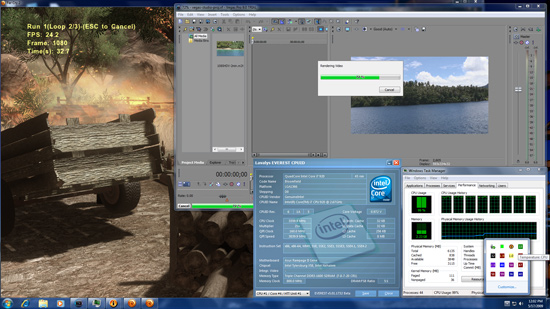


Both boards passed this benchmark and our full test suite at 21x160 for a final 3.37GHz core speed. We enabled the MSI BIOS with full power management options and Core Vid at a -0.100mV offset resulting in an idle voltage of 0.840V and full load voltage of 1.008V. VTT was set to 1.2V and VDimm at 1.60V with memory timings at 7-8-7-20 1T for DDR3-1600 speeds. The ASUS BIOS was also set with all power management features enabled with Core VID at 1.006V and no offset since a negative value is not available on the ASUS board. The load voltage for the ASUS board was 0.972V with VTT at 1.2V and VDimm at 1.60 with the same memory timings as the MSI board.
At stock settings (21x133) we were able to run the MSI board at 0.740V and the ASUS at 0.800V in a wide variety of applications and benchmarks with the same memory timings and settings above. Of course, the quality of the CPU has a significant impact on these results but so far, our four different D0 lot codes have performed equally in low volt testing on both of these boards.
Thoughts
We only have a single concern about recommending this board for 24/7 overclocking use. As mentioned, S3 resume does not work properly with Bclks above 150 or so at this time. If that is a deal breaker for you, then we suggest waiting to see if/when MSI resolves the problem or look at the DFI or ASUS uATX boards. However, they also have various quirks like the LAN dropout on the ASUS board with PCIe speeds over 101 or abnormally high VTT requirements on the DFI board with our D0 stepping processors. Once we have final BIOS releases from each manufacturer, we will complete our uATX roundup with the boards. For now, the MSI X58M is an excellent choice for your overclocking (with proper board cooling) or undervolting needs in this market sector. Our gallery has additional overclocking results and screenshots at a variety of settings.
Originally published at https://www.anandtech.com/show/2771 (Wayback Machine).