
Zotac's Ion: The Follow Up
- Posted in
- Motherboards
Overclocking the Atom Processor
Zotac provides a couple of performance tweaking options within its BIOS. You can set memory latencies manually as well as adjust the FSB and memory clocks. The biggest failure here is the inability to adjust the Atom’s core voltage, which is ultimately what limits how far we can push the processor.
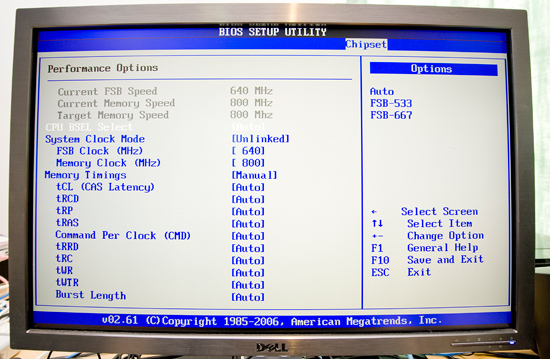
The Atom 330 runs at 1.6GHz by default with a 12.0x multiplier and a 533MHz quad-pumped FSB frequency (133MHz source clock x 4). Bumping the FSB up to 667MHz gave me a 2.0GHz clock frequency and I was actually able to boot into Windows at that speed. Unfortunately, even with additional cooling, that wasn’t stable enough to complete my benchmarks. I suspect that with additional voltage I’d be able to get 2.0GHz stable.
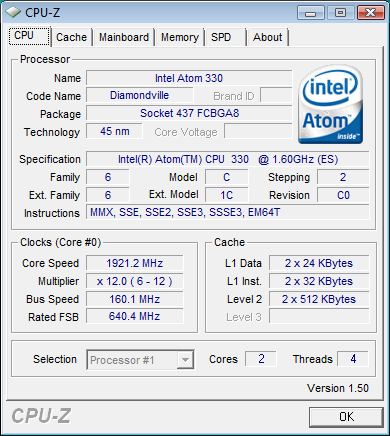
I backed down to a 640MHz FSB, resulting in a 1.92GHz CPU frequency and the result was completely stable over the course of several hours of benchmarking. Performance also went up by a good amount:
| x264 HD Encode (1st Pass) | World of Warcraft Frame Rate | Power Consumption | |
| Atom 330 @ 1.92GHz | 14.5 fps | 20.5 fps | 28.5W |
| Atom 330 @ 1.60GHz | 12.2 fps | 17.7 fps | 28.2W |
I generally saw a 15 - 19% increase in performance over the stock 1.60GHz Atom 330, which is quite good given that it’s a 20% increase in CPU frequency. I kept memory clock stationary at 800MHz but I’m guessing there’s additional room for a performance boost if you overclock that as well.
Power consumption only went up 0.3W from 28.2W to 28.5W - even overclocked, the Atom is a very efficient microprocessor.
Originally published at https://www.anandtech.com/show/2769 (Wayback Machine).