
Silverstone Raven: A New Concept in Case Cooling
- Posted in
- Cases/Cooling/PSUs
Appearance
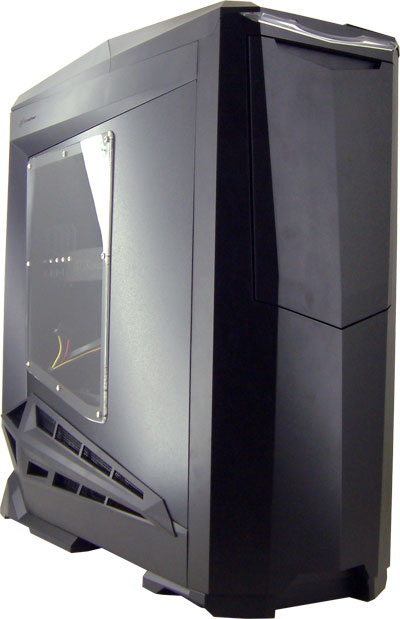
The case is all matte black with small windows on the left side panel where users can see their motherboard and components. We are rather pleased that Silverstone didn't include a larger window, since this allows you to show off your graphics card(s) and a few other items without worrying about showing the power supply and all of the extra cables that might be present. The top of the case is rather bulky, since there needs to be room for all of the cables that would normally be at the back of your case. The left side also features additional air intakes that bulge out on the bottom of the case; in fact, the case is somewhat reminiscent of HP's Blackbird design, with some obvious changes. The front of the case sports a horizontal clear plastic part at the top that glows blue when the system is powered up. If you use the appropriate motherboard connector, you also see a small red flashing light in the middle of the blue illuminated bar for hard drive accesses.


The front door is quite cool: it slides down into a recess when you push it. It will stay there until you tap it again, at which time it will slowly slide up to its starting position. Above the door in the horizontal glowing bar you find the power and reset buttons. Behind these buttons is a door that you might not at first notice, which provides access to some standard I/O ports -- USB, audio, and FireWire.
Moving to the rear of the case, things take a dramatic turn from what we are used to. You are greeted by a smooth surface, since all the connectors are now at the top of the case. The one exception is the power supply, which is located at the bottom of the chassis. We think this design will appeal particularly to people who have their PCs sitting next to (or under) their desk on the floor. It's possible to hide much of the cable clutter that you would normally see if you're careful. Of course, the flipside is that you would want to have this case sitting on top of something like your desk, as then everyone would see all of the cables hanging down from the top of your chassis.
Opening the top of the case to get all of the cables and expansion ports is very easy. You turn both knobs at the back of the top and then you can lift that part out of the way. You will then have access to all of the expansion slot ports. The removable section is perforated to allow airflow through the top of the chassis, and in fact airflow would probably be better if this perforated top didn't even exist (although then we wouldn't have hidden cables). You'll also need to remove the top panel anytime you want to access the side panels, since the two lovers that open the sides are underneath the top panel. When you push the appropriate lever towards the front, the respective side panel will open.
Another noteworthy feature is that Silverstone installed filters on all of the air intakes, which should help tremendously in keeping the interior of your case free of dust bunnies. Since the case will likely be sitting on the floor, this is an even bigger concern. Just remember to clean your air filters on a regular schedule.
Originally published at https://www.anandtech.com/show/2720 (Wayback Machine).