
Revealing The Power of DirectX 11
- Posted in
- GPUs
So What's a Tessellator?
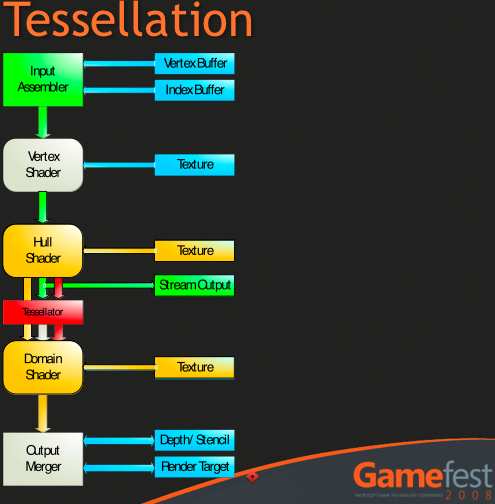
This has been covered before now in other articles about DirectX 11, but we first touched on the subject with the R600 launch. Both R6xx and R7xx hardware have tessellators, but since these are proprietary implementations, they won't be directly compatible with DirectX 11 which uses a much more sophisticated setup. While neither AMD nor the DX11 tessellator itself are programmable, DX11 includes programmable input to and output from the tesselator (TS) through two additional pipeline stages called the Hull Shader (HS) and the Domain Shader (DS).
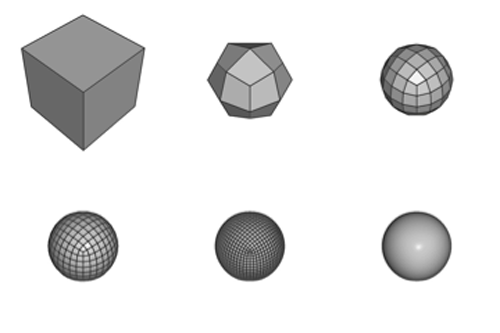
The tessellator can take coarse shapes and break them up into smaller parts. It can also take these smaller parts and reshape them to form geometry that is much more complex and that more closely approximates reality. It can take a cube and turn it into a sphere with very little overhead and much fewer space requirements. Quality, performance and manageability benefit.
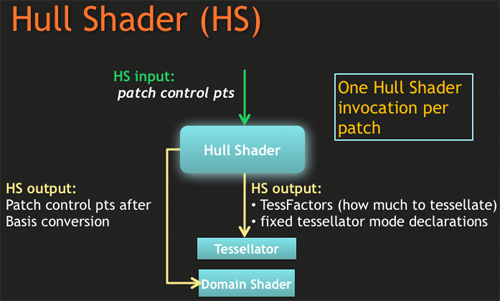
The Hull Shader takes in patches and control points out outputs data on how to configure the tessellator. Patches are a new primitive (like vertices and pixels) that define a segment of a plane to be tessellated. Control points are used to define the parametric shape of the desired surface (like a curve or something). If you've ever used the pen tool in Photoshop, then you know what control points are: these just apply to surfaces (patches) instead of lines. The Hull Shader uses the control points to determine how to set up the tessellator and then passes them forward to the Domain Shader.
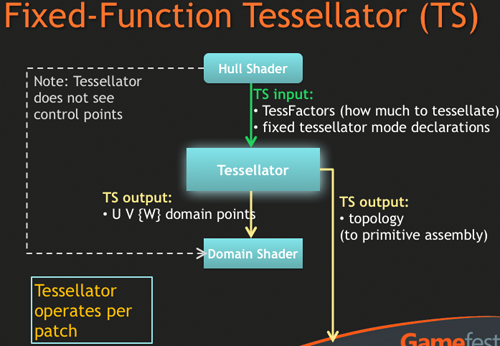
The tessellator just tessellates: it breaks up patches fed to it by the Hull Shader based on the parameters set by the Hull shader per patch. It outputs a stream of points to the Domain Shader, which then needs to finish up the process. While programmers must write HS programs for their code, there isn't any programming required for the TS. It's just a fixed function block that processes input based on parameters.
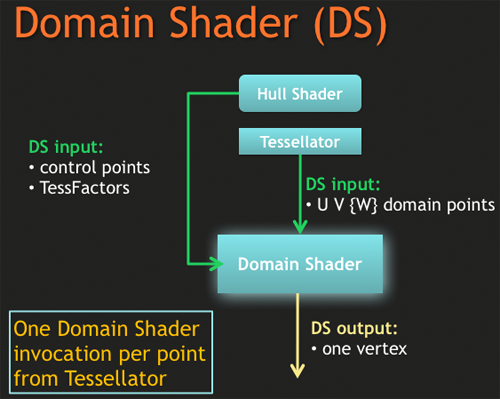
The Domain Shader takes points generated by the tessellator and manipulates them to form the appropriate geometry based on control points and/or displacement maps. It performs this manipulation by running developer designed DS programs which can manipulate how the newly generated points are further shifted or displaced based on control points and textures. The Domain Shader, after processing a point, outputs a vertex. These vertices can be further processed by a Geometry Shader, which can also feed them back up to the Vertex Shader using stream out functionality. More likely than heading back up for a second pass, we will probably see most output of the Domain Shader head straight on to rasterization so that its geometry can be broken down into screen space fragments for Pixel Shader processing.
That covers what the basics of what the tesselator can do and how it does it. But do you find your self wondering: "self, can't the Geometry Shader just be used to create tessellated surfaces and move the resulting vertices around?" Well, you would be right. That is technically possible, but not practical at this point. Let's dive into that a bit more.
Originally published at https://www.anandtech.com/show/2716 (Wayback Machine).