
Intel X58 Motherboard Roundup - What does $300 Get You?
- Posted in
- Motherboards
MSI Eclipse X58
Features
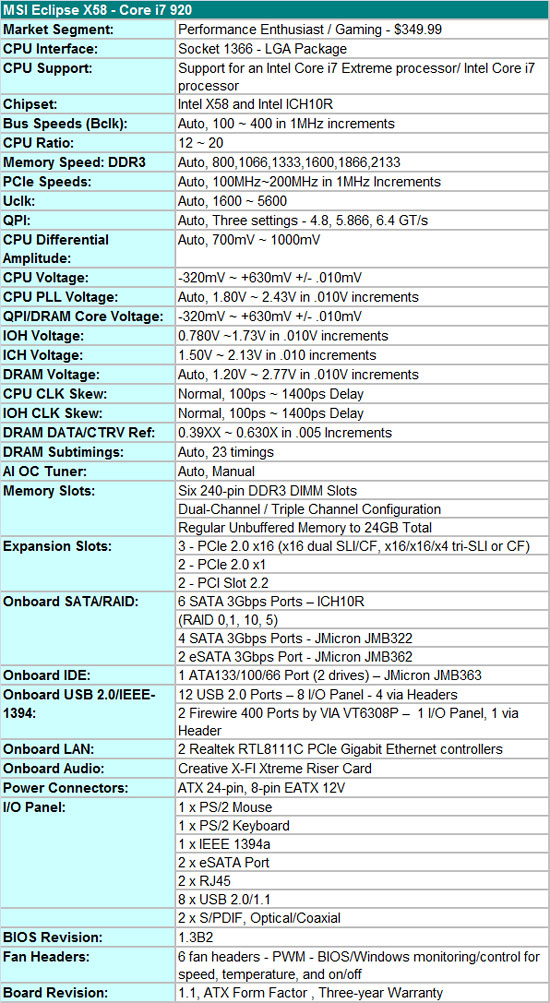
The MSI Eclipse X58 is a feature laden board from a hardware and software viewpoint. It should be considering the $350 price tag, although there is a $30 mail-in-rebate at present. The almost universal Realtek RTL-8111C PCIe Gigabit Ethernet controllers are utilized in tandem; a riser card featuring the Creative Lab's CA0110-IBG chipset provides HD audio and EAX 5.0 capabilities; JMicron’s JMB 363/362/322 chipsets are tabbed for eSATA, IDE, and additional SATA port duties; VIA's VT6308P provides IEEE 1394a support; and the Intel ICH10R is utilized for primary storage purposes.
The BIOS is designed for overclocking duties, although it's not as comprehensive as those from ASUS or Gigabyte. However, it is fair to say that several of the options that ASUS and Gigabyte provide will never be touched by about 95% of us when overclocking. Our main knock against the BIOS is that it is not as user friendly as the others in this roundup. We do not care for the +/- voltage settings as it becomes confusing for the user to understand exactly what effect their changes had on the particular option, especially without knowing what the base voltage is set at.
MSI supports stock memory speeds up to 2133MHz on the i920/i940 processors along with opening up QPI link speeds from a standard 4.800 GT/s up to 6.400 GT/s, which is standard on the i965 Extreme processor. The board fully supports 24GB of DDR3 memory. We have a 24GB kit arriving shortly for testing so we cannot confirm compatibility yet, but we trust MSI in this regard.
In the meantime, we have not had any problems running 12GB with our Patriot or G.Skill DDR3-1600 kits up to 1600 at 9-8-8-24 1T timings, although we needed about 1.68V for absolute stability with the i920 at stock speeds. Dropping the command rate to 2T allows 1.64V operation with the current BIOS. Overall, memory performance is very competitive with the other boards and improving in each BIOS release. However, this is the only six slot board that we have been unable to clock a 12GB configuration up to a 191x21 setting. The board stops around a 175 Bclk with an 8x memory multiplier that results in a DDR3-1528 speed. The board will clock up to a 191 Bclk with the memory multiplier at 6x, which results in a DDR3-1146 setting. MSI is working on improving this area.
The Eclipse board contains three PCI Express 2.0 x16 slots that operate in x16/x16 mode for 2x SLI/CF. The third x16 slot operates in x4 mode regardless of the second slot population. 3x SLI/CF configurations run in x16/x8/x8 mode on the EVGA and Gigabyte boards. We did not notice any performance differences between the x16/x16 or x16/x8 operation in 2x CF with our HD 4870 cards. However, we just received a new BIOS from MSI that allows 3X SLI/CF to operate properly. We will update the article in a few days with a comparison between the boards utilizing all three x16 slots. We had no problems running our ASUS Xonar D2X or Highpoint Rocket RAID cards in slots two or three.
The Board
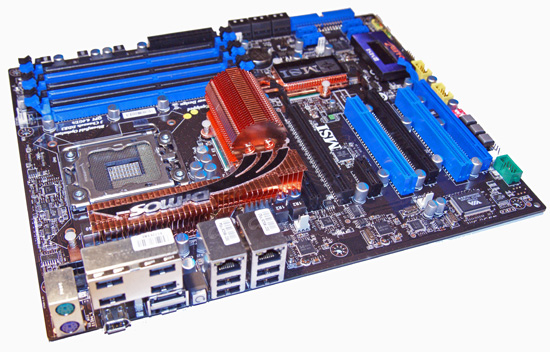
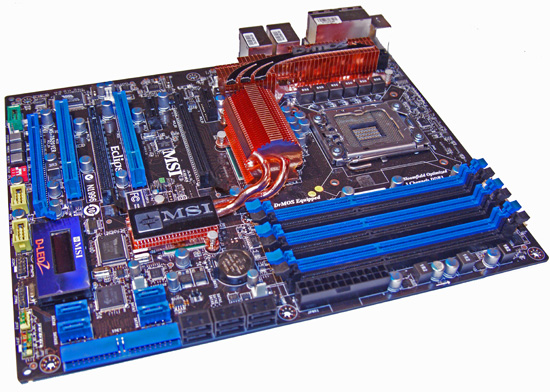


The Eclipse X58 is MSI's current flagship board with the recently introduced Platinum X58 filling a void in the low end X58 market with a $220 price tag. While $220 is an awful lot for a motherboard, it's practically a bargain in this particular market sector. Of course, you give up a few items like SLI compatibility, an additional x16 slot, and the JMicron SATA ports, but for a lot of users those features are not that important.
MSI went a different direction with this board compared to earlier designs; gone is the roller coaster or circular heatpipe design, as is the traditional fire engine red color scheme that is now a subdued black and blue color palette. While colors do not determine the performance of a board, they do tend to make a difference in first impressions. We like the new color scheme and sincerely appreciate a more traditional heat pipe setup. In fact, MSI skipped on an elaborate heatpipe setup found on other boards and concentrated on cooling the voltage circuitry separately, although the northbridge and southbridge are still linked together.
The CPU area is fairly open and our larger air coolers did not pose a problem. The Eclipse board features a two-phase power delivery system for the northbridge and for the memory subsystem. A six-phase power delivery design is utilized for the processor, half that of the Gigabyte and ASUS boards. However, this did not adversely affect the overclocking capabilities of the board. MSI utilizes high quality solid-state capacitors and ferrite core chokes on the board.
The general layout is very good as MSI has managed to situate the vast number of ports, slots, and hardware in a manner that keeps them from interfering with installed peripherals. MSI managed to squeeze three PCI Express 2.0 x16 slots (x16/x16/x4), two PCIe x1 slots, and two PCI slots. This arrangement allows 3X Crossfire or SLI and still leaves a single PCIe x1 slot open. However, using a double slot card in the third slot will make it extremely difficult to utilize the power, reset, IEEE 1394a, and USB ports. Our opinion about 3X CF/SLI is not that high unless you are benchmarking for 3DMark records, so we appreciate the fact that a 2X CF/SLI arrangement will leave a PCIe x1, PCI, and PCIe x16 (x4 electrical) slot open.
On the bottom of the board you will find onboard buttons for power, reset, and the D-LED 2 display module. The D-LED 2 is handy for a quick glance during the POST process or you can have it display VCore or northbridge voltages along with pinpointing a particular temperature on the board with the included 20" probe. The D-LED does not display hex codes, instead relying on short hand messages like "DDR Ini" during post processes.
While we appreciate the D-LED, it is really only good for windowed cases or open platform testing. We think MSI should have included an attachment cable that allowed placement outside of the case. Also, the unit does not live up to its potential by providing additional hardware monitoring capabilities such as temperatures, fan speeds, or other voltage readings. Of course, MSI has monitoring software that accomplishes these tasks, but we think a hardware solution would be better, especially considering the cost of the board.
The IO panel features eight USB 2.0 ports, two Ethernet jacks, an IEEE 1394a port, and two eSATA ports courtesy of the JMB 362 chipset. MSI also includes an expansion slot backplate that allows an additional two eSATA ports via any of the board's internal SATA connections. An audio output panel is missing since MSI utilizes a riser card that features Creative Lab's CA0110-IBG audio chipset.
Our first reaction was very positive until we looked at the chipset specifications and realized that hardware audio processing capabilities - including the EAX 5.0 implementation - are done through software and the CPU. Also, most of the software features from a standalone X-FI card are not available in the software package that MSI provides. They did include access to Creative's 24-bit Crystalizer and speaker virtualization features along with other hardware settings.
Of course the big question is the audio quality provided by this solution. RightMark Audio Analyzer indicated poor THD and inter-channel leakage, but in actual usage we could not tell any real differences between the Creative and Realtek solutions in music playback quality. The ADI solution on the ASUS board sounded a bit clearer and dynamic in music playback. In gaming, we thought the Creative solution was slightly better than the ADI chipset and noticeably better than the Realtek solutions on the Gigabyte and EVGA boards. If gaming or music playback is a priority, we still suggest an add-in card for best performance.
The Application
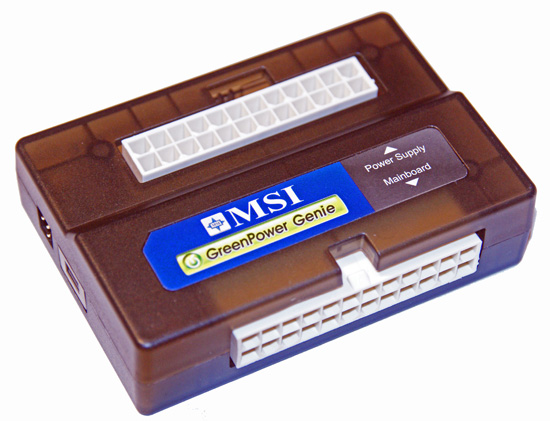
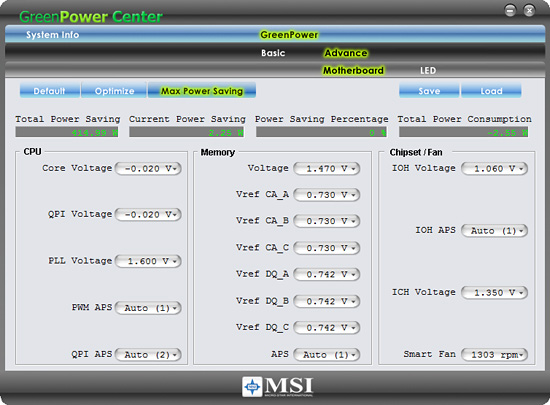
MSI features a unique power saving system on the Eclipse. They include a GreenPower Genie pass-through connector that attaches to the 24-pin ATX power supply cable and a cable that attaches to the 24-pin ATX connector on the motherboard. There is also a two-pin cable that attaches to the Genie and the motherboard that works in conjunction with the the GreenPower software to monitor and dynamically reduce power usage.
This system will automatically scale the number of active power phases for the processor, memory, and northbridge. We noticed savings of 9W at idle, so it actually works. In fact, it provides better results than the ASUS EPU-6 or Gigabyte DES power saving systems. During testing, it was able to switch fast enough so we did not have to worry about program crashes when utilizing GreenPower. The one drawback is that the pass-through connector and cable is a bit cumbersome to use in smaller cases.
Originally published at https://www.anandtech.com/show/2681 (Wayback Machine).