
Intel X58 Motherboard Roundup - What does $300 Get You?
- Posted in
- Motherboards
Gigabyte GA-EX58-UD5
Features
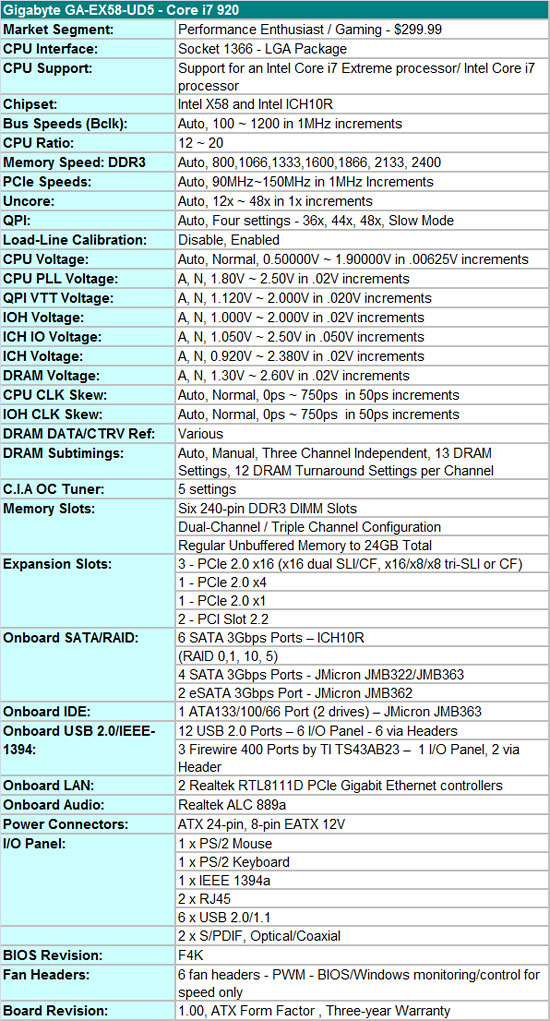
We have to hand it to Gigabyte; if there was an empty spot on the board during the design phase, they figured out a way to add a feature in that space. This board is loaded with everything but the kitchen sink and yet it appears mostly uncluttered; only when using the board do you sometimes notice that it is crowded. Gigabyte throws in twin Realtek RTL-8111D PCIe Gigabit Ethernet controllers that can be teamed; the Realtek ALC-889a is on board for HD audio and features real-time Dolby Digital Live encoding; JMicron’s JMB322/363 chipsets are tabbed for IDE and additional SATA port duties; TI is selected for IEEE 1394a; and the Intel ICH10R is onboard for primary storage purposes.
The BIOS is designed for those who like to tweak for a living. For some, the number of available options will be overwhelming while others will take joy in squeezing out every last little bit the board has to offer. The number of memory timing options is immense and includes the ability to setting timings for each individual channel. However, as we also found with the ASUS board, the auto settings are not always spot on.
Also, the latest beta BIOS we utilized (F4H) has a habit of overriding manual memory settings. This can be a good and bad decision on behalf of the BIOS. The good is that it will do its best to keep the user out of trouble; the bad is that when we manually tweak a board we would like to know when we are in trouble. In the end, the settings determined by the BIOS were always stable and performance was generally not detrimental. We will look at this as a glass half full situation. (update - BIOS F4K received today corrects this problem)
The only nitpick we truly have with the BIOS centers on Load-Line calibration. The purpose of this setting is to reduce VDroop and it works perfectly on the other boards. On our particular board sample we still noticed VDroop when a VCore setting of 1.425V resulted in 1.392V real. Gigabyte is aware of this and is working on it now. Otherwise, we commend Gigabyte for a well laid out BIOS and for offering the enthusiast just about every option one could use on a board.
Gigabyte supports a stock 800MHz ~ 2400MHz memory speed on the i920/i940 processors along with opening up QPI link speeds from a standard 4.800 GT/s up to 6.400 GT/s. They also include a slow mode QPI link speed for high Bclk testing. The board supports up to 24GB of DDR3 memory. We have not had any problems running 12GB of our Patriot or G.Skill DDR3-1600 kits with the latest F4H BIOS. Our final settings are at 1600 with 9-9-9-24 1T timings at 1.66V. Although the timings are looser than the other boards, performance is basically equal; only a user looking for that last bit of advantage in a benchmark would notice a difference.
The three PCI Express 2.0 x16 slots will operate in x16/x16 mode for 2x SLI/CF if the third x16 slot is empty. If you decide to place a PCIe RAID, network, audio, or TV tuner card in the third x16 slot, then the 2x SLI/CF configuration will operate in x16/x8 mode. 3x SLI/CF configurations will run in x16/x8/x8 mode. We had no problems running our ASUS Xonar D2X or Highpoint Rocket RAID cards in x16 slots two or three.
The Board
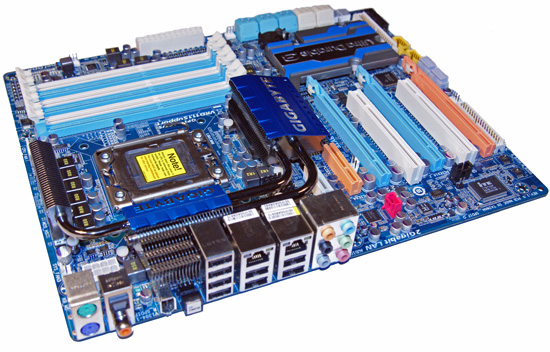


The $299 GA-EX58-UD5 is Gigabyte's mid-range X58 board, with the Extreme version being at the top end with a $330 price tag and the DS4 board placed at the low end with a $245 street price. We think Gigabyte's product separation is right on considering the feature set on each board, although we had hoped the DS4 would also have SLI capability considering the additional cost when compared to the MSI Platinum board.
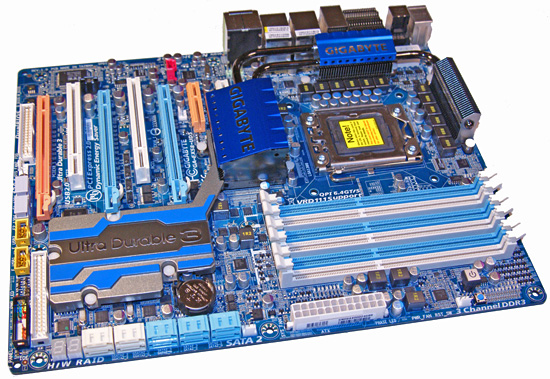
Gigabyte introduced a new color palette on this board and we like it for the most part. We still notice a few of the crayola colors in use but overall this board would not look bad in a case with a large window. The one item that stands out on the board is the rather large heatsink for the ICH10R/JMicron controllers proudly displaying the Ultra Durable 3 technology incorporated on the board. Ultra Durable 3 refers to Gigabyte's use of solid-state Japanese capacitors, ferrite core chokes, and low RDS(on) MOSFETs along with an extra dose of copper in the board layers.
All of this is meant to improve overclocking potential and extend the life of the board. Until we get to our sub-zero overclocking article, it has been difficult to notice any overclocking differences between this board and the others in our roundup. However, we do appreciate the high quality components that Gigabyte included at this price point.
Gigabyte provides a hefty combination of heatsinks for the northbridge and vrm areas that link together with a heatpipe system. In fact, part of the first VRM heatsink extends into the IO panel to provide an exhaust outlet for the cooling system. Of course this system relies on radial type cooling for proper heat dispersion. We highly recommend direct air-cooling in this area if you are utilizing a tower heatsink/fan for the CPU or water-cooling when overclocking.
The CPU area is fairly open and our larger air coolers installed perfectly without interference from the heatsinks. However, a large air cooler like the Monsoon Vigor III that we utilized will render the first DIMM socket unusable, essentially limiting you to only populating three of the DIMM slots. This board features a two-phase power delivery system for the northbridge and a two-phase delivery for the memory subsystem. A twelve-phase power delivery design is utilized for the processor, which could be construed as overkill, but it does serve its purpose when overclocking. Like the other boards, the capacitors in the CPU area are fairly close to the 1366 socket, something that is important to note when utilizing other cooling methods like large water blocks, cascade, or LN2 setups.
The general layout is very good considering the vast number of ports, slots, and hardware included on the board. Gigabyte's design keeps interference to a minimum with installed peripherals for the most part. The board includes three PCI Express 2.0 x16 slots (x16/x8/x8), one PCIe x1 slot, a single x4 slot, and two PCI slots. This arrangement allows 3X Crossfire or SLI and still leaves the PCIe x1 and x4 slots open. However, using double slot cards for CF or SLI will render the PCI slots physically unusable. It is at this point that we realized a couple of potential problems with this layout.
The first PCIe x1 slot can only be utilized with a half length card, which excludes most audio and tuner cards. The bigger problem is that when utilizing two double slot cards for CF or SLI, the cards sit right next to each other, which inhibits airflow. The same holds true when utilizing the third x16 slot. When installing a dual-slot card in the third slot, it will hangover the board, which could create an installation problem in most cases. We do not care for 3X CF/SLI for general gaming, so we would have preferred a proper dual x16 design or an additional slot between the first two x16 slots to improve cooling or allow water-cooling on the GPUs.
At the rear of the board are the ten SATA ports, a Debug LED display unit, and the IDE connector. The gigantic heatsink covers the ICH10R and the JMB 363/322 controller chipsets. The JMB322s are responsible for the two white SATA ports and offer driver-free RAID 0 and 1 support. The hardware stack in the JMB322 makes arrays appear as standard hard drives and hence the lack of required software drivers when setting them up. Gigabyte took a different approach and hooked the JMB322s directly into JMB363 SATA ports instead of riding on the PCI Express bus as they do on the MSI board. This results in slightly lower performance as our PCMark Vantage HDD test suite will indicate later on. All ten SATA ports have a right angle cable connection scheme that allows them to be utilized even with the longer double-slot video cards. About the only drawback is placing this board in a smaller case where the drive bays would butt up against the board. Even so, we feel this arrangement is the right way to go.
In a change from other board designs, Gigabyte locates the power on and reset buttons behind the DIMM slots, an unusual location but one that we grew accustomed to quickly. At the front of the board Gigabyte places their dual BIOS chips, which can come in handy in case a flash attempt goes south. Also, they figured out a way to include a floppy connector, although we no longer care to see them on boards in this market sector. Gigabyte also throws in some onboard LEDs to light up your life. Actually, they do serve a purpose besides looking cool in a windowed case at night: the LEDs will let you know how many phases are being utilized by the board during operation.
The IO panel features eight USB 2.0 ports, two Ethernet jacks with LED indicators, an IEEE 1394a port, standard PS/2 keyboard/mouse ports, coaxial and optical S/PDIF output ports, and a handy clear CMOS button. The audio panel offers connections to the Realtek ALC 889a HD audio codec. The one thing missing on this board is a fixed eSATA port. However, Gigabyte includes an expansion slot backplate that allows an additional two external SATA ports via any of the board's internal SATA connections.
The Applications
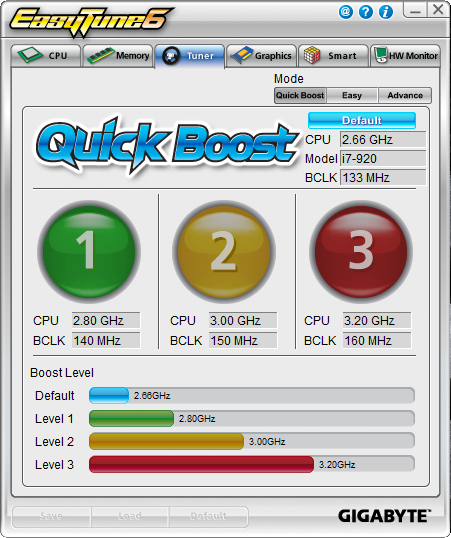


Gigabyte provides their EasyTune 6 application that provides monitoring, system information, and overclocking capabilities. This is one of the best applications provided by the various motherboard suppliers for tuning the system within Windows. We would still like to see the ability to save the settings to the BIOS or at least a BIOS profile; otherwise, this application is useful for extracting a fair amount of performance improvement out of the system within Windows.
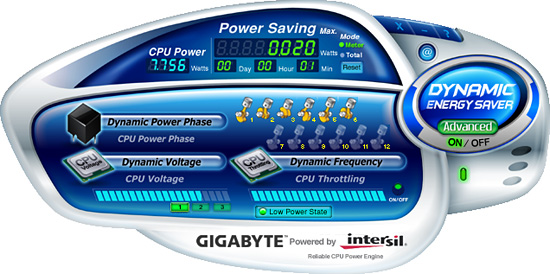
Gigabyte recently updated their DES (Dynamic Energy Saver) software so it is compatible with the X58 chipset, along with providing BIOS improvements. Our original F2 BIOS would not work properly with the latest DES beta but the F4 series has made great strides in this department. We noticed a 5W improvement in idle rates and a 1W improvement in our load tests with DES. Gigabyte expects some additional savings once the software and BIOS are finalized. The DES system offered fast switching times once a full load was placed on the system and we did not experience any crashes during our benchmark tests.
Originally published at https://www.anandtech.com/show/2681 (Wayback Machine).