
Gateway P-6831 FX: Best Midrange Gaming Notebook Ever
- Posted in
- Laptops
Battery Life, Power Use, Temperatures, and Noise
For battery life testing, we ran our standard three in-house tests. The first consists of surfing the internet until the battery runs down. We set Internet Explorer to load three web pages (including AnandTech.com), pause for 60 seconds, exit, and then reload those pages. The second test simply plays a DVD until the battery runs dead. For the third test, we loop the four gaming tests in 3DMark06. In all cases, we set the power profile to "Balanced" and set the display brightness at maximum brightness. The GPU on the P-6831 still consumes quite a bit of power, so turning down the backlight for the LCD won't help too much. However, you might be able to improve battery life by 20-25 minutes with a bit of effort (i.e. use the max power saving profile and turn down LCD brightness).
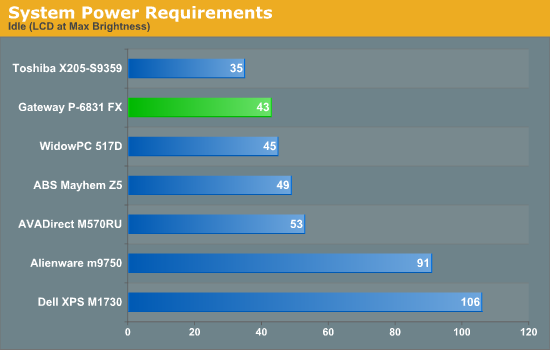
Related to battery life are the power requirements. We measure with the system plugged in, so some of the power saving features are not active. The numbers below will still give you an idea of how much relative power various tasks require.
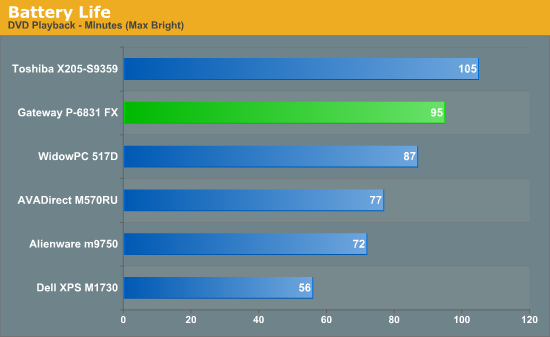
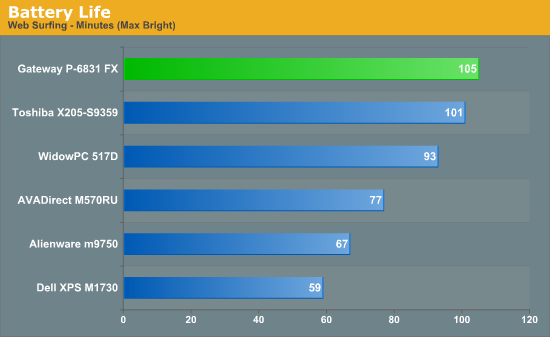
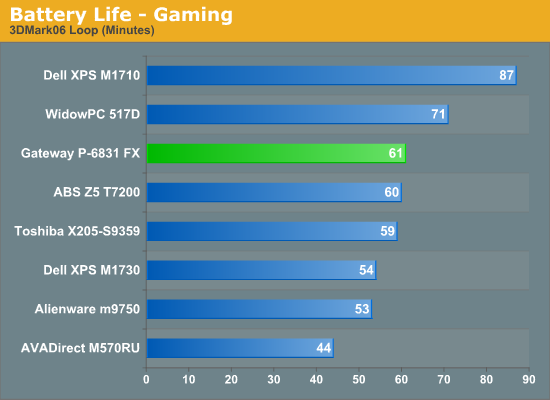
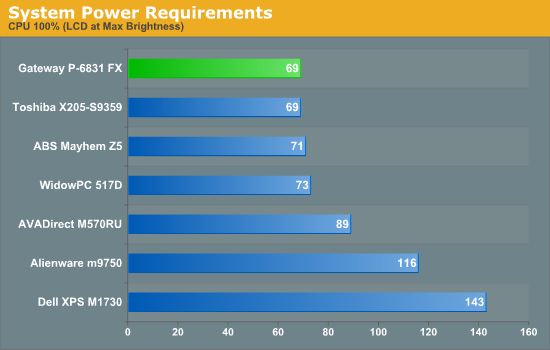
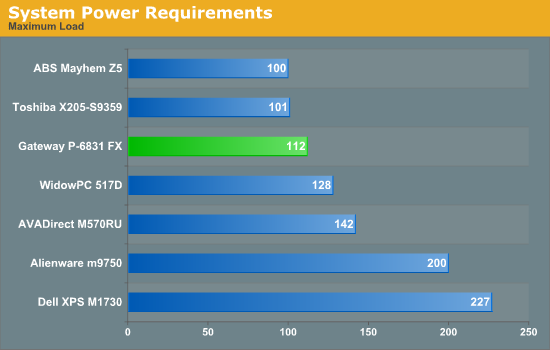
The Gateway system comes with an 86 Whr battery, in comparison to 95 Whr batteries on several of the other 17" systems and 65 Whr on the AVADirect and WidowPC laptops. The P-6831 places near the top of the battery life benchmarks, at least when compared to other gaming notebooks. Reducing the display brightness and performance mode should easily allow over two hours of battery life for web surfing. DVD playback is just over an hour and a half, so you could watch some shorter movies on a single charge. The gaming battery life falls behind several of the other notebooks, but then it appears that the GPU clock speeds don't throttle as far on the P-6831 FX. That's likely because the CPU isn't using a lot of power, relatively speaking.
Those worried about extremely high temperatures should be pleasantly surprised. While we won't go so far as to call the P-6831 a cool-running laptop, it doesn't get all that hot. After looping 3DMark06 for over an hour, we measured the following temperatures. The exhaust on the back left of the laptop was by far the hottest area, measuring 46-48C. While that seems high, all of that heat comes from the GPU, and the bottom of the laptop is nowhere near that hot. The bottom ranges in temperature from 26C to 36C, with most of the surface around 31C-33C; only a few hotpoints (right near the center under the Gateway label, presumably where the actual GPU sits) reach 35-36C. The palm rest stays at a cool 26-30C, and the keyboard is mostly in the 30-32C range, with a few areas (around RTY/FGH - again just above the GPU core) reaching up to 35C. Note that all of the testing was conducted in a ~21C environment; temperatures would naturally be higher if the ambient temperature increases.
One last item we would like to comment on is the noise levels of this notebook. Given the slightly less powerful GPU and the slower CPU, we figured the noise levels would be lower than other gaming notebooks. Compared to the Clevo M570RU, that's certainly the case; the maximum noise level of 42dB is about the same as the minimum noise level (41dB) of the Clevo. The GPU and CPU still require decent airflow, though, so even at idle noise levels never reach the point where we would call this notebook "silent". It fluctuates between 34dB and 36dB at idle, with the difference coming from the CPU fan spinning faster for short periods of time. At 100% CPU load, the noise stays at a constant 36dB. As soon as you load up any game, noise increases to 40dB initially and then usually reaches the maximum 42dB after a few minutes. Again, we have to give Dell credit, as even with SLI their XPS M1730 is nearly silent when idle (31dB).
Originally published at https://www.anandtech.com/show/2490 (Wayback Machine).