
ASRock Penryn 1600SLI-110dB : Penryn on the 650i, are you kidding me?
- Posted in
- Motherboards
System Setup -
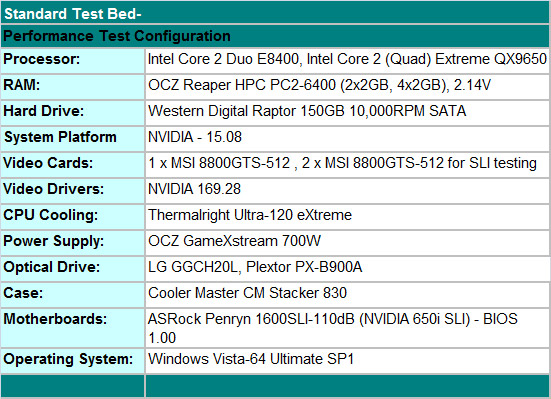
Our overclocking results today were run with either a 2x2GB or 4x2GB memory configuration from OCZ along with two MSI 8800GTS-512MB cards in SLI. Although not listed, we also populated two PCI slots with an ASUS Xonar D2 audio card and a Visiontek TV Wonder HD 650 HDTV Tuner card to ensure the system was fully loaded during testing. Our new test routines include fully loading the board, 4GB (4x1GB included) and 8GB configurations where applicable, dual core and quad core processors, turn on all peripherals, and then cycle our benchmark test suite until the board fails. At which time we readjust the settings and try again until all benchmarks pass.
The results listed below are based on close to 110 hours of overclocked testing and we feel extremely confident in the settings. We will publish additional overclocking results in the full review. ASRock also sent us a new performance oriented BIOS today to address our multiplier problems along with memory tuning improvements with 4GB and 8GB configurations. Testing with an E6300 at a low multiplier with 2GB of memory might show impressive overclocking results, however we feel this type of configuration does not truly represent the board's actual capability nor does it represent the best possible performance setup for the user. We will go into further detail in our upcoming motherboard reviews, but for now we are providing an early glimpse at this board's overclocking capability with Penryn.
QX9650 4GB 10x380 -
 |
| Click to enlarge |
QX9650 8GB 10x380 -
 |
| Click to enlarge |
QX9650 8GB 9x333 -
 |
| Click to enlarge |
Our first two screenshots show a final setting of 10.5x380FSB (4GB) and 10x380FSB (8GB) with the QX9650 quad-core processor. This particular CPU is not the best chip we have seen in the labs, far from it, but it will clock to 4.2GHz with 1.4625V on an X48 board with improved cooling. We could POST at 10x410 but Vista was not stable with either memory or CPU multiplier configuration. In fact, 10x400 was generally the best performing setting with memory at DDR2-800 and timings at 4-4-3-10 on 2.14V.
However, a game called Crysis prohibited us from running at any setting above 10.5x380 (4GB, DDR2-912 5-4-4-15) or 10x380 (8GB, DDR2-912 5-5-4-12) with our hardware configuration. Interestingly enough, we are also seeing lower clocks on the X48 boards with this particular game when a system is overclocked. Overall memory performance between two setups are basically the same, even with the 4GB configuration running slightly better timings and having a CPU clock advantage. Our settings represent the best overall blend of voltages, timings, and clock speeds that we were able to attain.
The board exhibited very good Vdroop levels with idle around -.01V raising to -.03V under load. The 4GB configuration required slightly higher Vcore rates than the 8GB configuration but was able to reach 3.99GHz compared to 3.8GHz on the 8GB setup. However, this is slightly offset as we could run our 4GB setup with 2.14V Vdimm compared to the maximum recommended 2.2V with the 8GB configuration. We have included a stock 9x333 screenshot as a reference point. Memory timings and performance results at stock settings were equal between the 4GB and 8GB setups.
Originally published at https://www.anandtech.com/show/2446 (Wayback Machine).