
iPod vs. Zune: January 2008 High End MP3 Player Roundup
- Posted in
- Smartphones
- Mobile
iPod Touch, Cont
Beyond its traditional media player abilities, the Touch also includes the full suite of iPhone applications, which were missing-in-action initially but Apple has since corrected the bungle on their part and new Touches are shipping with them (we're less happy however that owners of older Touches have to pay $20). The iPhone's excellent Safari browser is included with the Touch and functions every bit as well as we'd expect. The 480x320 screen of the Touch means that it's not a perfect replica of the desktop web browsing experience in spite of Apple's claims otherwise, but otherwise it's very easy to use. The jump start on web application development thanks to the iPhone launch means there are already numerous AJAX web applications that have been developed specifically for the iPhone/Touch that extend the usefulness of Safari and the Touch as a whole.
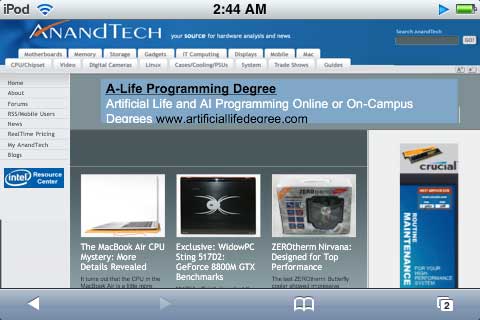
Also included are the YouTube player and the iTunes WiFi Music Store. The YouTube player loses some practicality in the transition from the iPhone, due to the fact that the Touch only includes a polyphonic tone generator instead of a (larger) speaker. This means that anyone wanting to share videos will also need to share their earbuds, something few of us are generally willing to do.
As for the iTunes WiFi Music Store, Apple doesn't pull any surprises. Given that the device has WiFi abilities it would have been a significant oversight not to include a store - something a lot of users have been waiting on their MP3 players for some time now - so there it is. Like everything else with the Touch that is a translation of a Mac OS X application, the UI has been structured specifically for the Touch and works well given the device's abilities. We would recommend keeping the Touch close to your wallet however, it's easy to quickly forget that you can rack up the music bill quickly with the Touch when buying music.
Rounding out the applications are Apple's personal information management applications Calendar, Contacts, and Mail, along with the general use applications Clock, Calculator, Stocks, Weather, Maps, and Notes. Because these applications were all originally designed around the iPhone, they do lose some of their usefulness on the Touch due to the lack of EDGE capabilities, but especially with the proliferation of city-wide WiFi in some areas it's hard to say they're hobbled in any significant way. If you want to know our thoughts on these applications we'll save on the redundancy and point you to our iPhone review, there has been very little chance in application functionality since that was published. Although Apple was late in including the full iPhone application suite with the Touch, the end result is that finally doing so is to their benefit: the difference between having the applications and not is the difference between an artificially hobbled media player and one of the best PDAs we have ever used.
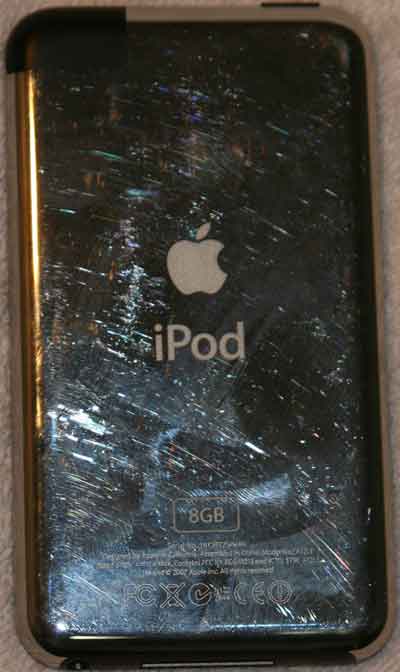
The design of the Touch's hardware straddles the line between that of an iPod and that of an iPhone: the back is traditional iPod chrome while the front is Spartan with the touch screen and the single home button. The entire device is a fingerprint magnet, and both the chrome and the screen make fingerprints very obvious; this is a bit of a change from other iPods where the matte scroll wheel isn't a fingerprint problem. Granted, it's not really possible to make a touch screen that isn't a fingerprint magnet, but perfectionists will probably have a heart attack. For the rest of us Apple includes a polishing cloth that will no doubt see a lot of use. We do have a minor gripe about the location of the headphone jack however, it's on the bottom which means the earbud plug jabs in to our palm. It could have been put at a location to make the jabbing worse, but it could have also been placed at the top which to us seems like a more sensible location in every way.
The build quality of the Touch is generally excellent with only one minor flaw. Because of the chrome back, a small plastic "window" exists near the top-right corner of the device to allow the WiFi radio to communicate uninterrupted; this itself isn't a problem but on our unit the window isn't flush with the chrome, making it possible for the chrome at the edge of the window to catch on things. Otherwise the Touch oozes the usual Apple design polish, with a very solid design that is hard to break, including the glass screen which judging from the iPhone is virtually unbreakable.
Given all of this however, the Touch isn't perfect; Apple did a good job with the hardware but the software is lacking. On top of the issues we've outlined earlier with the touch screen controls, there are a few more things we believe Apple didn't deliver on quite as well as they could have.
Apple's lack of imagination in using the Touch's WiFi is very obvious at times. Wireless synchronization is not supported and while this is a boondoggle for security issues, Microsoft made it work for the Zune which is plenty of proof that it's possible. Such a feature is definitely useful, especially for minor transfers such as PIM data where the data set is small and there may not otherwise be a need to recharge the Touch at that time. The lack of internet radio abilities is also a disappointment; we have no doubts the Touch's battery wouldn't be able to pull off the play time it can with regular music files due to the power requirements of the WiFi radio, but that should be up to the user to decide if they want to bother with the feature. We certainly would like to be able to listen to our favorite internet radio stations given that the device already has all of the necessary hardware.
Next is how the Touch interfaces with a host computer. Unlike the iPod Classic line, the Touch is not a USB mass storage device but rather a custom device requiring a device driver. This means the Touch can't be used as a portable USB hard drive like the Classic can (although this is admittedly less of an issue with the Touch's much smaller flash memory) but it also means the Touch is only supported by a limited number of operating systems. Apple has never officially supported Linux but since prior iPods have been USB mass storage devices, it has been fairly trivial for capable Linux programmers to write their own programs. This isn't the case for the Touch, where a quick check on our part didn't come across any drivers for it at all. Furthermore Apple was extremely late to the game for supporting Vista x64, it wasn't until this month that they finally released a version of iTunes with a 64bit driver. Given what's happened we can easily see the driver requirements for the device continuing to be a problem for the Touch and its successors.
Out final gripe is once again the earbuds. We didn't like them with the Classic, we still don't like them with the Touch. With the 16GB Touch featuring a $400 MSRP, the issue has moved beyond annoying and towards simply silly.
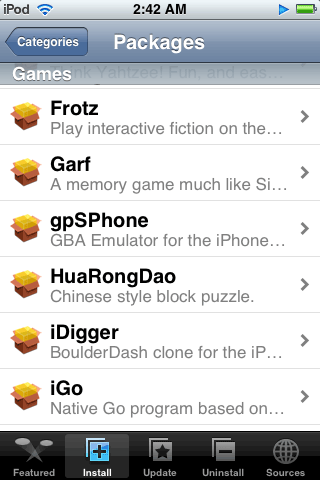
Before closing out our thoughts on the Touch, the modability of the Touch bears a quick mention. If you're willing to break your warranty, it's possible to run user-created applications on the Touch by jailbreaking it to allow installation of further applications. Apple will be rolling out their iPhone/Touch SDK in February, but we suspect it will be a few months for developers to catch up, and the application signing requirement (along with what we imagine will be a fee to acquire a key) will be a turn off to some developers. In the mean time the iPhone/Touch community has had over half a year to develop a number of good applications that can be installed on a jailbroken Touch, including a number of games, IM clients, UI customizations, and even a SSH server for your inner-*nix hacker. There's a definite risk to jailbreaking a Touch but at the moment it adds a lot of value to the device.
Originally published at https://www.anandtech.com/show/2423 (Wayback Machine).