
ASUS Eee PC 2G Surf
- Posted in
- Laptops
User Experience - Typing, Internet
As mentioned in our look at the 4G, user experience will vary widely depending on your expectations of what this system is. Some general categories are broken out below.
Typing
Yes, the keyboard, like the unit, is very small. How small is too small? That's a difficult question to answer, as it's different for each user. I have medium-sized hands, and wrote this whole article on the Eee. The keyboard is fatiguing, and breaks are necessary more often than normal, but touch-typing is possible. I took an online typing test with my standard keyboard and the Eee just after receiving the unit.
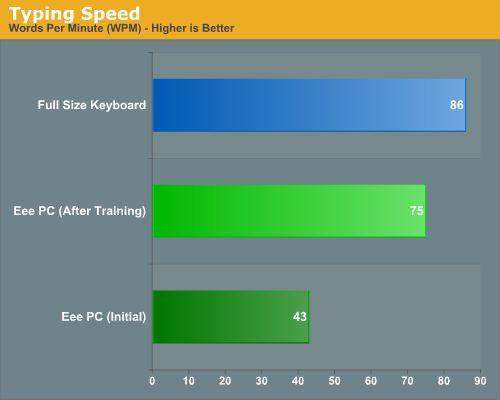
I initially took the test twice, and both times my results were about the same: the Eee cut my typing speed in half. This is a worst-case scenario, as I took the test before using the Eee for any length of time. With prolonged use, the keyboard has become somewhat easier to type on. I managed 72 wpm on the same test the following day, but this rate would not be sustainable for long: the keyboard will definitely slow you down. We have confirmed this with several other users, with the general consensus being that you will average between 50% to 75% of your regular typing speed when using the Eee.
Internet
Surfing results are mixed. At the native resolution (800x480), most websites required both a horizontal and a vertical scroll. Several only required a vertical scroll, which made navigation much easier.
 |
 |
 |
 |
The Java plug-in is not installed in Firefox, which made using certain websites impossible. Also, the wireless connection is not set to automatically connect at startup; it defaults to manual. Once changed to "At Boot" it works fine. We experienced no issues logging into a corporate VPN and accessing shared files and internal programs.
 |
Given the size of the Eee, in general the Internet usability is quite good.
Originally published at https://www.anandtech.com/show/2411 (Wayback Machine).