
ASUS P5E3 Deluxe Overclocking: DDR3 Takes Front Stage
- Posted in
- CPUs
Test Setup and Overclocking Results
We decided to make our first overclocking results available using a Q6600 quad-core as we feel this chip is great for the mainstream desktop performance crowd and is widely available at an attractive price. We chose high performance DDR3 in order to highlight the board's memory performance capabilities. Because testing was completed using a 32-bit operating system, we decided to limit ourselves to a maximum of 2GB memory for our initial results. Future testing on this board, including tests run using Windows Vista 64-bit, will utilize up to 4GB of the same DDR3 memory.
We used water-cooling in place of typical air-cooling. This assured us that performance limitations due to excessive CPU temperatures would not be a problem during multiple testing runs. Pushing a 65nm quad-core past 3.6GHz requires a robust cooling system in order to maintain system stability during periods of heavy benchmarking. Furthermore, our cooling system makes use of redundant components where possible to account for the potential failure of critical cooling components (i.e. two pumps, etc).
Standard benchmarks included 3DMark06 (at the default 1280x1024 resolution) for testing overall graphics performance and Super PI 32M for combined processor/memory testing as well as CineBench10 and WinRAR 3.70 (a great way to quickly measure memory system performance). We utilized EVEREST 4.20 extensively in the collection and analysis of synthetic memory performance benchmarks (memory read and overall memory latency).
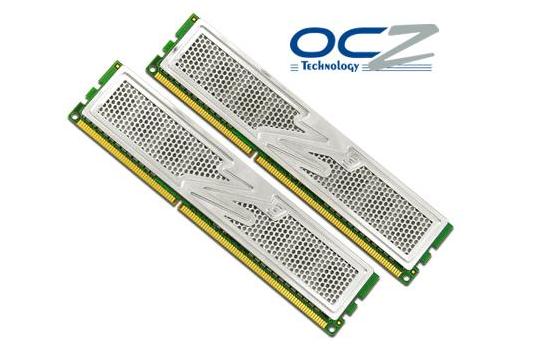
With the motherboard picked out all we had left to do was choose a pair of 1GB DDR3 modules. We decided on a pair (2x1024MB) of OCZ DDR3 PC3-14400 (DDR-1800) Platinum Edition modules, which proved to be tremendously capable across an amazing range of frequencies and timings. This allowed us the flexibility we needed to perform direct performance caparisons at legacy DDR2 speeds as well as the overclocking headroom we craved. Cool to the touch during even the most intense benchmarking session and exceptionally responsive to voltage on the test bench, these modules are great choices for those looking to overclock.
Now that we have looked at our test setup and gone over a few of the ways that we intend on measuring our system's performance, let us explore the ASUS P5E3 Deluxe BIOS options.
| ASUS P5E3 Deluxe Overclocking Testbed |
|
| Processor | Intel Core 2 Quad Q6600 Quad-core, 2.4GHz, 8MB Unified Cache, 9x Multiplier, 1066FSB |
| CPU Voltage | 1.2750v Stock |
| Cooling | D-tek FuZion CPU water block, EK FC8800-GTX/Ultra full coverage GPU block, Thermochill PA120.3 radiator, dual Laing D5 pumps in series, 1/2" ID (3/4" OD) Tygon tubing, 6x Yate Loon D12SM-12 120x25mm fans @ 12v in push/pull configuration |
| Power Supply | Seasonic 600W |
| Memory | OCZ DDR3 PC3-14400 (DDR-1800) Platinum Edition |
| Memory Settings | 4-4-4-12 (DDR-1066) to 8-8-8-15 (DDR-1940) |
| Video Cards | MSI 8800 Ultra (660/1050) |
| Video Drivers | NVIDIA 164.09 (beta) |
| Hard Drive | 2x Western Digital 10K RPM 74GB SATA 3/Gbps 8MB Buffer (RAID 0) |
| Optical Drives | 2x Plextor PX-755A |
| Case | Lian-Li PC-G70B |
| BIOS | ASUS 0601 |
| Operating System | Windows XP Professional SP2 |
We decided to make our first overclocking results available using a Q6600 quad-core as we feel this chip is great for the mainstream desktop performance crowd and is widely available at an attractive price. We chose high performance DDR3 in order to highlight the board's memory performance capabilities. Because testing was completed using a 32-bit operating system, we decided to limit ourselves to a maximum of 2GB memory for our initial results. Future testing on this board, including tests run using Windows Vista 64-bit, will utilize up to 4GB of the same DDR3 memory.
We used water-cooling in place of typical air-cooling. This assured us that performance limitations due to excessive CPU temperatures would not be a problem during multiple testing runs. Pushing a 65nm quad-core past 3.6GHz requires a robust cooling system in order to maintain system stability during periods of heavy benchmarking. Furthermore, our cooling system makes use of redundant components where possible to account for the potential failure of critical cooling components (i.e. two pumps, etc).
Standard benchmarks included 3DMark06 (at the default 1280x1024 resolution) for testing overall graphics performance and Super PI 32M for combined processor/memory testing as well as CineBench10 and WinRAR 3.70 (a great way to quickly measure memory system performance). We utilized EVEREST 4.20 extensively in the collection and analysis of synthetic memory performance benchmarks (memory read and overall memory latency).
With the motherboard picked out all we had left to do was choose a pair of 1GB DDR3 modules. We decided on a pair (2x1024MB) of OCZ DDR3 PC3-14400 (DDR-1800) Platinum Edition modules, which proved to be tremendously capable across an amazing range of frequencies and timings. This allowed us the flexibility we needed to perform direct performance caparisons at legacy DDR2 speeds as well as the overclocking headroom we craved. Cool to the touch during even the most intense benchmarking session and exceptionally responsive to voltage on the test bench, these modules are great choices for those looking to overclock.
Now that we have looked at our test setup and gone over a few of the ways that we intend on measuring our system's performance, let us explore the ASUS P5E3 Deluxe BIOS options.
Originally published at https://www.anandtech.com/show/2381 (Wayback Machine).