
DFI UT P35-T2R: Tweakers Rejoice!
- Posted in
- Motherboards
Even More BIOS Settings
PERFORMANCE LEVEL
Leaving this function set to Auto works very well within the FSB limits of the board for normal everyday use. For maximum performance and benchmark runs, we took a look at possible manual setting ranges.
Performance Level settings with the 266/667 strap/divider-
Level 5 is usable up to ~ 410FSB
Level 6 up to 475FSB using 2GB of RAM with quad-core CPUs
Performance Level settings with the 333/800 strap/divider-
Use level 7, this is good up to ~ 495FSB with the quad-core CPUs. Dual-core CPUs can use this strap/divider combination for benchmarking in excess of 500FSB if the CPU is capable of these FSB rates.
TRD PHASE ADJUST-
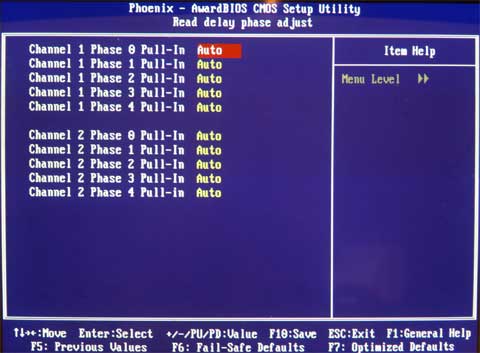
This BIOS function is best explored by more advanced tweakers and benchmarkers; our own findings are as follows.
Options for this function are between AUTO and ENABLED
Default for all phases is AUTO (this sets the current PERFORMANCE LEVEL in the DRAM page).
AUTO is best used for all phases when using the 266 chipset strap and associated dividers. The 266 strap is generally quite aggressive and does not allow lowering of Performance Level phases. Users can safely stay at AUTO without sacrificing large amounts of performance. For crazy tweakers, read on...
There are five phases of the Performance Level (TRD) cycle per channel;
'ENABLED': Sets the corresponding phase of the TRD cycle to -1. If we set a Performance Level of 7 in the DRAM page, using ENABLED for any of the phases will set the Performance Level of the selected Phase to 6, i.e. TRD -1 for the corresponding phase and channel.
Both channels have independent phase adjustments, and the maximum advantage of setting a phase to ENABLED occurs when the same phase from both channels is set to ENABLED simultaneously. (Check the 333/800 BIOS profile for a possible usage combination).
Using the 1333 strap has an immediate impact upon memory latency, which can be overcome in part by using a higher FSB level on a lower multiplier for an equivalent CPU MHz speed (assuming we stick to using the same strap). By manipulating combinations of the TRD phases together for both channels it is possible to reclaim some of the memory latency and bandwidth loss without the need for a large increase of FSB. The lowering of TRD phases is especially useful for 4GB overclocking with the 333/800 strap/divider and benchmarking at high FSBs with dual-core CPUs, again using the 333 strap.
PERFORMANCE LEVEL
Leaving this function set to Auto works very well within the FSB limits of the board for normal everyday use. For maximum performance and benchmark runs, we took a look at possible manual setting ranges.
Performance Level settings with the 266/667 strap/divider-
Level 5 is usable up to ~ 410FSB
Level 6 up to 475FSB using 2GB of RAM with quad-core CPUs
Performance Level settings with the 333/800 strap/divider-
Use level 7, this is good up to ~ 495FSB with the quad-core CPUs. Dual-core CPUs can use this strap/divider combination for benchmarking in excess of 500FSB if the CPU is capable of these FSB rates.
TRD PHASE ADJUST-
This BIOS function is best explored by more advanced tweakers and benchmarkers; our own findings are as follows.
Options for this function are between AUTO and ENABLED
Default for all phases is AUTO (this sets the current PERFORMANCE LEVEL in the DRAM page).
AUTO is best used for all phases when using the 266 chipset strap and associated dividers. The 266 strap is generally quite aggressive and does not allow lowering of Performance Level phases. Users can safely stay at AUTO without sacrificing large amounts of performance. For crazy tweakers, read on...
There are five phases of the Performance Level (TRD) cycle per channel;
'ENABLED': Sets the corresponding phase of the TRD cycle to -1. If we set a Performance Level of 7 in the DRAM page, using ENABLED for any of the phases will set the Performance Level of the selected Phase to 6, i.e. TRD -1 for the corresponding phase and channel.
Both channels have independent phase adjustments, and the maximum advantage of setting a phase to ENABLED occurs when the same phase from both channels is set to ENABLED simultaneously. (Check the 333/800 BIOS profile for a possible usage combination).
Using the 1333 strap has an immediate impact upon memory latency, which can be overcome in part by using a higher FSB level on a lower multiplier for an equivalent CPU MHz speed (assuming we stick to using the same strap). By manipulating combinations of the TRD phases together for both channels it is possible to reclaim some of the memory latency and bandwidth loss without the need for a large increase of FSB. The lowering of TRD phases is especially useful for 4GB overclocking with the 333/800 strap/divider and benchmarking at high FSBs with dual-core CPUs, again using the 333 strap.
Originally published at https://www.anandtech.com/show/2354 (Wayback Machine).