
Foxconn MARS: God of War Performance?
- Posted in
- Motherboards
Foxconn MARS BIOS Overview and Software Features
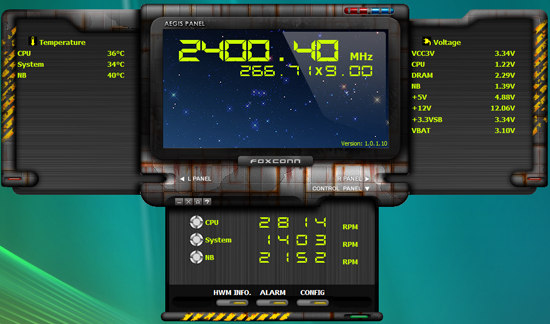
Foxconn provides their new Aegis software with the MARS board, which allows the monitoring of several system functions and the ability to control the Northbridge, CPU, and System fan headers. The application worked well during testing and provided accurate feedback on temperatures and voltages. Foxconn plans on a major update to the program in late October that will add on-the-fly overclocking features.
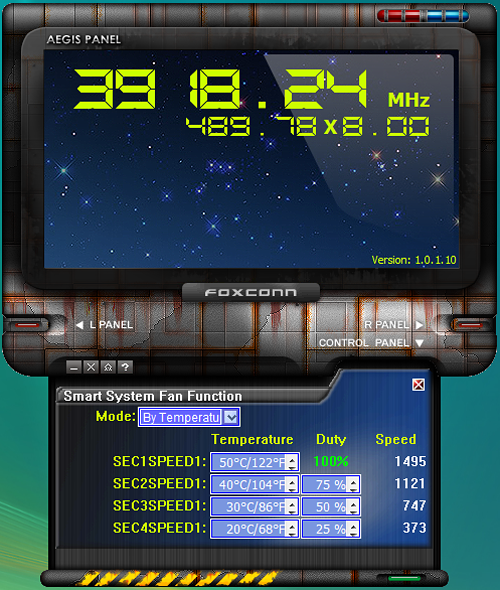
Fan control is very good, although it falls just short of abit's excellent uGuru setup. The Aegis application allows you to set four different modes: Full Speed, Duty Cycle, Temperature, and Smart Fan for each header type. Depending on the mode you set, several options are available for tuning the fan speed. The three System Fan headers all operate off the same set of options and are not individually controlled.
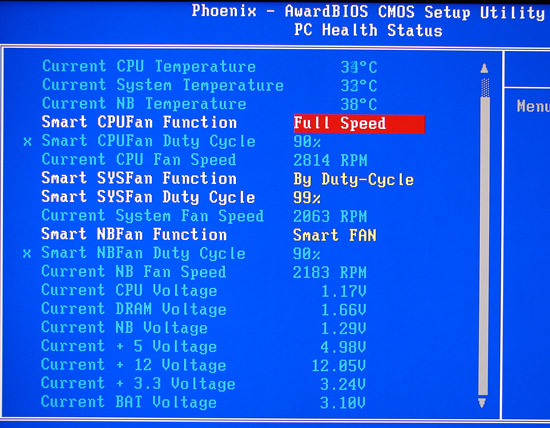
Foxconn monitors the CPU, System Fan, and Northbridge fan speeds and voltage readings within the BIOS. Fan control is fairly extensive with three different modes available within the BIOS settings. The Aegis software does provide the additional temperature controlled setting, however.
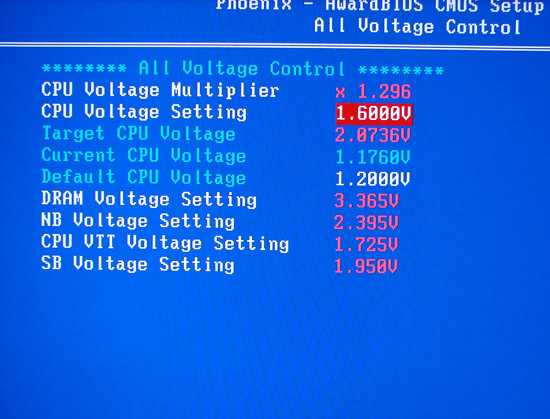
The available voltage control options are fairly standard with the only interesting selection being the CPU voltage multiplier option that allows additional voltage tuning with a maximum setting of 2.0736V. In fact, for a board that prides itself on overclocking options, we expected additional voltage options.
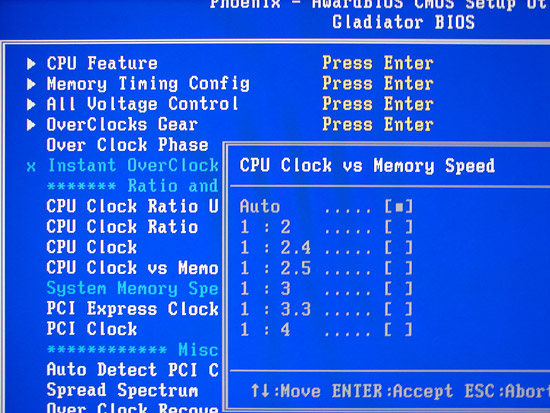
Foxconn dubs their BIOS Gladiator, and it contains the standard overclocking options that one might see on the typical enthusiast board from ASUS, Gigabyte, and MSI. Although not as extensive as the typical DFI enthusiast board, the options are fairly extensive with the notable exception being the inability to control the FSB Strap settings.
Although not shown, the Overclocks Gear section contain the Profile settings and Foxconn allows up to four different profiles to be saved. Also, the BIOS offers an automatic overclock option that features percentage-based overclocking from 5% to 75%. The system worked well with most of our processors up to 30%; after that, the automatic voltages and memory settings would usually result in a non-POST situation. Fortunately, the recovery system never failed or required a clear CMOS action, but as usual higher overclocks are possible for those willing to manually tweak settings. Still, a 30% overclock without any particular effort is quite good.
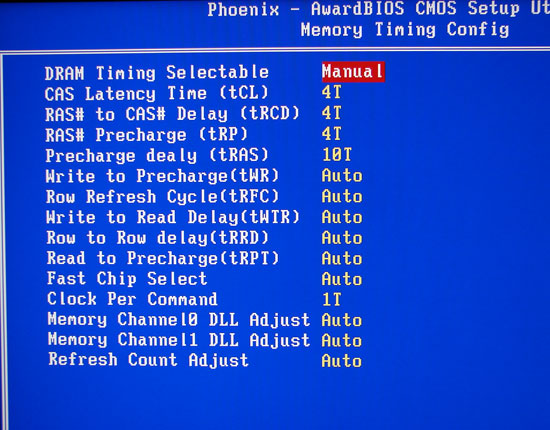
The BIOS offers 14 different memory configuration options and generally always utilized the memory SPD settings at a given clock speed if the DRAM timing was set to SPD or auto when in manual mode. Although the Clock per Command is listed at 1T or 2T, it is actually called 1N or 2N on the Intel chipset and works differently than the 1T/2T command rates on the AMD chipsets. 1N is generally equivalent to a 1.5T type performance level at this time. We will go into this further in an upcoming overclocking-centric article.
Foxconn provides their new Aegis software with the MARS board, which allows the monitoring of several system functions and the ability to control the Northbridge, CPU, and System fan headers. The application worked well during testing and provided accurate feedback on temperatures and voltages. Foxconn plans on a major update to the program in late October that will add on-the-fly overclocking features.
Fan control is very good, although it falls just short of abit's excellent uGuru setup. The Aegis application allows you to set four different modes: Full Speed, Duty Cycle, Temperature, and Smart Fan for each header type. Depending on the mode you set, several options are available for tuning the fan speed. The three System Fan headers all operate off the same set of options and are not individually controlled.
Foxconn monitors the CPU, System Fan, and Northbridge fan speeds and voltage readings within the BIOS. Fan control is fairly extensive with three different modes available within the BIOS settings. The Aegis software does provide the additional temperature controlled setting, however.
The available voltage control options are fairly standard with the only interesting selection being the CPU voltage multiplier option that allows additional voltage tuning with a maximum setting of 2.0736V. In fact, for a board that prides itself on overclocking options, we expected additional voltage options.
Foxconn dubs their BIOS Gladiator, and it contains the standard overclocking options that one might see on the typical enthusiast board from ASUS, Gigabyte, and MSI. Although not as extensive as the typical DFI enthusiast board, the options are fairly extensive with the notable exception being the inability to control the FSB Strap settings.
Although not shown, the Overclocks Gear section contain the Profile settings and Foxconn allows up to four different profiles to be saved. Also, the BIOS offers an automatic overclock option that features percentage-based overclocking from 5% to 75%. The system worked well with most of our processors up to 30%; after that, the automatic voltages and memory settings would usually result in a non-POST situation. Fortunately, the recovery system never failed or required a clear CMOS action, but as usual higher overclocks are possible for those willing to manually tweak settings. Still, a 30% overclock without any particular effort is quite good.
The BIOS offers 14 different memory configuration options and generally always utilized the memory SPD settings at a given clock speed if the DRAM timing was set to SPD or auto when in manual mode. Although the Clock per Command is listed at 1T or 2T, it is actually called 1N or 2N on the Intel chipset and works differently than the 1T/2T command rates on the AMD chipsets. 1N is generally equivalent to a 1.5T type performance level at this time. We will go into this further in an upcoming overclocking-centric article.
Originally published at https://www.anandtech.com/show/2337 (Wayback Machine).